Recording Your Drum Performance to a Song
Quick Guide
48
DTX900 Owner’s Manual
Re-recording a Track After Clearing
To record again, use the following procedure to clear previously recorded data in the track, then try recording again.
1
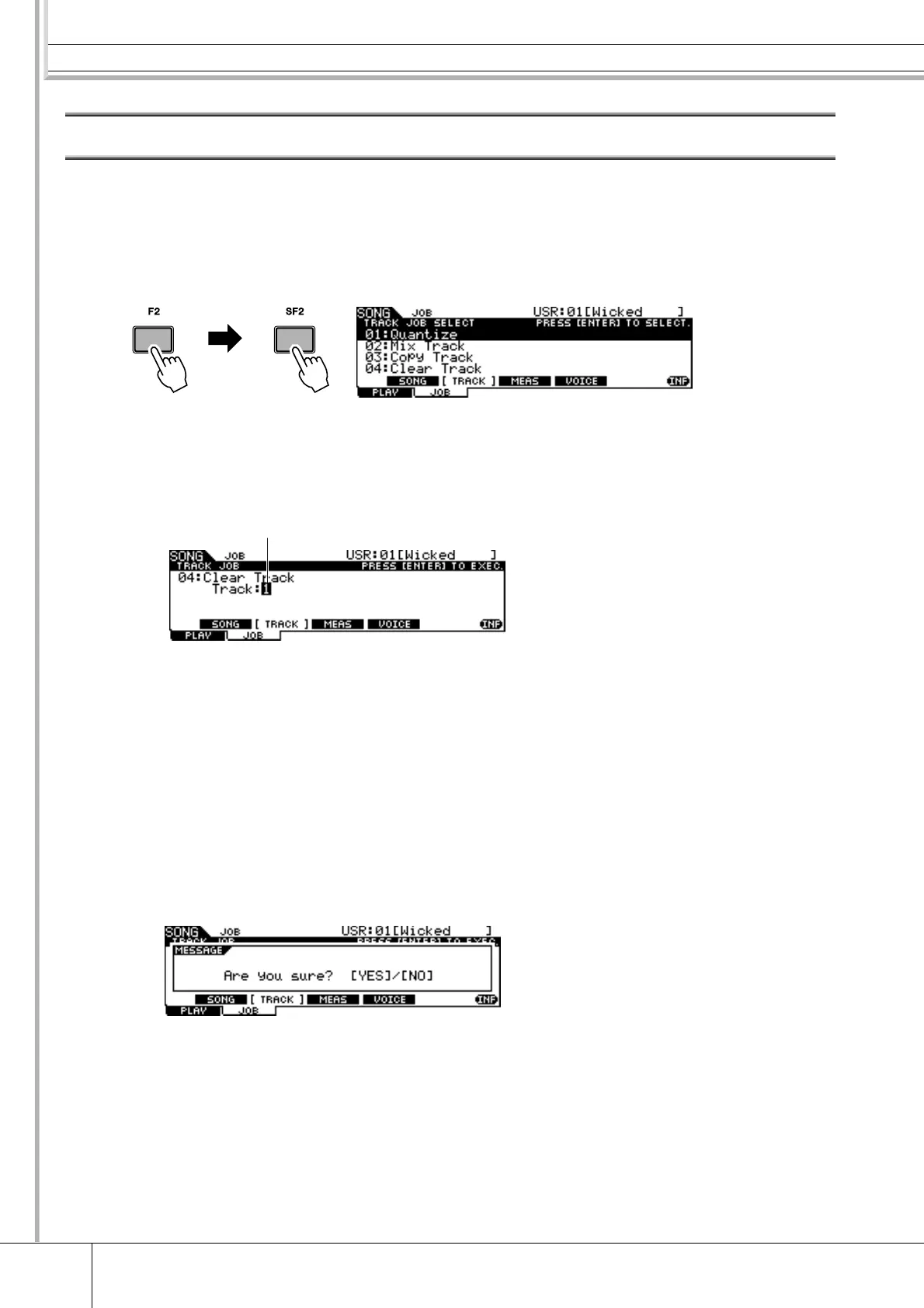
With the User Song to be re-recorded selected, press the [F2]
JOB button followed by the [SF2] TRACK button in the Song
mode to call up the TRACK JOB SELECT display.
2
Move the cursor to “04: Clear Track,” then press the [ENTER/
STORE] button to call up the Clear Track Job display.
1 Track
Indicates the track to be cleared.
3
Select a track to be cleared.
If you have copied the Preset Song data to the User Song and then recorded your
drum performance to track 2, select “2” here.
4
Press the [ENTER/STORE] button.
The display prompts you for confirmation. To cancel the Clear Track operation, press
the [DEC/NO] button.
5
Press the [INC/YES] button to execute the Clear Track operation.
The data recorded to the specified track will be erased.
6
Re-record your drum performance to the cleared track.
Follow the instructions on page 44.
1



 To Next Page