104 PSR-A3000 Owner’s Manual
This instrument features Voices provided specially for Style playback and XG/GM compatibility. These Voices
cannot be called up directly from the VOICE category selection buttons. However, they can be called up as
described below.
1 Turn on the PART SELECT button corresponding to the part you want to use.
2 Press one of the VOICE category selection buttons (other than the [ORGAN FLUTES] and
[EXPANSION/USER] buttons) to call up the Voice Selection display.
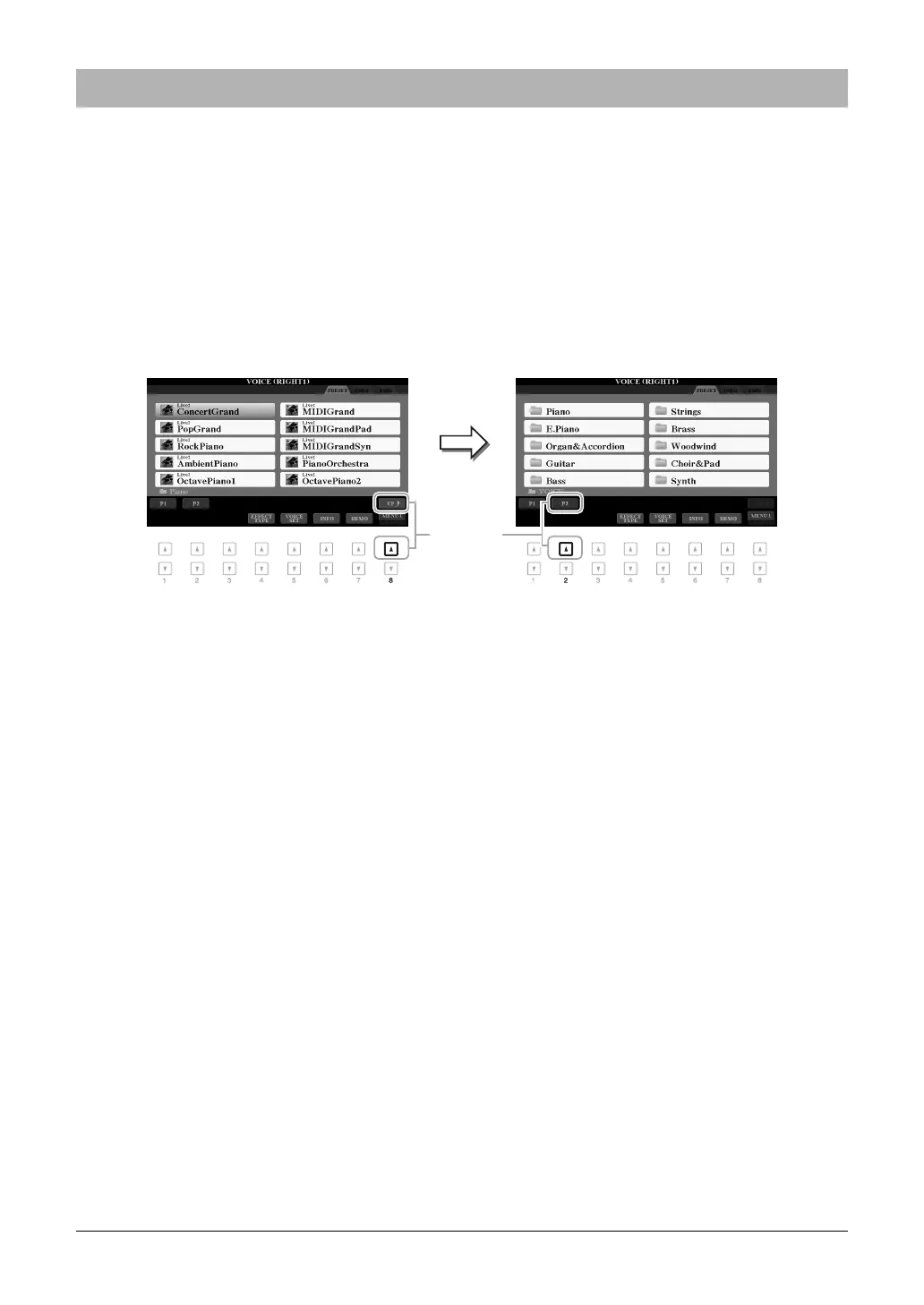
3 Press the [8 ] (UP) button to call up the Voice categories.
4 Press the [2 ] (P2) button to display page 2.
5 Press the desired [A]–[J] button to call up the Voice Selection display of GM&XG Voices,
GM2 Voices, etc.
NOTE You can find the “Legacy” folder in this display. This folder contains previous Yamaha keyboards’ Voices (such as PSR-A2000, etc.) for data compatibility with
other models.
NOTE The “MegaVoices” folder contains the MegaVoices (page 103).
6 Select the desired Voice.
Selecting GM&XG or Other Voices



 To Next Page
 Loading...