146 PSR-A3000 Owner’s Manual
When playing back a Song and a Style at the same time, channels 9-16 in the Song data are replaced with Style
channels—allowing you to play the accompaniment parts of the Song yourself. Try playing chords along with the
Song playback as shown in the instructions below.
1 Select a Song.
2 Select a Style.
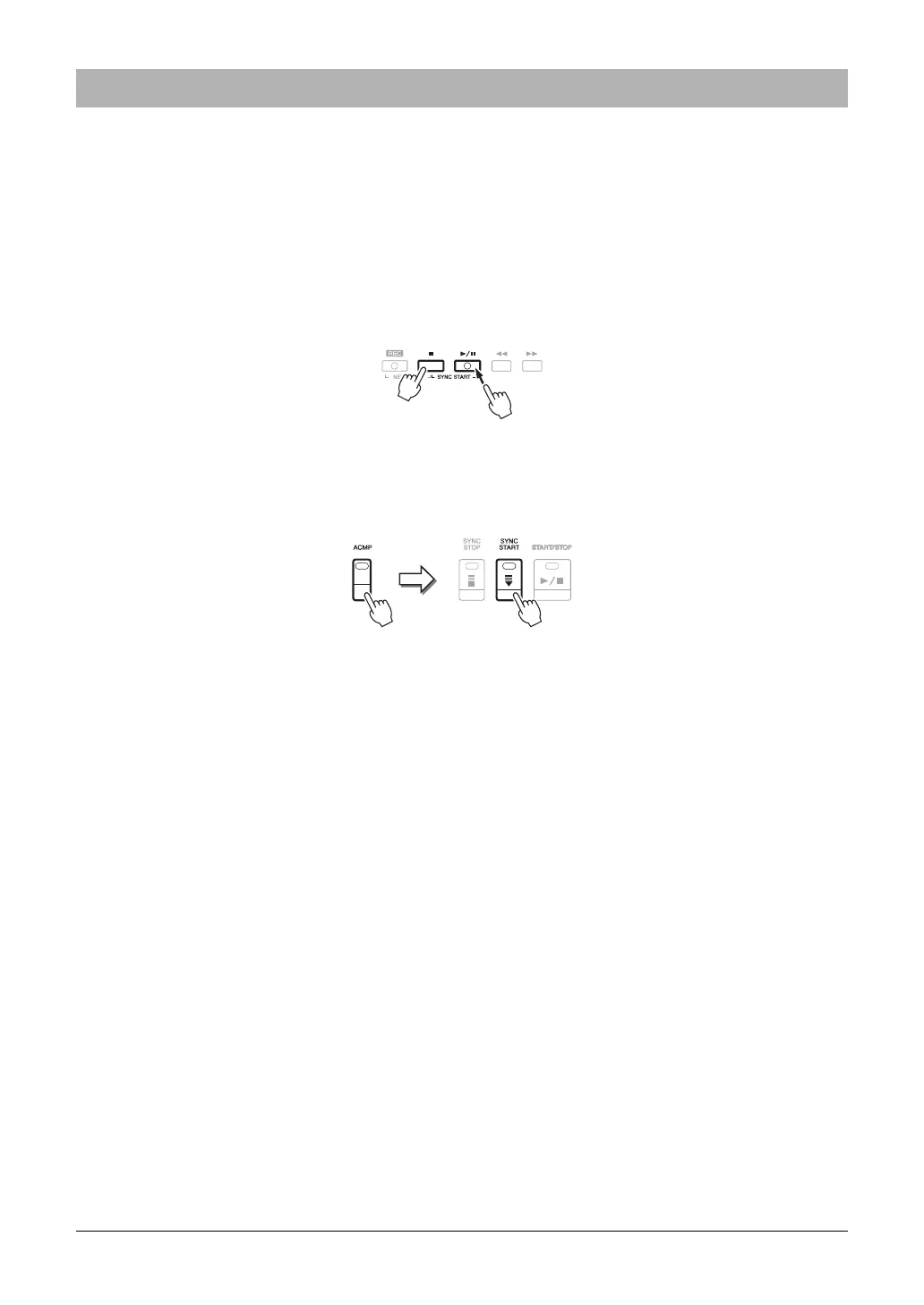
3 While holding down the SONG [J] (STOP) button, press the [F/
K] (PLAY/PAUSE) button
to enable synchronized start of the Song.
4 Press the STYLE CONTROL [ACMP] button to turn on the auto accompaniment function,
then press the [SYNC START] button to enable synchronized start of the
accompaniment.
5 Press the STYLE CONTROL [START/STOP] button or play chords in the chord section.
The Song and Style starts playing. When you play chords, pressing the [SCORE] button and turning CHORD
on (page 143) allows you to see the chord information.
NOTE When playing back a Song and a Style at the same time, the tempo value set in the Song is automatically used.
NOTE The Style Retrigger function (page 112) cannot be used during Song playback.
When the Song playback is stopped, Style playback is also stopped at the same time.
Using the Auto Accompaniment Features with Song Playback



 To Next Page
 Loading...