12 PSR-A3000 Owner’s Manual
Panel Controls and Terminals
Top Panel
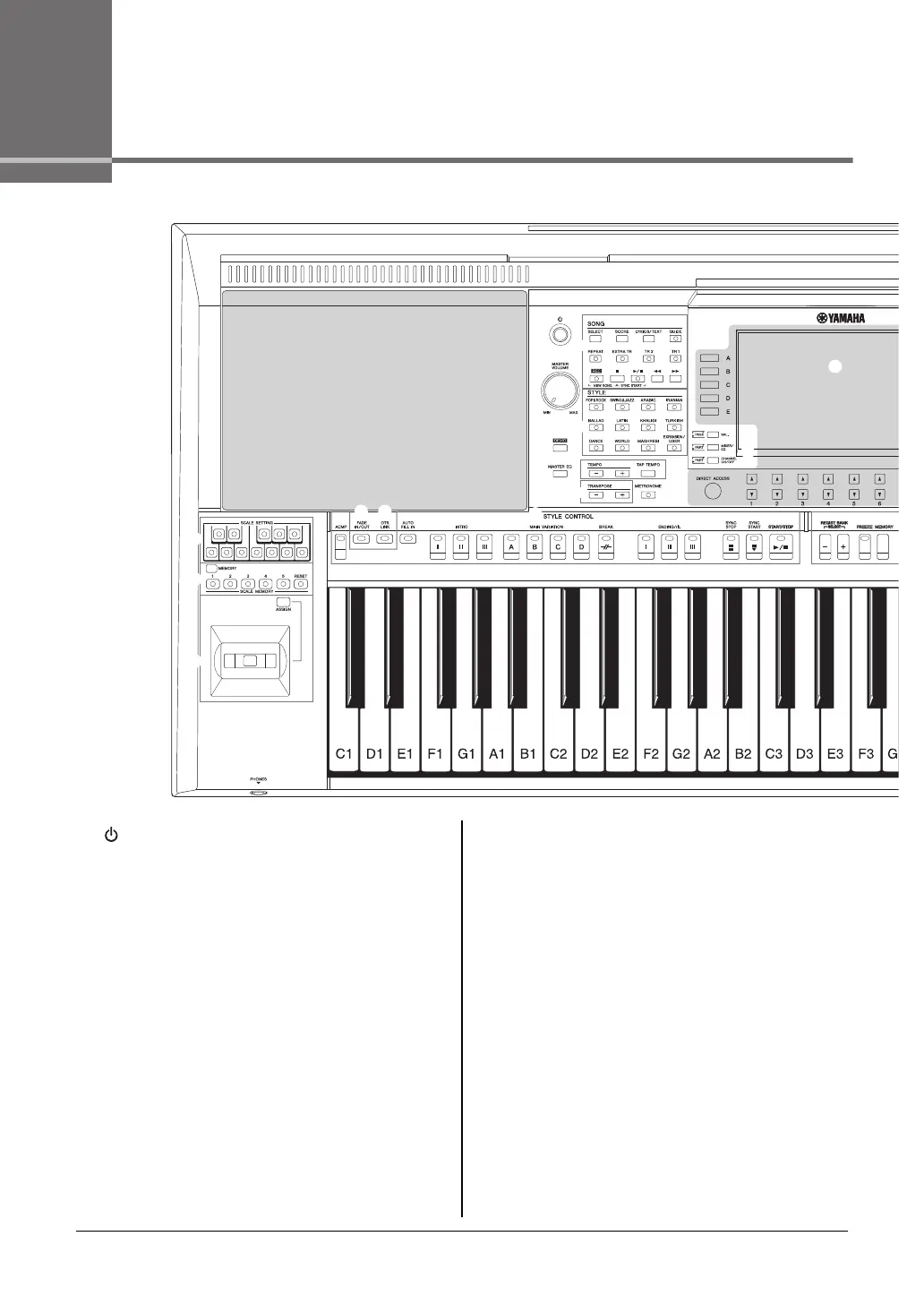
1 [ ] (Standby/On) switch ..............................Page 16
Turns on the instrument’s power or sets to standby.
2 [MASTER VOLUME] dial ................................Page 18
Adjusts the overall volume.
3 [DEMO] button ................................................Page 19
Calls up the display for selecting a Demo.
4 [MASTER EQ] button.................................... page 188
Calls up the display for setting the Master Equalizer type.
5 SONG buttons.................................................Page 62
Selects a Song and controls Song playback.
6 STYLE category selection buttons ...............Page 49
Selects a Style category.
7 [TAP TEMPO]/TEMPO buttons ......................Page 52
Controls the tempo for Style, Song and Metronome playback.
8 TRANSPOSE buttons .....................................Page 39
Transposes the entire pitch of the instrument in semitone
steps.
9 [METRONOME] button ...................................Page 38
Turns the metronome on or off.
) [FADE IN/OUT] button.................................... Page 53
Controls fade in/out of Style/Song playback.
! [OTS LINK] button .......................................... Page 55
Turns on/off the OTS Link function.
@ STYLE CONTROL buttons............................. Page 51
Controls Style playback.
# SCALE SETTING buttons ............................. page 88
Lowers the pitches of specific notes by 50 cents.
$ SCALE MEMORY [MEMORY],
[1] – [5], [RESET] buttons.............................. page 89
Lets you memorize your scale settings, or reset them to fac-
tory default.
% Joystick, [ASSIGN] button............................. page 40
For using pitch bend or modulation functions, or assigning
other functions to control sounds in real time.
^ [PHONES] jack ............................................... Page 15
For connecting a pair of headphones.
& LCD and related controls .............................. Page 20
* [BAL.] button .......................................... Pages 57, 74
Calls up settings for the volume balance among the parts.



 To Next Page
 Loading...