106 PSR-A3000 Owner’s Manual
Making Detailed Settings for Harmony/Arpeggio
This lets you make detailed settings, including volume level.
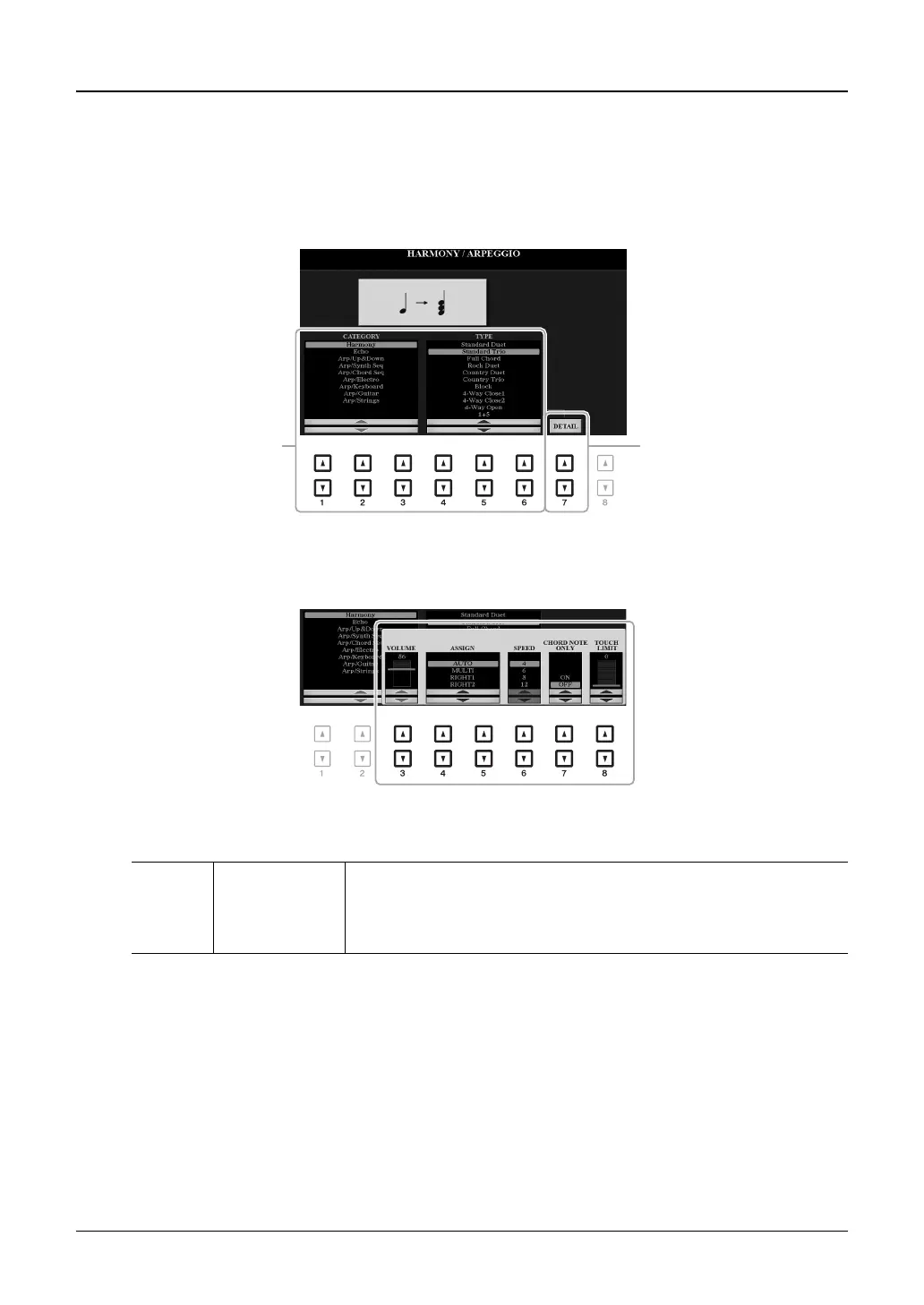
1 Call up the operation display.
[FUNCTION] TAB [E] MENU 1 [B] HARMONY/ARPEGGIO
2 Select the desired Harmony/Arpeggio category and type by using the [1 ]–[6 ]
buttons.
3 Use the [7 ] (DETAIL) buttons to call up the detailed setting window.
4 Use the [3 ]–[8 ] buttons to make various Harmony/Arpeggio settings.
When any one of the Arpeggio types is selected, only the parameters indicated by “*” in the list below can be
set.
[3 ] VOLUME* Determines the volume level of the Harmony/Arpeggio notes generated by
the Harmony/Arpeggio function.
NOTE When you are using certain Voices, such as Organ Voices, in which the TOUCH SENSE DEPTH is set to
0 in the VOICE SET display (page 114), the volume does not change.



 To Next Page
 Loading...