PSR-A3000 Owner’s Manual 119
Voices
1
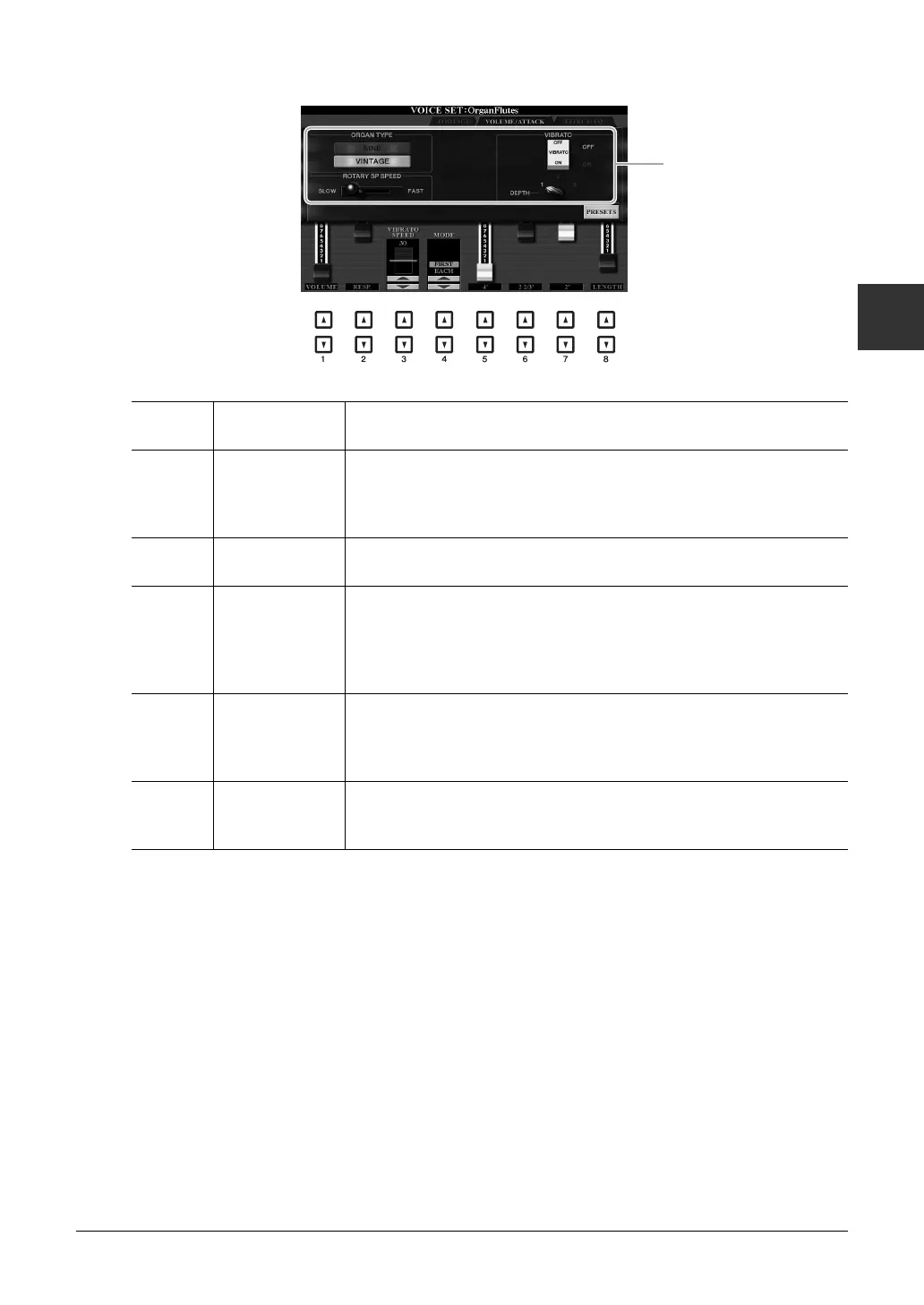
VOLUME/ATTACK Page
EFFECT/EQ Page
Same parameters as in the VOICE SET “EFFECT/EQ” page explained on page 116, except that PANEL
SUSTAIN is not available for the Organ Flutes Voices.
[1 ] VOLUME Adjusts the overall volume of the Organ Flutes. The longer the graphic bar,
the greater the volume.
[2 ]RESP.
(Response)
Affects both the attack and release (page 116) portion of the sound, increas-
ing or decreasing the response time of the initial swell and release, based on
the FOOTAGE controls. The higher the value, the slower the swell and
release.
[3 ] VIBRATO
SPEED
Determines the speed of the vibrato effect controlled by the Vibrato On/Off
([F]/[G] buttons) and Vibrato Depth ([H] button).
[4 ] MODE The MODE control selects between two modes: FIRST and EACH. In the
FIRST mode, attack (percussive sound) is applied only to the first notes
played and held simultaneously; while the first notes are held, any subse-
quently played notes have no attack applied. In the EACH mode, attack is
applied equally to all notes.
[5 ]–
[7 ]
4’, 2 2/3’, 2’ These determine the attack sound volume of the Organ Flutes Voice. The 4’,
2-2/3’ and 2’ controls increase or reduce the volume of attack sound at the
corresponding footages. The longer the graphic bar, the greater the attack
sound volume.
[8 ] LENGTH Affects the attack portion of the sound producing a longer or shorter decay
immediately after the initial attack. The longer the graphic bar, the longer
the decay.
Same as the
FOOTAGE page.



 To Next Page
 Loading...