152 PSR-A3000 Owner’s Manual
• 1-16...................... For recording melodies (Step Recording; see below) or editing the recorded melodies
(page 165).
• SYS/EX. .............. For editing System Exclusive events (tempo, time signature, etc.). See page 165.
• LYRICS............... For inputting/editing a Song name and lyrics. See page 165.
Recording Melodies (Step Recording)
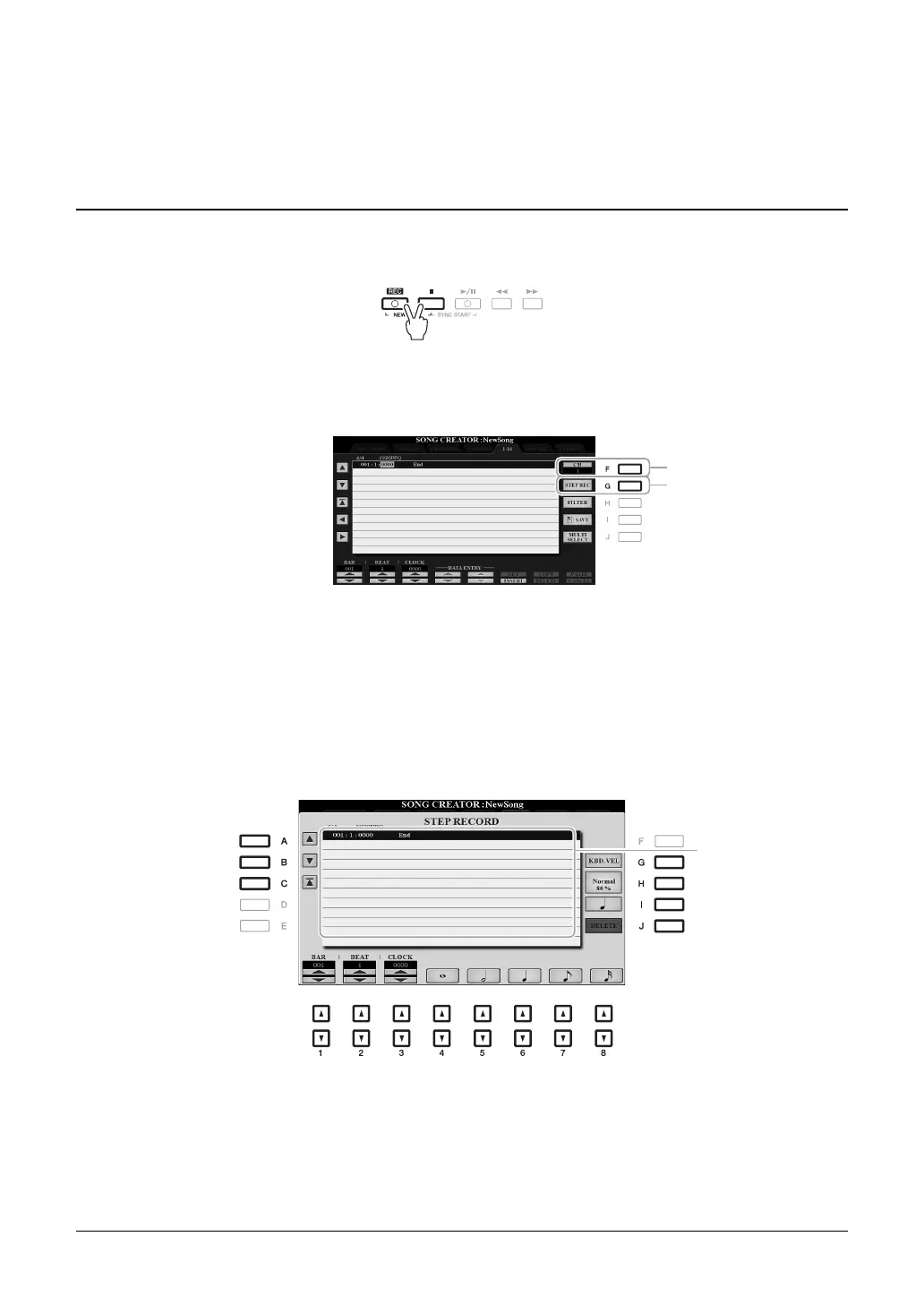
1 Press the SONG [REC] and SONG [J] (STOP) buttons simultaneously.
A blank Song (“New Song”) is called up for recording.
2 Call up the operation display.
[FUNCTION] TAB [F] MENU 2 [B] SONG CREATOR TAB [E][F] 1-16
3 Press the [F] button to select the channel for recording.
4 Press the [G] (STEP REC) button to call up the STEP RECORD display.
5 Start Step Recording by using the [A]–[J] buttons and [1 ]–[8 ] buttons, as well
as the keyboard.
Refer to the example on page 154 for specific instructions.
When a note is input, the
location (bar: beat: clock),
note name, velocity and
length listed in succession.



 To Next Page
 Loading...