22 PSR-A3000 Owner’s Manual
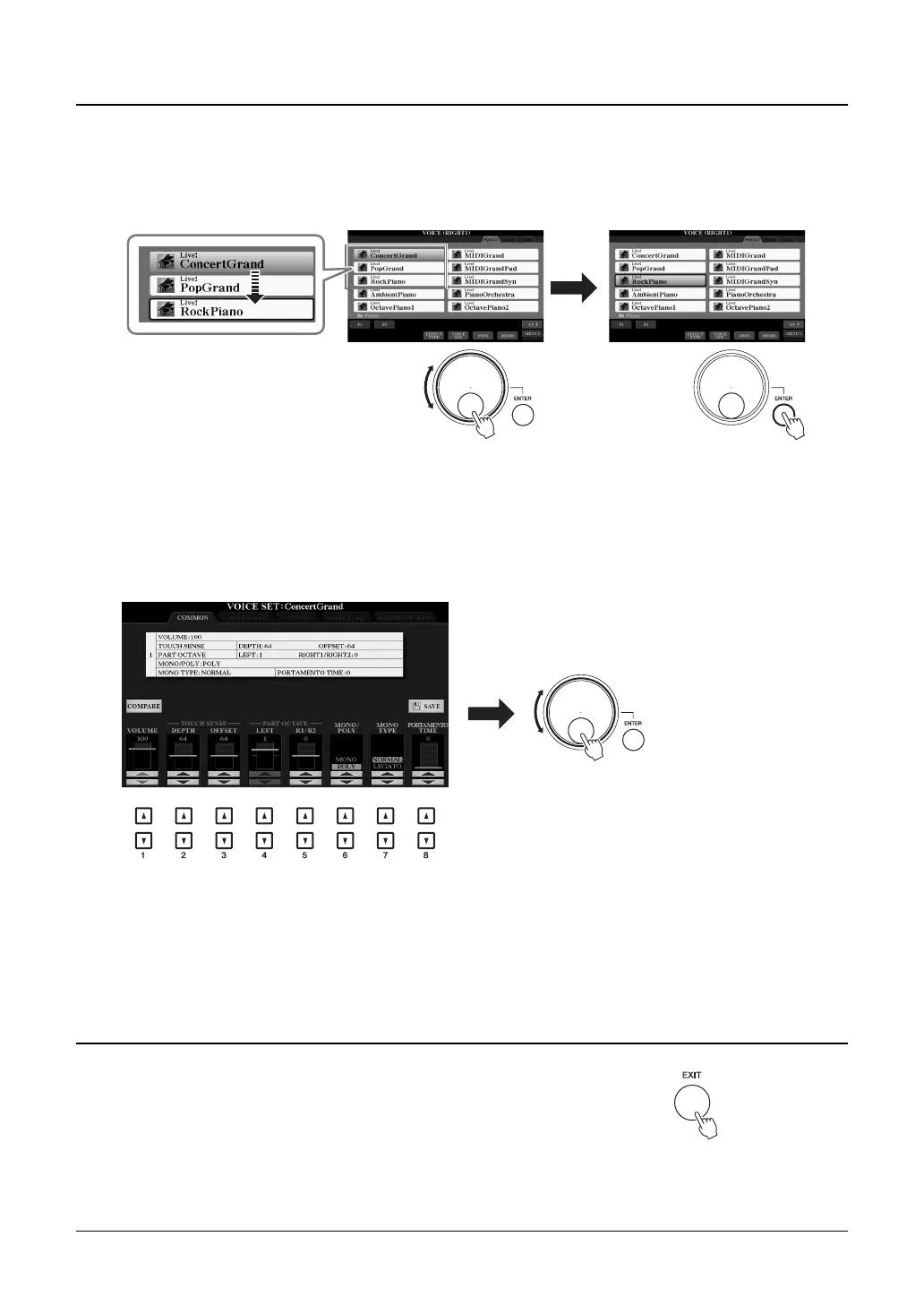
Depending on the selected display, the Data dial can be used in the following two ways.
• Selecting files (Voice, Style, Song, and so on)
When one of the File Selection displays (page 26) is shown, you can use the Data dial and the [ENTER] button to
select a file.
• Adjusting parameter values
You can conveniently use the Data dial in tandem with the [1 ] – [8 ] buttons to adjust parameters
indicated in the display.
This convenient technique also works well with pop-up parameters such as Tempo and Transpose. Simply press the
appropriate button (ex., TEMPO [+]), then rotate the Data dial to set the value.
4
Data dial and [ENTER] button
Rotate the Data dial to move the
cursor.
Press the [ENTER] button to actu-
ally select the file. The selected file
is highlighted.
Rotate the Data dial to adjust the
selected parameter.
Select the desired parameter with the appropriate [1 ] –
[8 ] button.
5
[EXIT] button
Pressing the [EXIT] button returns to the previously indicated display.
Pressing the [EXIT] button several times returns to the default Main display
(page 24).



 To Next Page
 Loading...