EasyManua.ls Logo

YASKAWA VARISPEED-656RC5 - User Manual

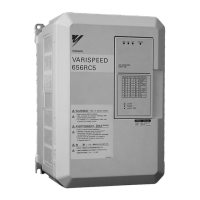
YASKAWA VARISPEED-656RC5
66 pages
Print Icon
To Next Page IconTo Next Page
Loading...
YASKAWA
VARISPEED-656RC5
INSTRUCTION MANUAL
YASKAWA
MANUAL NO. TOE-S656-3D
POWER REGENERATIVE UNIT (VS-656RC5)
MODEL
:
Upon receipt of the product and prior to initial operation, read these instructions
thoroughly, and retain for future reference.
200V CLASS 3.7 to 37kW
400V CLASS 3.7 to 75kW
CIMR-R5U , CIMR-R5A

Other manuals for YASKAWA VARISPEED-656RC5

Questions and Answers

  • V
    Victoria HaleAug 5, 2025
    What to do if YASKAWA VARISPEED-656RC5 Industrial Equipment shows Main Circuit Undervoltage?
    • T
      Tyler RoseAug 5, 2025
      If the YASKAWA Industrial Equipment indicates a Main Circuit Undervoltage, it could be due to several reasons: * An open-phase occurred with the input power supply. * A momentary power loss occurred. * The wiring terminals for the input power supply are loose. * The voltage fluctuations in the input power supply are too large. In each of these cases, reset the fault after correcting its cause.
  • K
    Kayla DunnAug 10, 2025
    Why is my YASKAWA VARISPEED-656RC5 Industrial Equipment Heatsink Overheating?
    • J
      jaime38Aug 10, 2025
      The YASKAWA Industrial Equipment heatsink may be overheating due to: 1. The ambient temperature being too high. In this case, install a cooling unit. 2. A nearby heat source. Remove the heat source. 3. The power regenerative unit’s cooling fan has stopped. Replace the cooling fan (contact our sales representative).
  • M
    Mike WilliamsAug 15, 2025
    What to do if YASKAWA VARISPEED-656RC5 Industrial Equipment reports an External Fault?
    • A
      Ashley TurnerAug 15, 2025
      If your YASKAWA Industrial Equipment reports an External Fault, it could be due to an external fault input from the contact input terminal. Try resetting the fault from the contact input terminal. Also, correct the cause of the external fault.
  • N
    Nancy LinAug 20, 2025
    What to do if YASKAWA VARISPEED-656RC5 Industrial Equipment shows Power Regenerative Unit Input Overload?
    • K
      Kelly SanchezAug 20, 2025
      If the YASKAWA Industrial Equipment displays a Power Regenerative Unit Input Overload, the load might be too heavy. Check the size of the load.
  • C
    Christopher GordonAug 25, 2025
    What to do if YASKAWA VARISPEED-656RC5 Industrial Equipment shows Control Power Fault?
    • M
      Michelle BrownAug 26, 2025
      If a Control Power Fault occurs with the YASKAWA Industrial Equipment, try turning the power supply off and on. If the fault continues, replace the power regenerative unit.
  • J
    Jasmine CooperAug 29, 2025
    What to do if YASKAWA Industrial Equipment shows Inrush Prevention Circuit Fault?
    • K
      Krystal KingAug 29, 2025
      If an Inrush Prevention Circuit Fault occurs with the YASKAWA Industrial Equipment, try turning the power supply off and on. If the fault continues, replace the power regenerative unit.

Summary

PREFACE

General Precautions

Important safety guidelines and general advice for using the product and manual.

SAFETY INFORMATION

Safety Warning Classification

Defines WARNING and CAUTION levels for safe operation.

NOTES FOR SAFE OPERATION

Receiving Safety

Precautions to take upon receiving the power regenerative unit.

Installation Safety

Safety measures and precautions for installing the unit.

Wiring Safety

Critical safety instructions and warnings related to electrical wiring.

RECEIVING

Inspection Checkpoints

Steps to verify the power regenerative unit after delivery.

Nameplate Data Verification

How to check and understand the unit's nameplate information.

Model Designation

Explanation of the model naming convention and its components.

Protective Structure Types

Details on different protective structures like IEC IP00 and NEMA 1.

INSTALLATION

Installation Site Checks

Procedures for checking the installation site and environmental conditions.

Ambient Temperature Control

Guidelines for controlling ambient temperature for reliable operation.

Foreign Matter Protection

Methods to protect the unit from foreign matter during installation.

Cooling Airflow Clearances

Required clearances for effective cooling and airflow.

Unit Dimensions

Physical dimensions for different model capacities.

Front Cover Removal and Installation

Step-by-step guide for removing and replacing the front cover.

LED Monitor;Digital Operator Removal and Replacement

Procedures for removing and replacing the LED monitor/digital operator.

WIRING

Connection Diagram Overview

Introduction to the connection diagram for the VS-656RC5 with inverter.

Servo Unit Connection Diagram

Diagram showing connection with a servo unit.

Main Circuit Input Fuse Selection

Guidance on selecting appropriate fuses for the main circuit input.

Input AC Reactor Requirements

Information on selecting the correct AC reactor for input.

Surge Protector Connection Diagram

Diagram illustrating surge protector connection.

Control Circuit Wiring Practices

Best practices for wiring control circuits to prevent noise interference.

Ground Wiring Guidelines

Proper procedures and recommendations for ground wiring.

Required Wire Size

Specifies wire sizes and types for main circuit terminals.

Closed-Loop Connectors Size

Details on closed-loop connector sizes and tightening torques.

Main Circuit Terminal Functions

Description of terminals for the main power circuit.

Control Circuit Terminal Functions

Description of terminals for control circuits.

OPERATION

Pre-Power-On Checks

Essential checks before turning on the power supply.

Voltage Jumper Configuration

Procedure for setting the voltage selection jumper for 400V class units.

LED Monitor Display Overview

Explanation of the LED monitor and its display patterns.

Normal Operation LED Display

Describes LED displays during normal operation and minor faults.

Power Supply Sequence Management

Guidelines for managing the power supply ON/OFF sequence.

Run Command Mode Selection

Explains Auto Run and Manual Run modes for command selection.

MAINTENANCE AND INSPECTION

Maintenance Safety Warnings

Critical safety warnings for performing maintenance and inspection.

Maintenance Period

Recommends the period for performing maintenance.

Daily Inspection

Lists items to check daily during system operation.

Periodic Inspection

Details tasks for periodic maintenance inspections.

Part Replacement Guidelines

Recommendations for periodic replacement of unit parts.

TROUBLESHOOTING

Fault Detection and Processing

Identifying and correcting faults based on LED displays.

Minor Fault Identification and Correction

Procedures for identifying and correcting minor faults.

SPECIFICATIONS

200 V Class Specifications

Technical specifications for the 200 V class models.

Environmental Conditions

Specifies operating environment requirements like temperature, humidity, and vibration.

400 V Class Specifications

Technical specifications for the 400 V class models.

APPENDIX 1 OPTIONAL FUNCTIONS

Using the Digital Operator JVOP-130

Functions available using the digital operator.

Mounting the Digital Operator

Procedure for physically installing the digital operator.

Digital Operator Components and Functions

Names and functions of the digital operator's parts.

Unit Operating Modes

Description of the four operating modes for the unit.

Switching Between Modes

How to navigate and switch between different operating modes.

Operations in Operation Mode

Describes key operations and navigation within the operation mode.

APPENDIX 2 PROTECTIVE AND DIAGNOSTIC FUNCTIONS OF THE DIGITAL OPERATOR

Fault Detection with Digital Operator

How the digital operator displays and aids in fault detection.

Minor Fault Identification and Correction

Procedures for identifying and correcting minor faults.

OPERATION ERRORS

Operation Error Displays

Explains operation error codes and their causes/corrections.

APPENDIX 3 CONSTANTS LIST

Constants Monitored in Operation Mode

Lists constants that can be monitored during operation.

YASKAWA VARISPEED-656RC5 Specifications

General IconGeneral
ModelVARISPEED-656RC5
Input Frequency50/60 Hz
Output Frequency0-400 Hz
Protection FeaturesOvercurrent, Overvoltage, Undervoltage, Overheat
Storage Temperature-20 to +60°C (-4 to 140°F)
Altitude1000m or less
Vibration5.9m/s² or less

Related product manuals