Ÿ Plug the 2-pin Spool Gun Control Cable into the Spool Gun Socket.
Ÿ Connect to Wire Drive Polarity (+) Lead to the Positive (+) Output Terminal.
Ÿ Connect the Work Clamp into the Negative (-) Output Terminal.
Ÿ Connect the gas line to the regulator and connect to the gas cylinder with the appropriate shielding gas.
Ÿ Install the spool gun (follow the installation instruction below).
Ÿ Turn the power source on and choose MIG/MAG process in the Home Menu page.
Ÿ Set the torch at spool gun mode.
Ÿ Turn on the gas cylinder valve and set the flow rate to between 20~30 CFH.
Ÿ Set other welding parameters and begin welding.
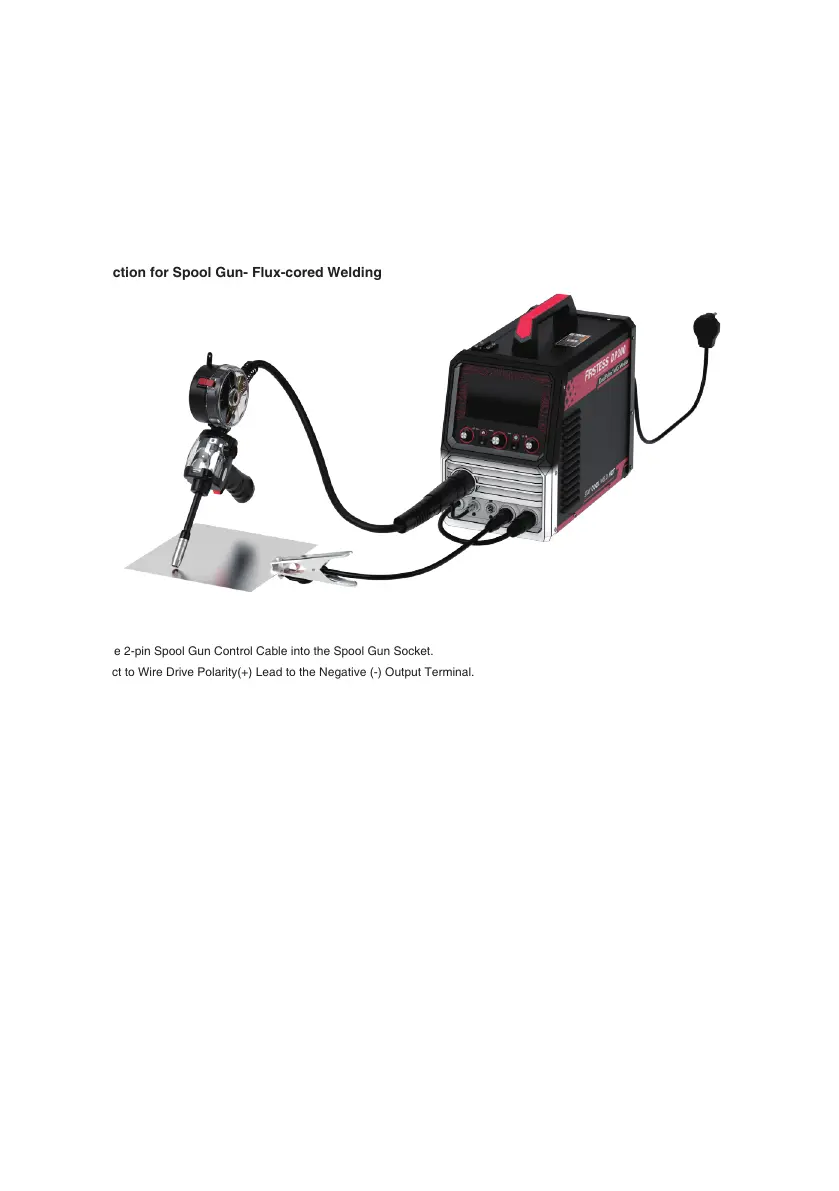
Connection for Spool Gun- Flux-cored Welding
Ÿ Plug the 2-pin Spool Gun Control Cable into the Spool Gun Socket.
Ÿ Connect to Wire Drive Polarity(+) Lead to the Negative (-) Output Terminal.
Ÿ Connect the Work Clamp into the Positive (+) Output Terminal.
Ÿ Install the spool gun (follow the installation instruction below).
Ÿ Turn the power source on and choose Flux-cored process in the Home Menu page.
Ÿ Set the torch at spool gun mode.
Ÿ Set other welding parameters and begin welding.
3.11.2 Basic Spool Gun Installation
Below is a basic guide for the spool gun installation. Follow the steps as shown in the image to ensure proper setup and optimal
performance.
1. Insert the optional YesWelder LBT150 spool gun into the Euro MIG connection socket on the front panel and secure it. Connect
and tighten the control cable to the receptacle.
2. Based on the Spool Gun Connection section, install the wire drive polarity lead and work clamp as needed for the specific setup.
3. Press the Cover Release clip on the spool gun to open the wire housing cover.
4. Place the wire on the spool holder. Remove the tensioner before placing the spool and reinstall it afterward.
5. Adjust the spool holder's tension to enable a smooth and stable wire feeding.
6. Remove the gas nozzle and contact tip from the welding torch.
7. Install a correct-sized contact tip, screw the contact tip into the tip holder of the torch, and tighten it up.
8. Turn on the power source on and select MIG/MAG or Flux process on the Home Menu page.
9. Navigate to the “Torch” menu and choose the “Spool Gun” option.
- 30 -





 To Next Page