3.10 Set Up for Flux-cored Welding (FCAW)
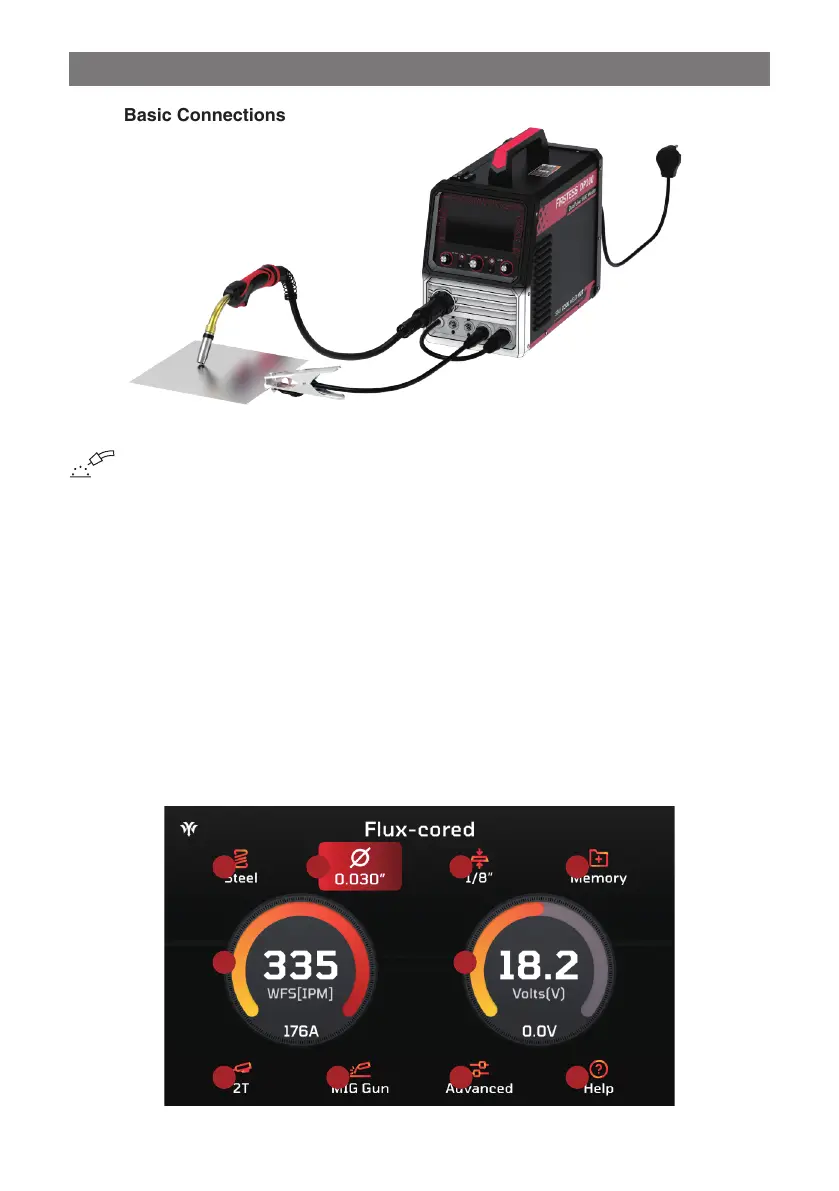
3.10.1 Basic Connections
Ÿ Connect the MIG gun to the Euro Torch Connector.
Ÿ Attach the Wire Drive Polarity Lead to the Negative (-) Output Terminal.
Ÿ Connect the work clamp to the Positive (+) Output Terminal, ensuring a solid connection to clean, bare metal (avoid rust
or paint).
Ÿ Load the wire spool into the cabinet and feed it through the wire feeder into the gun (see “Installing the Welding Wire”).
Ÿ Press the gun trigger or hold Value Adjustment Knob to load the wire through the gun.
Ÿ Power on the machine and select Flux-cored welding process with Home Menu page. Enter the Flux-cored parameter
settings page.
Ÿ Choose the wire diameter (.030"~.045").
Ÿ Select the panel thickness (24ga~3/8").
Ÿ Set torch trigger operation 2T/4T/Spot/S4T.
Ÿ Choose standard MIG gun mode, trigger the torch control switch to feed the wire, and begin welding.
3.10.2 Overview of Basic Flux-cored Parameters
This section provides an overview of basic Flux-cored parameters for welding tasks:
2 3 41
6 7 85
9 10
- 27 -



 To Next Page