OPERATION
Axio Observer TFT display touchscreen on the Axio Observer 7, 7 materials ZEISS
12/2016 431004-7244-001 133
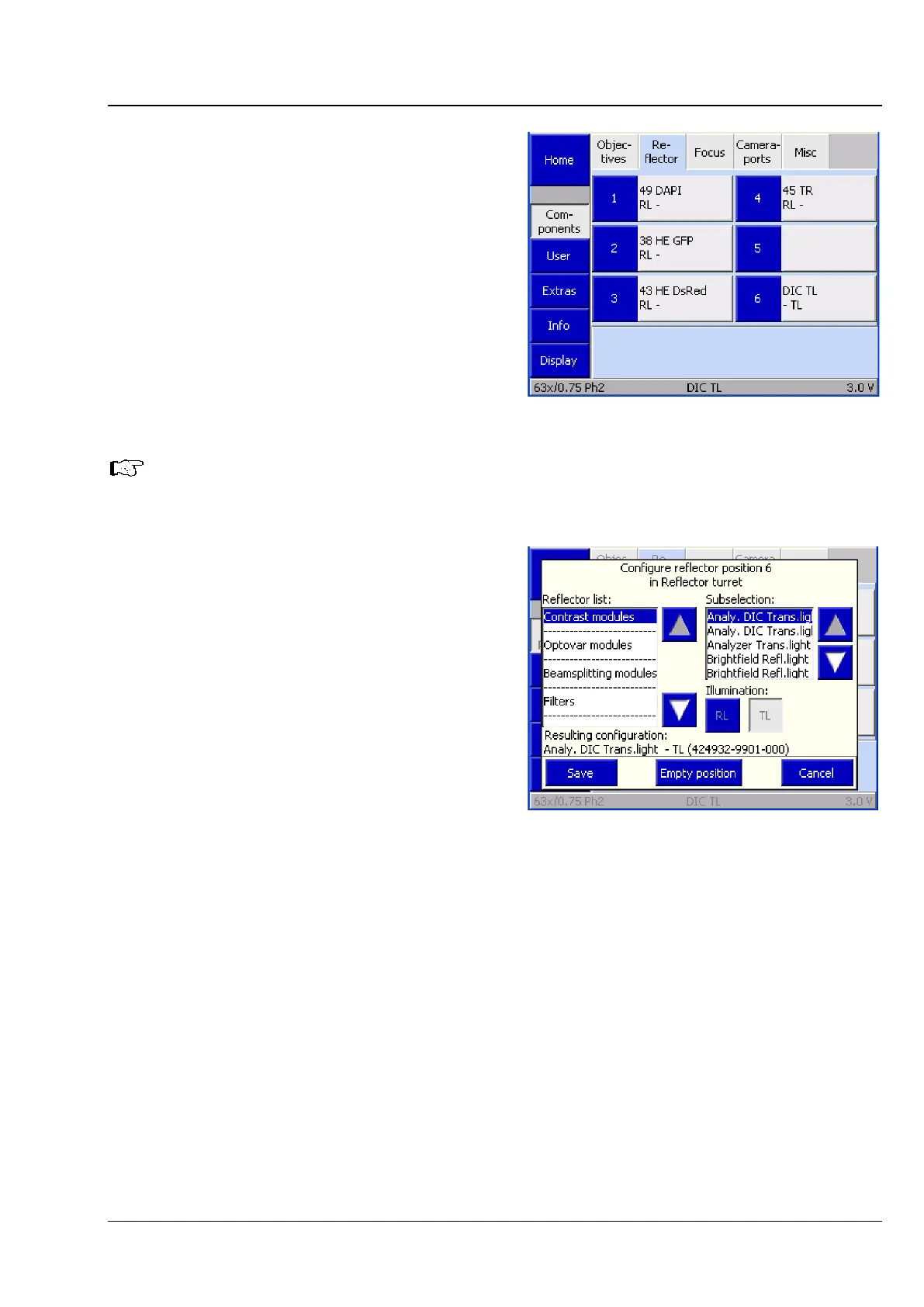
(2) Reflector
This tab is used to configure the reflector turret.
Up to six buttons are displayed, depending on the
actual number of turret positions. The system
detects the number of nosepiece positions during
initialization (and when the Settings ->
Components page is opened). Before any
reflectors have been configured, the buttons are
labeled only with the numbers of the turret
positions.
After a reflector has been configured, the
following data is displayed: designation (Type),
reflected light module (RL), transmitted light
position / module (TL)
Once a reflector has been assigned to a
position, the corresponding reflector
button on the Microscope -> Control
page will be labeled accordingly.
• Press the relevant button to configure a turret
position.
• Select the appropriate reflector from the list in
the Configure reflector position # in
Reflector turret window. The current selection
is shown in the Resulting configuration line.
• Select RL and / or TL.
• Press the Save button. If the turret position has
already been configured, a confirmation prompt
will be displayed.
Fig. 123 Settings -> Components -> Reflector
page
Fig. 124 Settings -> Components -> Reflector
-> Configure reflector position # in
Reflector turret page








 To Next Page