OPERATION
Axio Observer TFT display touchscreen on the Axio Observer 7, 7 materials ZEISS
12/2016 431004-7244-001 141
5.11.9.3 Settings -> Extras
The Settings -> Extras page includes the Light
manager, Oil stop, Dazzle protect, Ethernet
and Misc tabs.
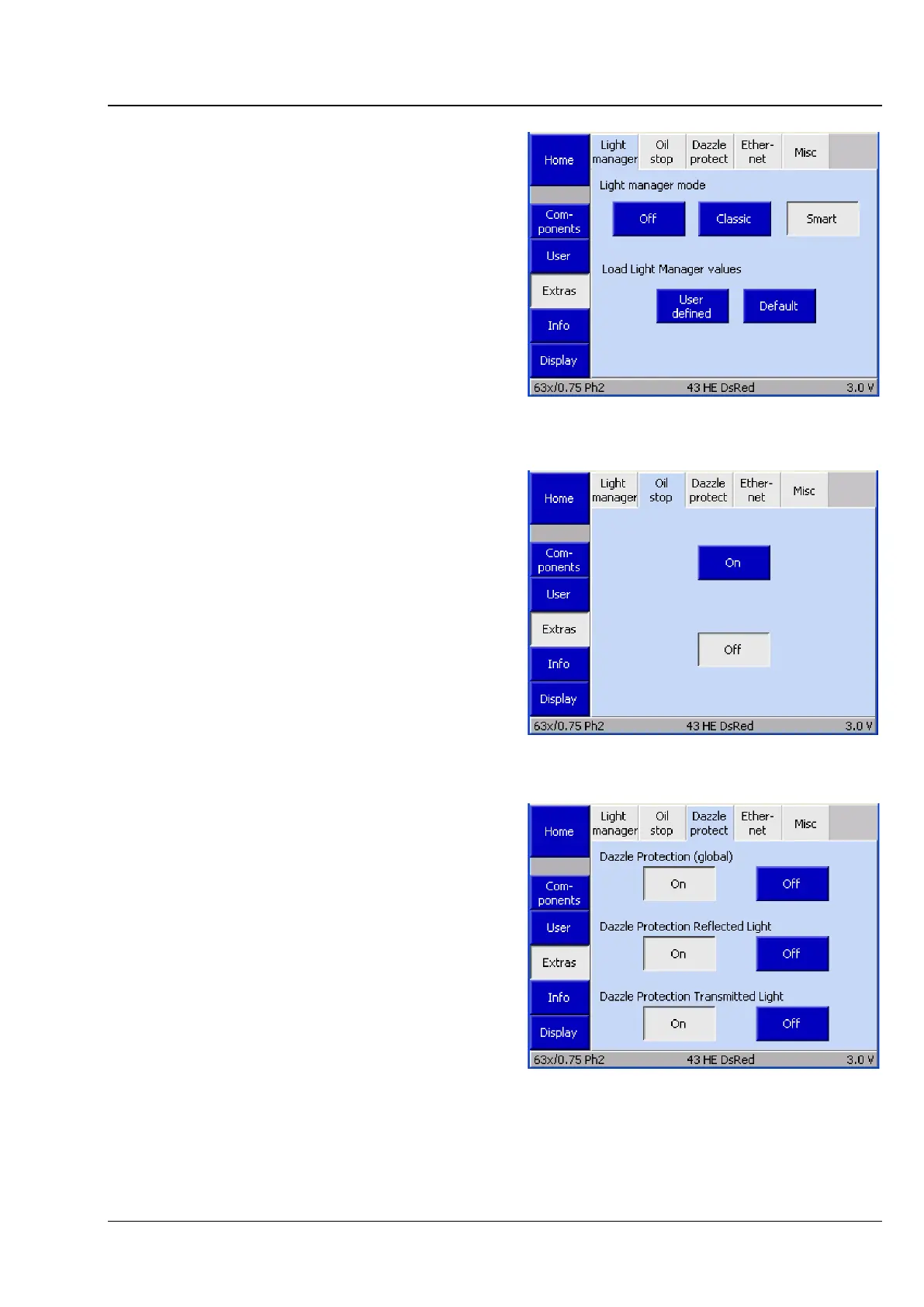
(1) Light Manager
This tab is used to activate or deactivate Light
Manager or to change the Light Manager mode.
Light Manager is used for automatic brightness
adjustment (see section 5.8).
(2) Oil stop
The Oil stop tab is used to activate or deactivate
the oil stop function. The oil stop function prevents
a dry objective from being moved into the
immersion fluid. The nosepiece is always lowered
when switching between a dry and an immersion
objective.
(3) Dazzle protection
The Dazzle protect tab is used to activate or
deactivate the Dazzle protect function.
Note:
If the Dazzle protect function is deactivated
globally, all other fields on this tab will be grayed
out.
If one of the above components is not installed,
the corresponding buttons will not be displayed.
Fig. 141 Settings -> Extras -> Light Manager
page
Fig. 142 Settings -> Extras -> Oil stop page
Fig. 143 Settings -> Extras -> Dazzle protect








 To Next Page