INSTALLATION INSTRUCTIONS AND FIRST-TIME SET-UP
ZEISS HAL 100 illuminator Axio Observer
66 431004-7244-001 12/2016
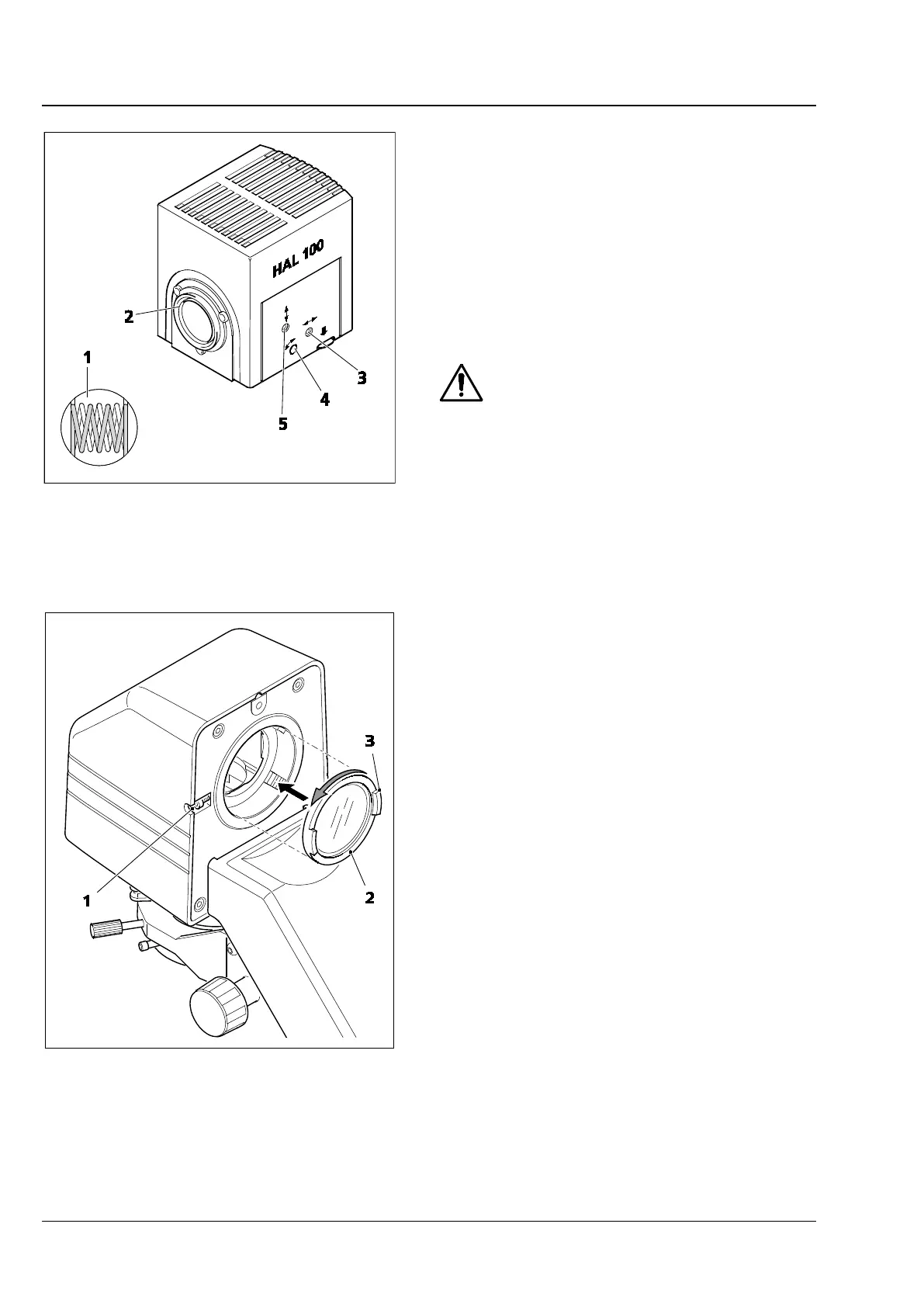
4.22.2 Adjusting the HAL 100 illuminator
(1) Coarse adjustment
• After loosening the clamping screw (Fig. 50/1 or
Fig. 50/8), remove the halogen illuminator
(Fig. 51/3) which is ready for use from the
microscope stand.
• Switch on the microscope.
• Direct the light beam to a projection surface
(wall) at a distance of at least 3 m.
Do not look into the light exit aperture
of the illuminator.
• Using a 3 mm ball-headed screwdriver, turn the
adjusting screw (Fig. 51/3) until both images of
the lamp filament appear as sharp as possible
on the projection surface.
• Then turn the two adjusting screws (Fig. 51/4
and 5) until the lamp filament of one image
exactly fills the gaps in the reflected filament
image (Fig. 51/1).
(2) Fine adjustment
• If necessary, loosen the clamping screw
(Fig. 52/1) and remove the HAL 100 from the
transmitted light illumination mount.
• Manually unscrew the diffusion disk (Fig. 52/2)
from the mount (anti-clockwise). Hold the edge
of the diffuser by the projections on the disk
(Fig. 52/3).
• Reattach the HAL 100 and tighten the locking
screw.
• Remove filters (if inserted) from the optical path
or deactivate them.
• Focus on the specimen using a ≤ 40x objective
and find a free area on the specimen.
• Remove the eyepiece and center the lamp
filament and its reflection in the pupil image
using the adjusting screws (Fig. 51/4 and 5).
• Turn the adjusting screws (Fig. 51/3) until the
illumination of the visible image is as
homogeneous as possible.
• Once you have completed the adjustment,
remove the HAL 100.
• Manually screw the diffuser into the adaptor.
• Reattach the HAL 100 and activate the filters.
Fig. 51 Adjusting the HAL 100 illuminator
Fig. 52 Fitting/removing the diffusion disk








 To Next Page