Primo Star / Primo Star iLED Care and Troubleshooting Carl Zeiss
M60-2-0011 v 08/2008 37
En
lish
Problem Cause Remedy
Transmitted-light illuminator of
Primo Star iLED cannot be
switched on.
Transmitted light / reflected light
changeover switch is in reflected light
(Fluorescence) position.
Turn transmitted light / reflected light
changeover switch to transmitted light
(Brightfield) position.
Transmitted light / reflected light
changeover switch is in transmitted
light (Brightfield) position.
Turn transmitted light / reflected light
changeover switch to reflected light
(Fluorescence) position.
Reflected-light illuminator of
Primo Star iLED cannot be
switched on.
Reflected-light illuminator not exactly
enough aligned to microscope stand
or displaced, causing interruption of
power supply by interlock function.
Align reflected-light illuminator exactly
to microscope stand and tighten
clamping screw sufficiently.
4.3 Changing the LED module in the reflected-light fluorescence illuminator
ATTENTION
The LED module in the reflected-light fluorescence illuminator has to be changed in any case
by an authorized service technician.
The Primo Star iLED microscope with reflected-light fluorescence illuminator is provided with
an interlock function to switch off the installed LED of the reflected-light illuminator as soon as
the reflected-light illuminator will be turned with regard to the stand or detached or if the lid
of the reflected-light illuminator will be removed.
• Disconnect the reflected-light illuminator from
the power supply.
• Detach the tube (see also section
3.5.1). To this
end, loosen the knurled screw, turn the tube
counterclockwise by approximately 90° and lift
it out of the dovetail mount.
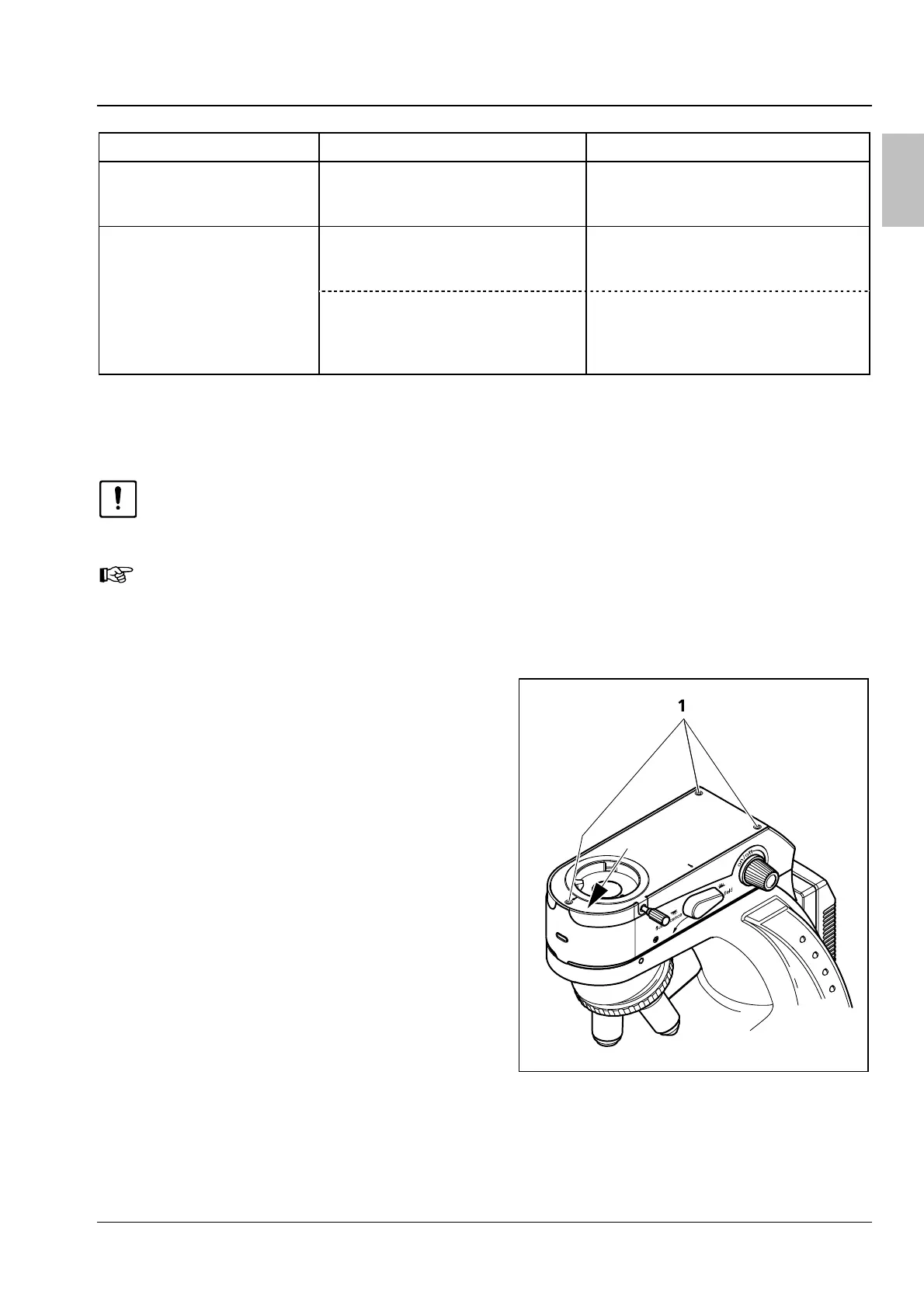
• Loosen the three fastening screws (
Fig. 33/1) of
the lid of the reflected-light illuminator (2.5 mm
Allan key).
• Disconnect the plug-in connector of the LED
module connection cable (
Fig. 34/3) on the
circuit board. To this end, press the safety hook
against the connector to release it and pull out
the connector.
• Unscrew the two fastening screws of the LED
holder (
Fig. 34/1) completely. Remove holder
(
Fig. 34/2) and screws.
• Remove the LED module (
Fig. 34/4).
• Insert the new LED module. Because of limited
space, the flat side of the LED module must
point to the circuit board.
Fig. 33 Lid of reflected-light illuminator


 To Next Page
 Loading...