GETTING TO KNOW YOUR "iV
TYPICAL CONTROL PANEL
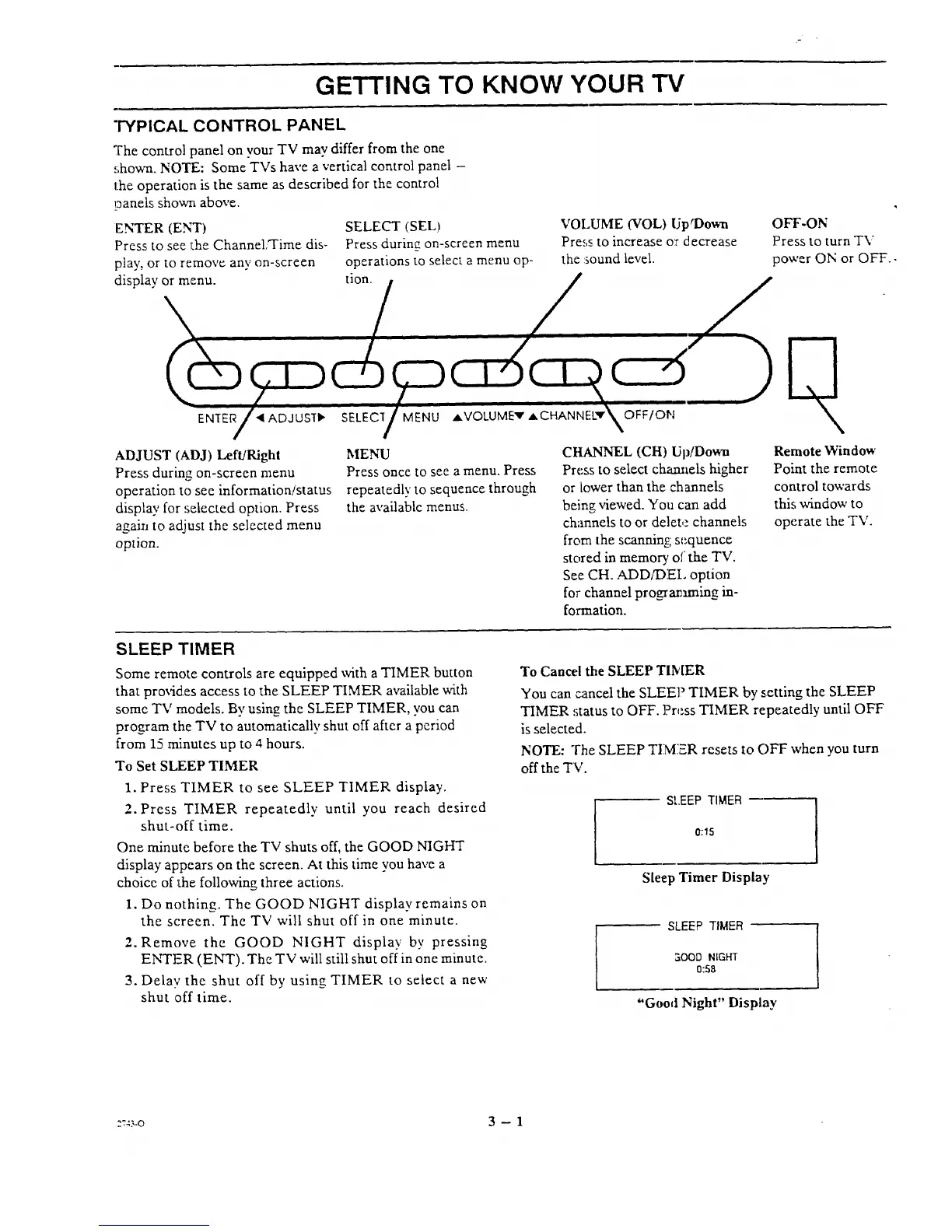
The control panel on vour TV may differ from the one
,;hown. NOTE: Some TVs have a vertical control panel -
the operation is the same as described for the control
panels shown above.
ENTER (ENT)
Press to see the Channel;'Time dis-
play, or to remove any on-screen
display or menu.
SELECT (SEL)
Press during on-screen menu
operations to select a menu op-
tion.
VOLUME (VOL) UptDown
Press to increase or decrease
the sound level.
OFF-ON
Press to turn TV
power ON or OFF..
ENTER _1 ADJ USI"I_
SELEC1 MENU AVOL
ADJUST (ADJ) Left!Right
Press during on-screen menu
operation to see information!status
display for selected option. Press
again to adjust the selected menu
option.
MENU
Press once to see a menu. Press
repeatedly to sequence through
the available menus.
OFF/ON
CHANNEL (CH) Up/Down
Press to select channels higher
or k)wer than the channels
being viewed. You can add
channels to or delete channels
from the scanning; sequence
stored in memory of the TV.
See CH. ADD/DEI, option
for channel programming in-
formation.
Remote Window
Point the remote
control towards
this window to
operate the TV.
SLEEP TIMER
Some remote controls are equipped with a TIMER button
that prm5d.es access to the SLEEP TIMER available with
some TV models. By using the SLEEP TIMER, you can
program the TV to automatically shut off after a period
from 15 minutes up to 4 hours.
To Set SLEEP TIMER
1. Press TIMER to see SLEEP TIMER display.
2. Press TIMER repeatedly until you reach desired
shut-off time.
One minute before the TV shuts off, the GOOD NIGHT
display appears on the screen. At this time you have a
choice of the following three actions.
1. Do nothing. The GOOD NIGHT display remains on
the screen. The TV will shut off in one minute.
2. Remove the GOOD NIGHT display by pressing
ENTFR (ENT). The TV will still shut off in one minute.
3. Delay the shut off by using TIMER to select a new
shut off time.
To Cancel the SLEEP TIMER
You can cancel the SLEEP TIMER by setting the SLEEP
TIMER status to OFF. Press TIMER repeatedly until OFF
is selected.
NOTE: The SLEEP TIMIER resets to OFF when you turn
off the TV.
SLEEP TIMER
0:15
Sleep Timer Display
SLEEP TIMER
SOOO NIGHT
0:S8
"Good Night" Display
z=_-o 3 -- 1




 To Next Page