REMOTE CONTROL MODEL MBR3420
PROGRAMMING BRAND CODES
Before using your new remote control, it must be programmed
to recogn_ the brands of equipment it will be used to
operate, tf you are using a Zenith "1"%',Zenith VHS VCR or a
Zenith c_tble-T'vIdecoder, it has already been programmed for
you.
Find the code that corresponds to each brand and type of
equipment you are going to operate. Refer to Tables 1, 2
and 3.
For example, if you were programming the remote for use
with a Z"enith TV, you would look up "Zenith" in "Table
1.", and find code "101."
Write the brand codes for your equipment on the following
lines.
TV CODE:
CABLE CODE:
VCRCODE:
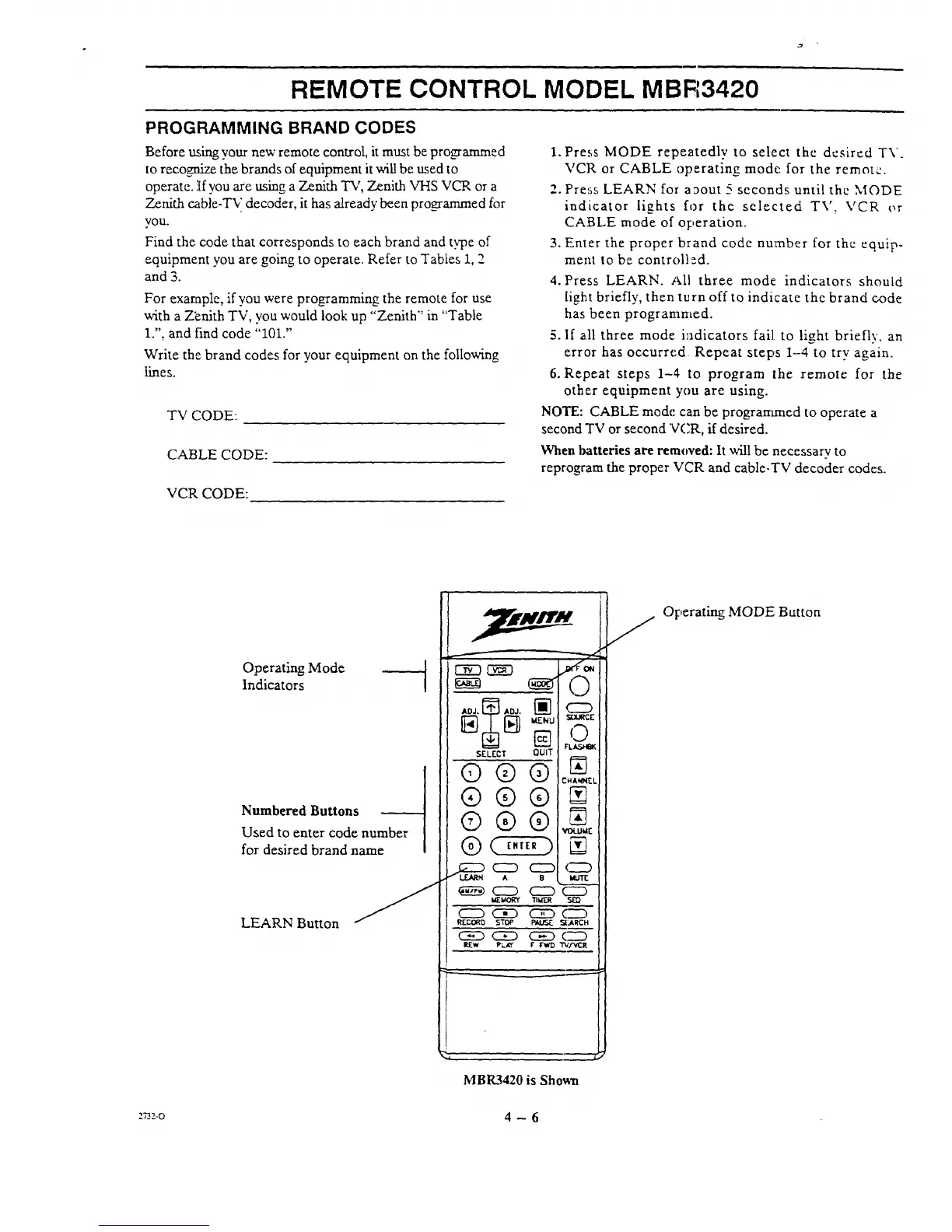
1. Press. MODE repeatedly to select the desired TV.
VCR or CABLE operating mode: for the remote.
2. Pres.,_ LEARN for a_out 5 seconds until the MODE
indicator lights for the selected TV, VCR or
CABLE mode of operation.
3. Enter the proper brand code number for the equip-
ment to be controll _-d.
4. Press LEARN. All three mode: indicators should
light briefly, then turn off to indicate the brand code
has been programmed.
5. If all three mode i_adicators fail to light briefly, an
error has occurred Repeat steps 1-4 to try again.
6. Repeat steps 1-4 to program the remote for the
other equipment you are using.
NOTE: CABLE mode can be prograrrtmed to operate a
second TV or second V('R, if desired.
When batteries are removed: It will be necessary to
reprogram the proper VCR and cable-TV decoder codes.
Operating Mode
Indicators
Numbered Buttons
Used to enter code number
for desired brand name
LEARN Button
r-wn r--_-7
SELECT 0UIT
G®®
®®®
©®®
_ c_ c2D
CZD C_D C_D
(5_D CSED _
r _
C2D
FL_
CHANNEL
N
_ktl"
c_
CZD
._L,I.RCH
"rv.cvl_
i
MBR3420 is Shomla
Operating MODE Button
.n_-o 4 - 6




 To Next Page