AUDIO MENU
AUDIO MENU i_,UD_OMENU
BASS I
TREBLE - I
BALANCE L I
AUDIO STEREC
SEQ ON
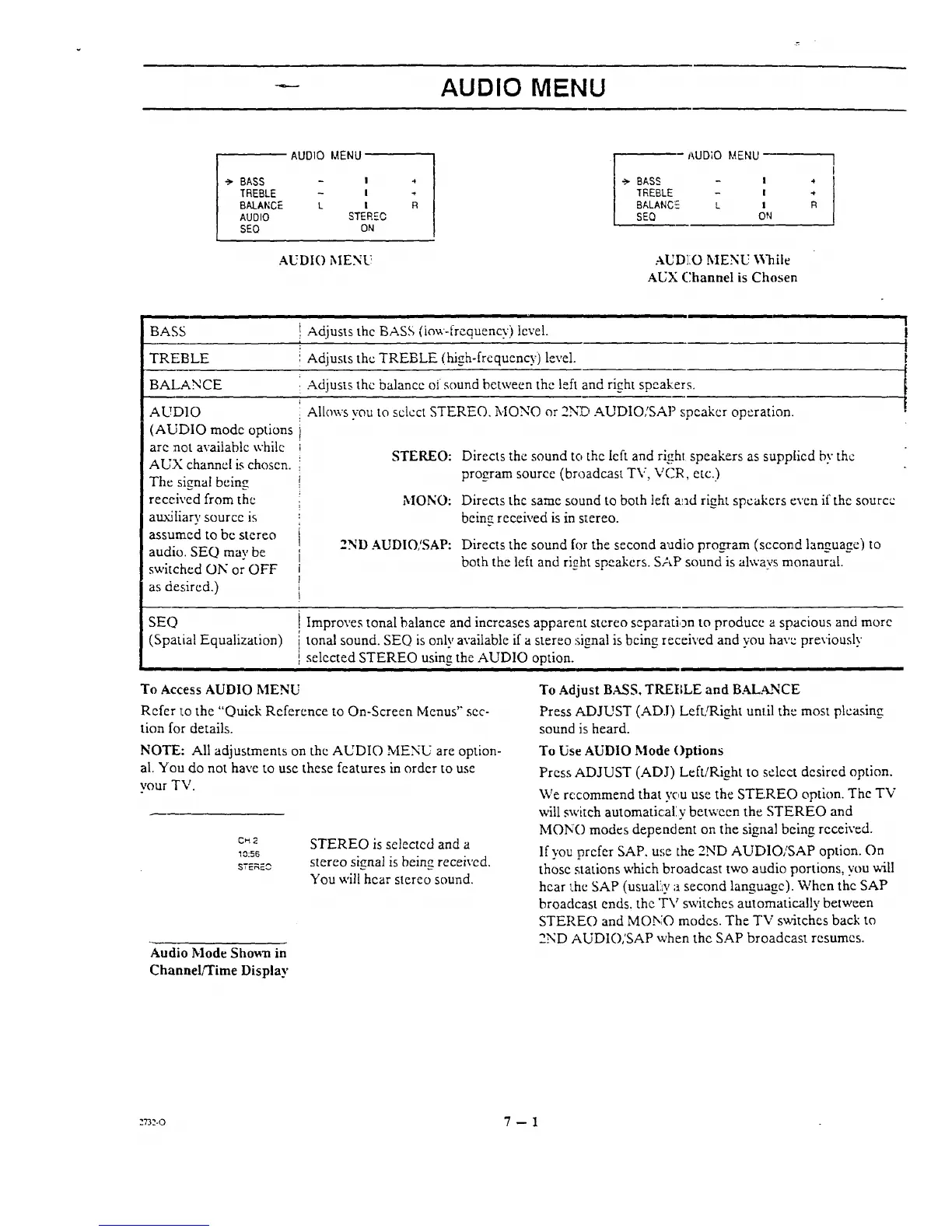
AUDIO MENU
4
R
BASS - !
TREBLE - I
BALANC!_ L I
SEQ ON
AUDIO MENU \Vhile
AUX Channel is Chosen
1
I
at
R
BASS
i ii
} Adjusts the BASS (Low-frequency) level.
TREBLE { Adjusts the TREBLE (high-frequency) level.
BALANCE : Adjusts the balance of sound between the left and right speakers.
AUDIO
(AUDIO mode options
are not available while
AUX channel is choscn.
The signal being
Allows vou to select STEREO. MONO or 2ND AUDIO,'SAP speaker operation.
STEREO: Directs the sound to the left and righl speakers as supplied by the
program source (broadcast TV, VCR, etc.)
received from the
auxiliary source is
assum.ed to be stereo
audio. SEQ may be
switched ON or OFF
as desired.)
MONO:
2ND AUDIO/SAP:
Directs the same sound to both left and right speakers even if the source
being received is in s_ereo.
Directs the sound for the second audio program (second lan_uaee) to
both the left and right speakers. SAP sound is always monaural.
SEQ
(Spatial Equalization)
i ii
To Access AUDIO MENU
Refer 1:othe "Quick Reference to On-Screen Menus" sec-
tion for details.
NOTE: All adjustments on the AUDIO MENU are option-
al. You do not have to use these features in order to use
your TV.
C_2
10;56
STERF.O
Improves tonal balance and increases apparent stereo separation to produce a spacious and more
' tonal sound. SEQ is only available if a stereo signal is being received and you have previously
selected STEREO using the AUDIO option.
n
Audio Mode Sho_aa in
Channel/Time Display
STEREO is selected and a
stereo signal is being received,
You will hear stereo sound.
To Adjust BASS. TREBLE and BALANCE
Press ADJUST (ADJ) Left/Right until the most pleasing
sound is heard.
To Use AUDIO Mode Options
Press ADJUST (ADJ) Left/Right to :select desired option.
We recommend that you use the STEREO option. The TV
will switch automatically between the STEREO and
MON() modes dependent on the signal being received.
If you prefer SAP, use the 2ND AUI')IO/SAP option. On
those stations which broadcast two audio portions, you will
hear l:he SAP (usual!ty a second language). When the SAP
broadcast ends, the "FV switches automatically between
STEREO and MONO modes. The TV switches back to
2ND AUDIO,'SAP when the SAP broadcast resumes.
:r3:.o 7 -- 1




 To Next Page