REMOTE CONTROL MODEL MBR3420
INTRODUCTION
The multi-brand remote control supplied with your new
Zenith TV allows you to operate most models of infra-red
(IR) remote-controlled TVs, VCRs. and cable-TV
decoders, even if they are all different brands.
Your multi-brand remote has already been programmed tt,
operate your Zenith TV, a :Zenith cable-TV decoder and a
Zenith Vt-[S VCR. It must be programmed to operate other
brands of equipment.
Refer to the "Pro_amming Brand Codes" paragraph for
more information.
CHOOSING OPERATING MODE
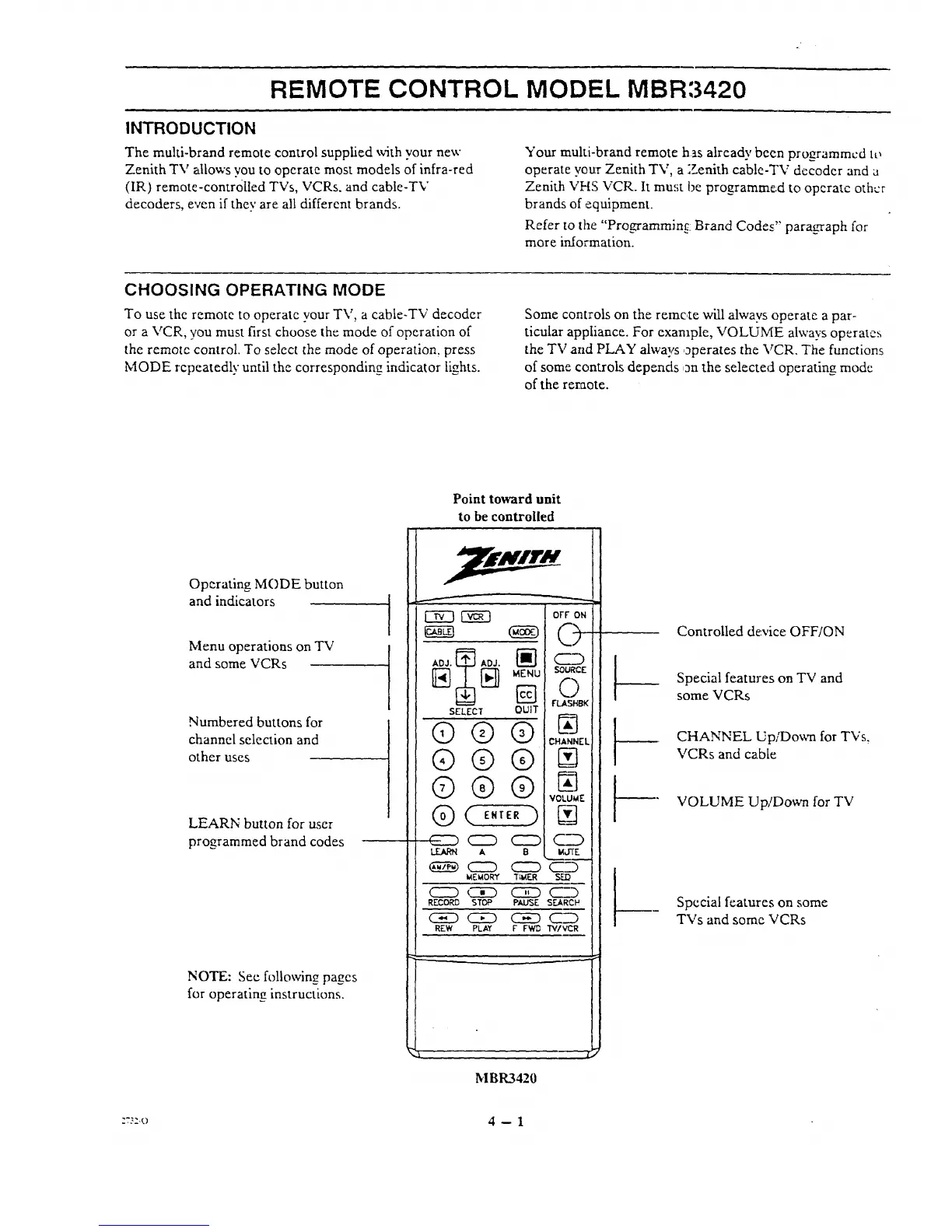
To use the :remote to operate your TV, a cable-TV decoder
or a VCR, you must first choose the mode of operation of
the remote control. To select the mode of operation, press
MODE repeatedly until the corresponding indicator lights.
Some controls on the remote will alwavs operate a par-
ticular appliance. For example, VOLUME always operates
the TV and PLAY always operates the VCR, The functions
of some controls depends on the selected operating mode
of the remote.
Point toward unit
to be controlled
Operating MODE button
and indicators
Menu operations on TV
and some VCRs
Numbered buttons for
channel selection and
other uses
LEARN button for user
programmed brand codes
NOTE: See following pages
for operating instructions.
r
SELECT
©®
®®
®®
®
OFF ON
MI_U SOURCE
O
FLABH_
QUIT
@ N_J
CHANNEL
VOLUWIE !
( )--'
ENTER _vl i
A B MJ'rE !
(EED (ZZD C23
_EWAORY TiW_F.R SLD
<=:D _ LIE) _D
RECORD STOP PAUSE SEARCH
CE) C]E) _C__
REW PLAY F FWB WIVCR
Controlled device OFF/ON
Special features on TV and
some VCRs
CHANNEL Up/Do\vn for TVs.
VCRs and cable
VOLUME Up/Down for TV
Special features on some
TVs and some VCRs
M BR3420
:r;:.o 4 --1




 To Next Page