SETUP MENU
CH. (Channel) LABELS
Purpose
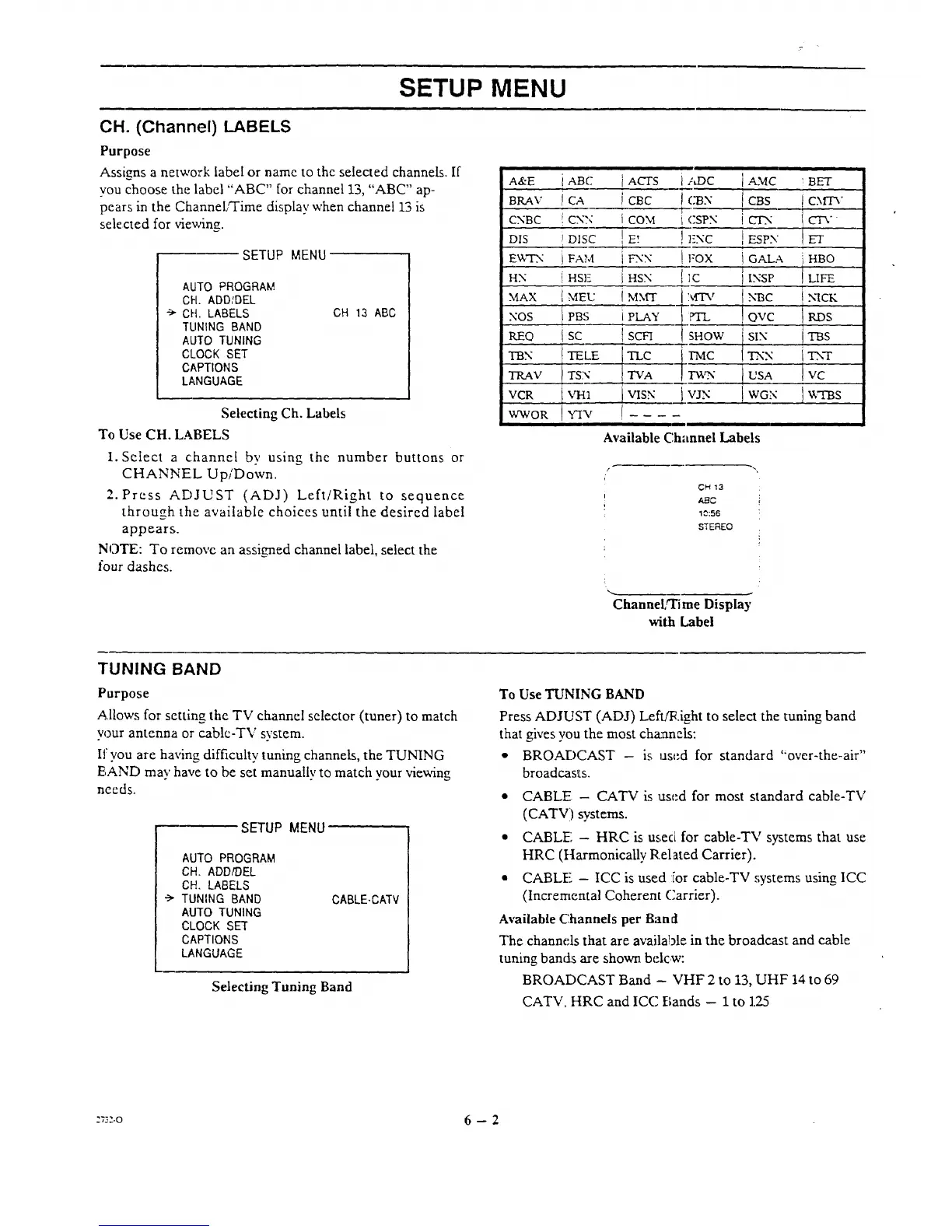
Assigns a network label or name to the selected channels. If
vou choose the label "ABC" for channel 13, "ABC" ap-
pears in the ChanneL'Time display when channel 13 is
selected for vievAng.
SETUP MENU
AUTO PROGRAM
CH. ADD/DEL
CH. LABELS
TUNING BAND
AUTO TUNING
Ct.OCK SET
CAPTIONS
LANGUAGE
CH 13 ABC
Selecting Ch. Labels
To Use CH. LABELS
1. Select a channel by using the number buttons or
CHANNEL Up/Down.
2. Press ADJUST (ADJ) Left/Right to sequence
through the available choices until the desired label
appears.
NOTE: To removc an assigned channel label, select the
four dashes.
A&E
B_V
CNBC
DIS
E_WN
HN
MAX
NOS
_O
_N
TRAV
VCR
WWOR
iABe j ACrS
ICA i CBC
_CN:¢ I CON
_DISC ! E_
i FAM t FXX
j .s]-: t HSX
IMEL: I M_rr
i PBS i
I PLAY
l sc . i scn
TELE TLTvCA
TSN
VH1 I VISN
i/LDC
i CSPN
iENC
!FOX
-['1C
]MTV
?TL
SHOW
1-_
_. VJN
] AMC ; BET
CBS ! C.XflA"
tCIN CTV
i ESPN ET
l GALA HBO
i lNSP LIFE
t NBC TICK
I OVC KIDS
SIX TBS
TNN TN-T
USA VC
WGN 1V:I'BS
Available Channel Labels
CH 13
,ABC
10:56
STEREO
Channel,q'ime Display
with Label
TUNING BAND
Purpose
Allows for setting the TV channel selector (tuner) to match
w3ur antenna or cablc-TV system.
If you are having difficulty tuning channels, the TUNING
EAND may have to be set manuallv to match your viewing
needs.
SETUP MENU
AUTO PROGRAM
CH. ADD/DEL
CH. LABELS
•-> TUNING BAND
AUTO TUNING
CLOCK SET
CAPTIONS
LANGUAGE
CABLE-CATV
Selecting Tuning Band
To Use TUNING BAND
Press ADJUST (ADJ) LeflA_.ight to select the tuning band
that gives you the most channels:
• BROADCAST - is used for standard "over-the-air"
broadcasts.
• CABLE - CATV is used for most standard cable-TV
(CATV) systems.
• CABLE; - HRC is used for cable-TV systems that use
HRC (ttarmonicaIly Related Carrier).
• CABLE - ICC is used :ior cable-TV :;ystems using ICC
(Incremental Coherent Carrier).
Available Channels per Band
The channels that are available in the broadcast and cable
tuning bands are shown belcw:
BROADCAST Band - VHF 2 to 13, UHF 14 to 69
CATV, HRC and ICC Bands - 1 to 1.25
::3:-o 6 - 2




 To Next Page