EasyManua.ls Logo

ZinWave UNITIVITY 5000 - Optical Module

ZinWave UNITIVITY 5000
110 pages
Print Icon
To Next Page IconTo Next Page
To Previous Page IconTo Previous Page
Loading...
UNItivity 5000 Understanding the Components
User Manual
Copyright © 2022 Zinwave. All rights reserved. 2-6
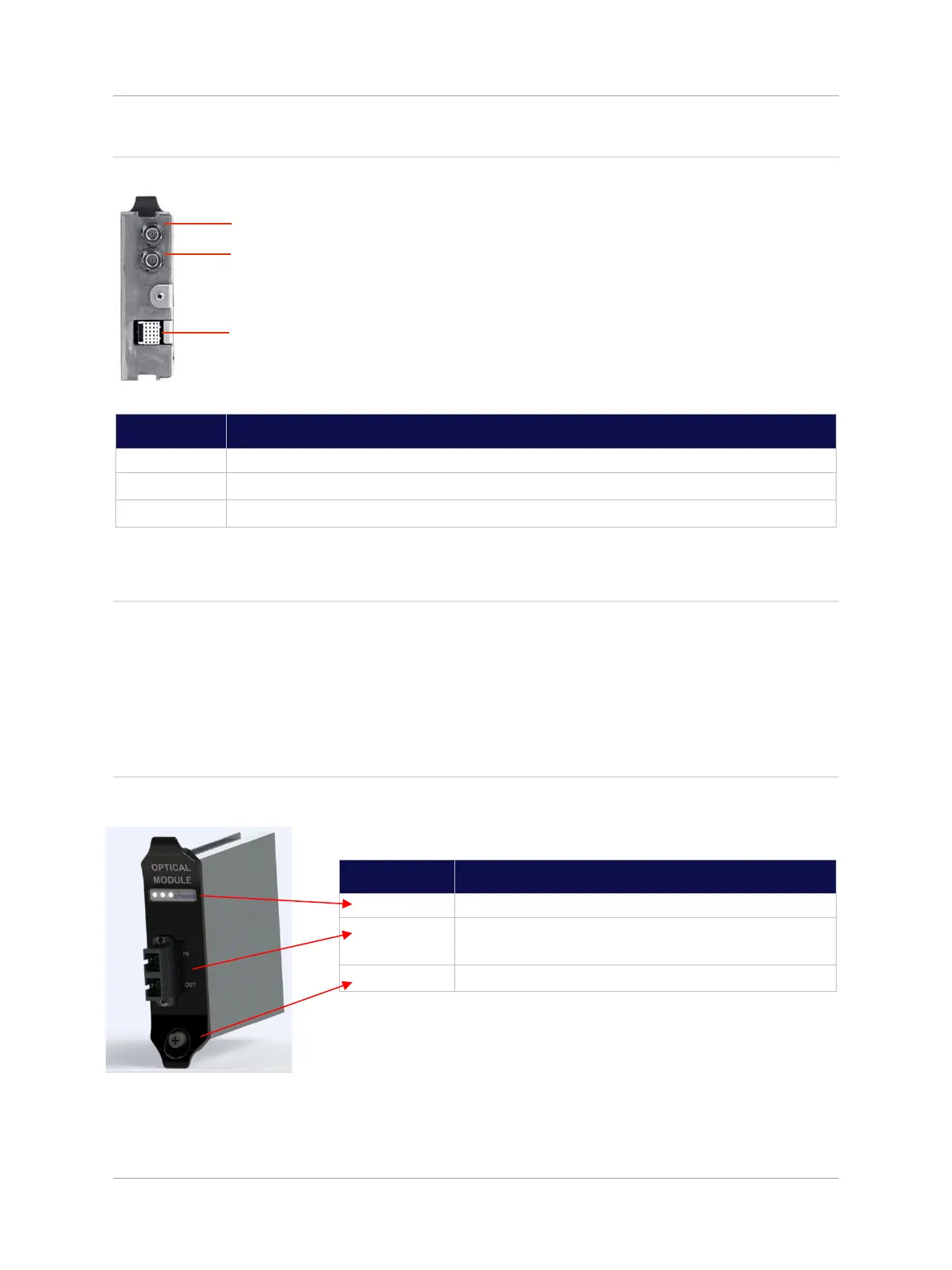
Rear View
Number
Description
1
Floating BMA RF Connector
2
Floating BMA RF Connector
3
Multi-pin Data and Power Connector
2.3 Optical Module
The Optical Module provides the fiber link between a Primary Hub and a Secondary Hub or a Remote
Unit. Up to 8 Optical Modules can be installed in the front of a Primary Hub to connect to Remote Units
or Secondary Hubs as required. These modules are hot swappable to allow for system maintenance
or adding Secondary Hubs or Remote Units with no impact to service. Optical Modules are intended to
connect only by optical fiber.
Front View
Optical Modules are intended to connect via Zinwave patch cords.

Number
Description
1
Status LEDs
2
Optical Fiber connector (Duplex SC-APC/SC-
APC connector)
3
Retaining Screw
1
2
3

Table of Contents