UNItivity 5000 Hub and Module LEDs
User Manual
Copyright © 2022 Zinwave. All rights reserved. 3-10
3 Hub and Module LEDs
3.1 Primary Hub Front Panel LEDs
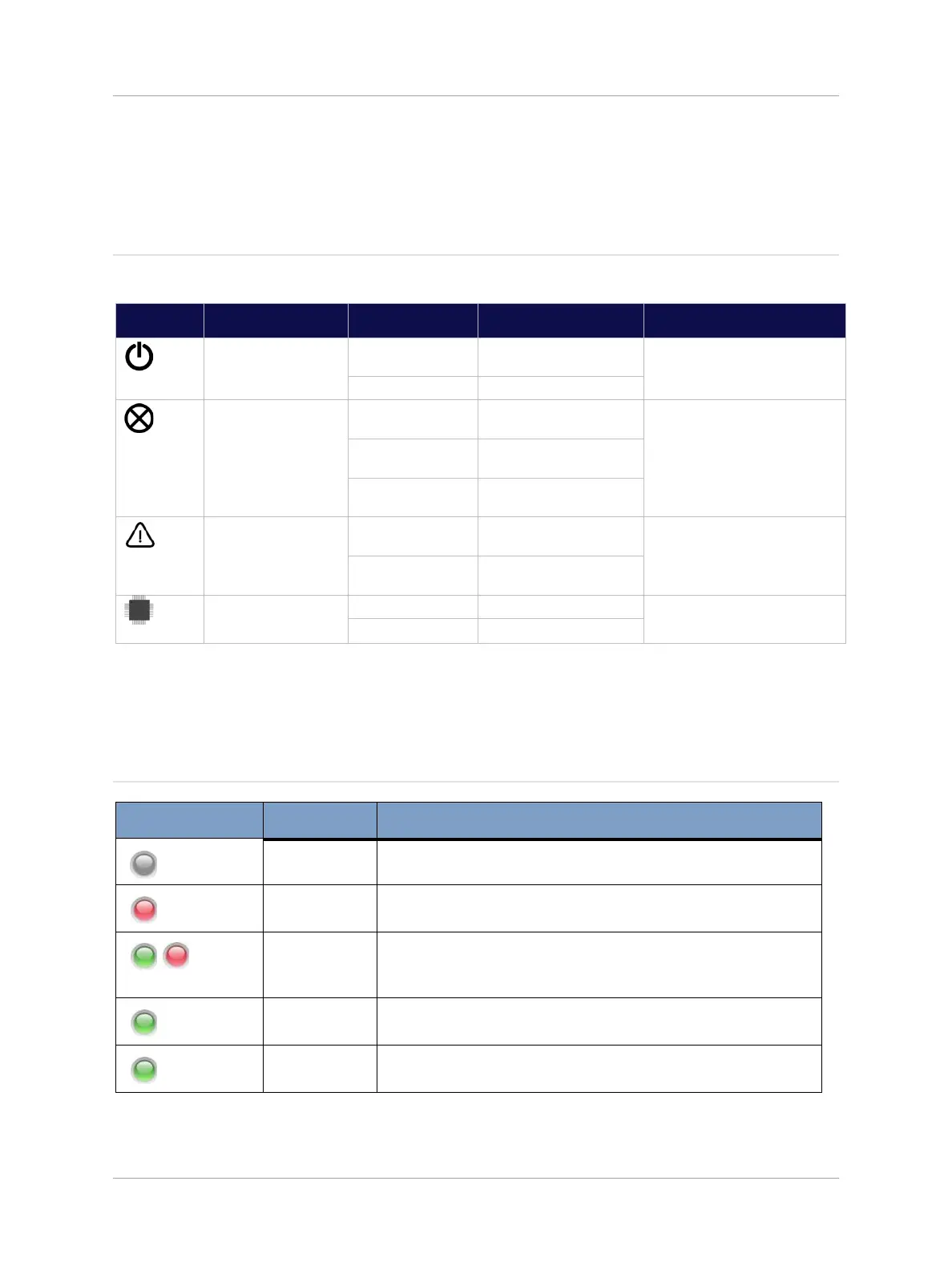
There are four LEDs on the front of the Primary Hub. The following table describes them:
Power connected to CPU
board
Shows processor is correctly
powered
No error. System is fully
functional
This alarm cannot be masked
and will ALWAYS be Red when
loss of service conditions active.
Loss of service currently
active
Firmware programming in
progress
All Units operating
correctly
Service or Hardware
warning currently active
Shows Processor is correctly
operational
3.2 Secondary Hub Status LEDs
3.2.1 Optical Link to Primary Hub
Secondary Hub not powered.
Secondary Hub that had been in fully operational state has
lost communication/association with Primary Hub.
Secondary Hub waiting to be associated with Primary Hub
following power-on/reboot.
Secondary Hub successfully associated with PH, but there are
no fully operational Remote Units attached.
Secondary Hub successfully associated with Hub, and there is
at least 1 fully operational Remote Unit attached.


 To Next Page