C2-260/inBio2-260 Access Control Panel
User Manual
Page | 17 Copyright©2020 ZKTECO CO., LTD. All rights reserved.
Connection with RS485 Readers 3.6
The Control panel supports RS485 reader (Note: C2-260 supports RS485 Card Reader only, inBio2-260
supports both RS485 card and Fingerprint reader).
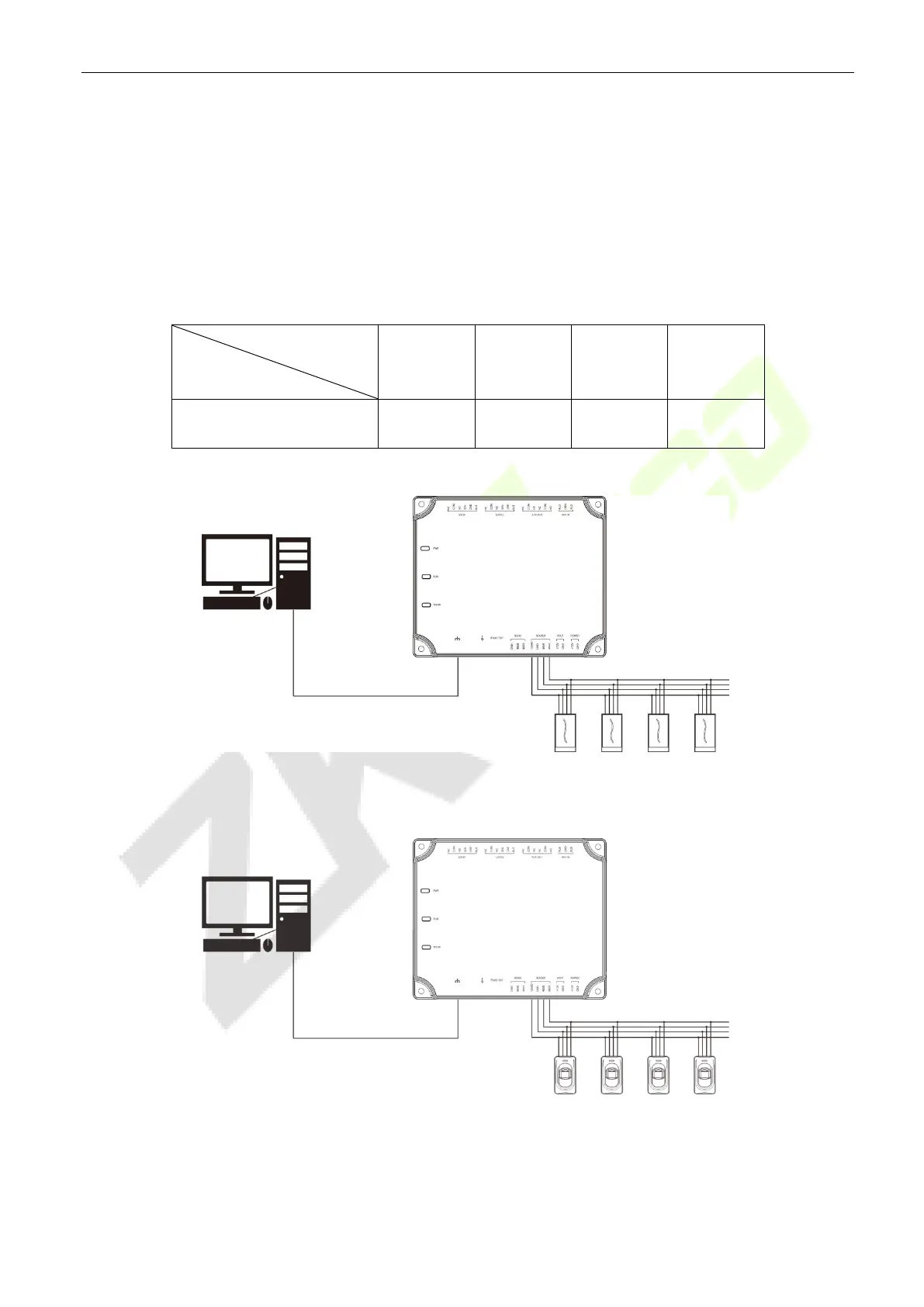
The Control panel supports four readers, which can be connected in the two-door two-way mode.
RS485 reader connection: Set the RS485 address (device number) of the reader by DIP switch or other
ways.
RS485 address
Control Panel
1 2 3 4
C2-260/inBio2-260 1Door IN 1Door OUT 2Door IN 2Door OUT
The connection between the Control Panel and RS485 Card Readers
The connection between the Control Panel and Fingerprint Readers
PC
4# Reader 3# Reader 2# Reader 1# Reader
TCP/IP
PC
4# FR1200 3# FR1200 2# FR1200 1# FR1200
TCP/IP



 To Next Page
 Loading...