Notus User Manual
Page | 27 Copyright©2021 ZKTECO CO., LTD. All rights reserved.
Settings 5.3
Comm Settings 5.3.1
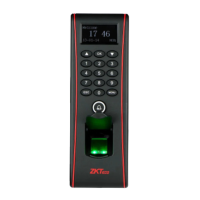
When the device needs to communicate with the network, you need to configure the IP settings.
The fields description is as follows:
DHCP: DHCP (Dynamic Host Configuration Protocol) dynamically allocates the IP addresses for clients
via server. If DHCP is enabled, IP addresses cannot be set manually.
IP Address: The default value is192.168.1.201, it can be modified according to the available network
parameters.


 To Next Page