Need help?
Do you have a question about the ZKTeco Notus and is the answer not in the manual?
Defines conventions for buttons, window names, menu items, and multi-level menus used in the manual.
Explains the meaning of various symbols used in the manual, such as notes, tips, and warnings.
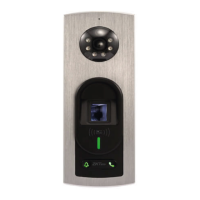
Shows the front and rear views of the Notus device, illustrating its physical design.
Details the technical specifications of the Notus device, including credentials, environment, connectivity, and capacity.
Illustrates the pin connections for the Notus device, covering Wiegand, RS485, auxiliary inputs, and outputs.
Provides instructions on how to set up the installation of the Notus device, including site selection and steps.
Outlines the procedures for connecting various auxiliary devices, locks, readers, and power to the Notus device.
Explains how to reset the Notus device to its factory default settings using the reset button.
Guides users on the correct way to position their finger on the fingerprint sensor for accurate registration and identification.
Details the different verification modes supported by the Notus device, including fingerprint and card verification.
Instructs users on how to add the Notus device to the ZSmart App via QR code scanning or web application.
Explains how visitors use the Call key to initiate a call and how users can accept or decline it.
Describes the functions available within the video door phone interface, such as screenshot, speak, record, and unlock.
Covers various settings within the ZSmart App, including device name, sharing, information, and basic function settings.
Details the process of searching and adding the Notus device to the ZKBioAccess software.
Guides on how to set up the device as a registration device and register users and fingerprints.
Explains how to access the device's web application by entering the correct IP address and default credentials.
Covers device management functions including device status, password change, and video intercom QR code generation.
Configures network communication parameters like IP address, subnet mask, and gateway.
Enables and configures Wi-Fi connectivity, including SSID, password, and DHCP settings.
Configures connection to the cloud server, including URL, server IP, port, and HTTPS settings.
Adjusts system parameters like device volume and doorbell trigger settings.
Sets the device's date and time, either automatically synchronizing with PC or manually inputting.
Allows viewing and downloading of device operation logs based on selected time ranges.
Manages firmware updates, factory resets, and device reboots for the Notus device.
Guides on uploading device certificate and private key files for secure communication.
 General
| Model | Notus |
|---|---|
| Auxiliary Input | 2 |
| RAM | 128MB |
| Flash Memory | 256MB |
| Communication Interface | RS485 |
| Power Supply | 12V DC |
| Operating Current | 500mA |
| Access Control Interface | RS485 |

 To Next Page