5. Basic Operating Instruction
5-3-2 Setting of Pattern Program
It is advised to preset the pattern
data parameters which are frequently
used so that user would only need to
select the pattern code to have access to
the set pattern in the future usage, thus
saves the time for resetting the
parameters at each time.
The 20 patterns can be registered at
most, whose parameters can be altered at
any time.
When leaving the factory, pattern
codes from P01 ~P20 save the default
pattern program (The patterns from P01
~ P20 are all the same.)
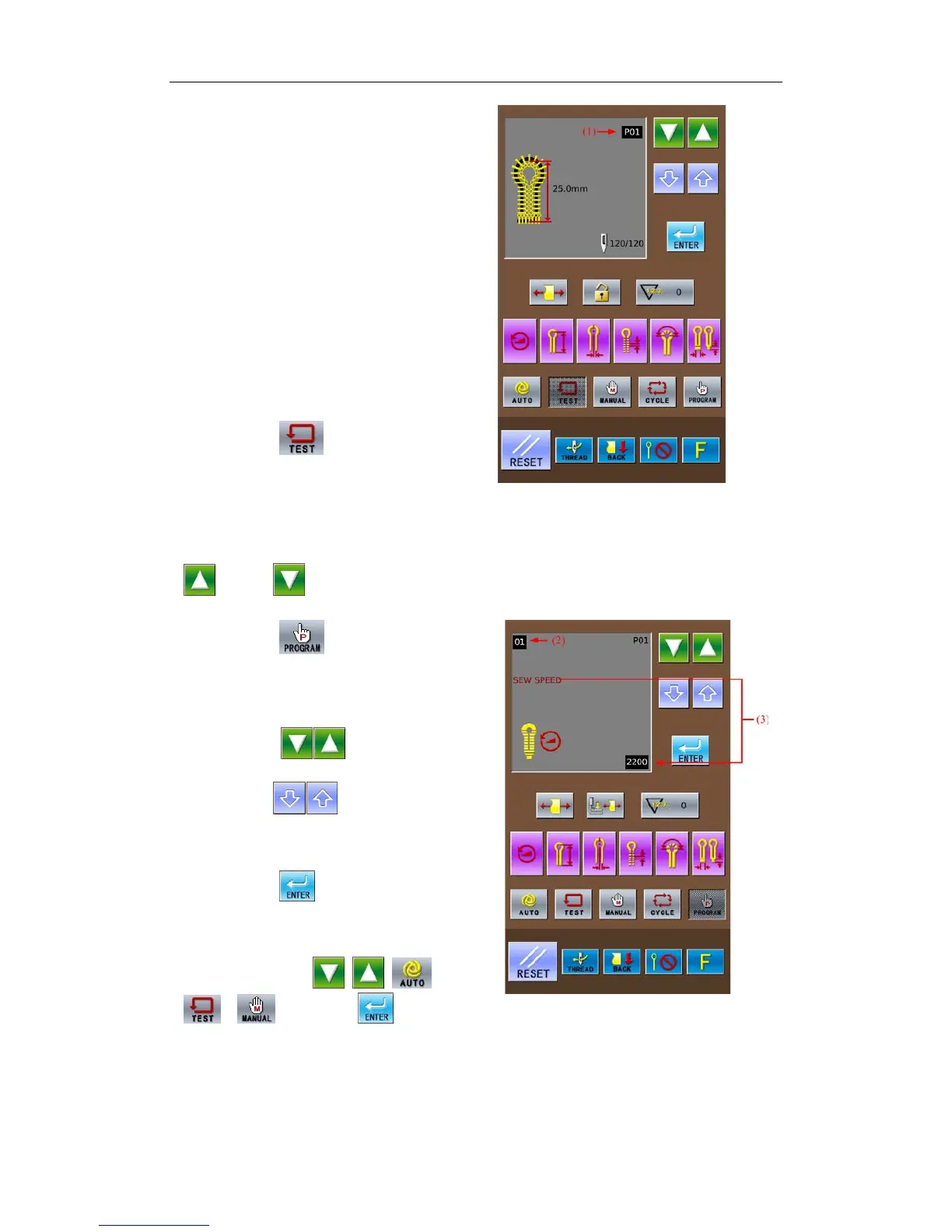
① Press
② Select a pattern code from
P01~P20 (1) for changing the
content.
Pattern code (1) will change in the
following sequence: P01 → P02 → …
P20 → C1→C2…C9, at each pressing
.(press to change the code in
the contrary direction.)
③ Press
The pattern data display area will
display the parameter code (2) and the
specific parameter information (3) at
previous time.
④ Press
to select the
parameter code(2).
⑤ Press
to change the
content of parameter(3).
The shining parameter information
(3) means the content is uncertain
⑥ Press
to confirm the
changed content.
If the parameter information is still,
that means it has been confirmed. If
press any key among
, , ,
, instead of at (3)
shining, the changed parameter (3) will
be abandoned and return to the original
value.
⑦ Repeat the operation from 4 to 6
to change other parameters.
23



 To Next Page