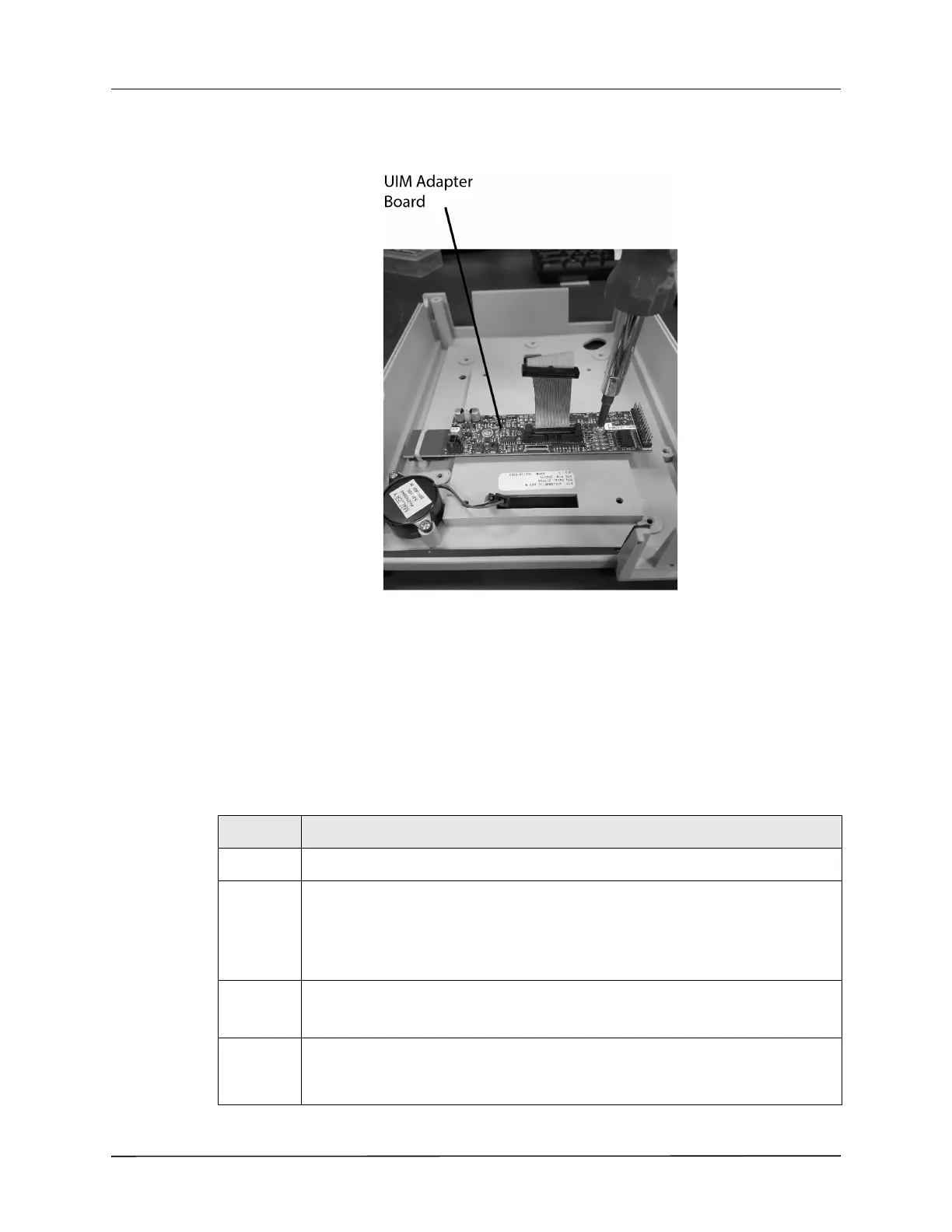
Replacement Part Installation
3–24 www.zoll.com 9650-000278-01 Rev. B
UIM Adapter Board Replacement
Required Tools and Other Items
• Torque Driver
• #2 Phillips bit
• #1 Phillips bit
• Torque Nut Driver Set
• Vibra-Tite
Instructions
Step Action
1 Loosen, but do not remove, the four 8-32 x 3 screws on the Exhaust Muffler baffle.
2 Remove the two 10-32 Keps nuts and the four 6-32 x 2 screws that secure the back
cover to the aspirator chassis.
Save these screws and nuts.
Remove the back cover by pulling it from the aspirator.
3 Remove the 4-40 x 1/4 screw on the dovetail stabilizer bracket.
Save this screw.
4 Flip the aspirator over and remove the front case assembly by lifting it straight up
away from the module. Place the front case assembly so that the inside of the case is
facing up.











 To Next Page