RT100 Rough Terrain Crane 06 - 5
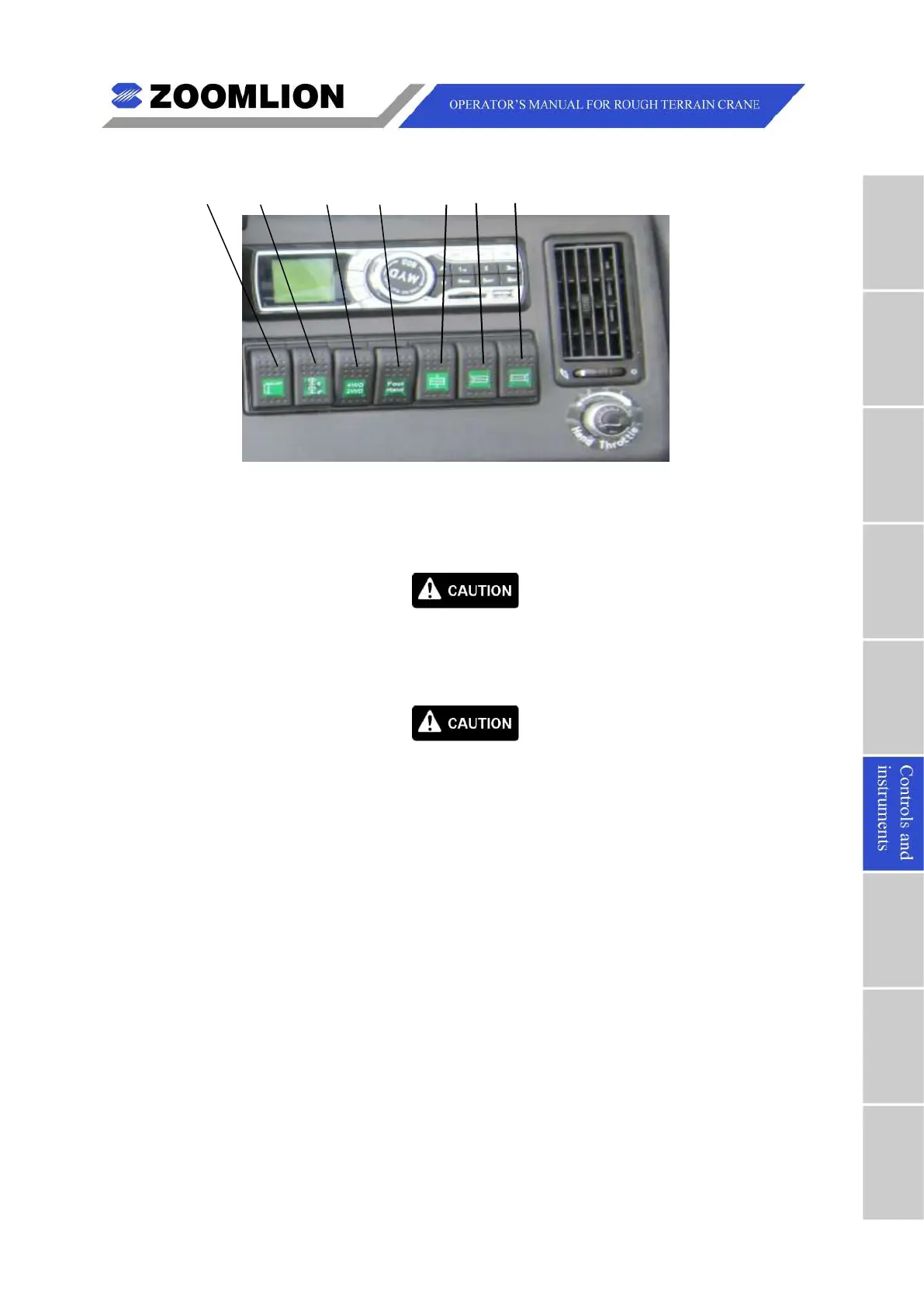
1 2 3 4 5 6 7
1. OUTRIGGER EXTEND / RETRACT MASTER SWITCH – Used with switches (12, 13,
15, 16 in Figure 06 – 1) to extend and retract the outrigger beams and jacks. Push
down to retract, up to extend.
You must set the swing lock switch to LOCK, when the boom is in the
2. SWING LOCK SWITCH – Push down to disengage swing lock, up to engage.
Do not use this switch until you stop the crane.
3. 2-WHEEL / 4-WHEEL DRIVE SWITCH – Push up to engage 2-wheel drive, down to
4. HAND / FOOT THROTTLE SELECT SWITCH – Push up to select foot throttle, down
5. Counterweight Cylinders Extend / Retract Switch – Push up to retract both
counterweight cylinders, down to extend.
6. Left Counterweight Cylinder Extend / Retract Switch – Push up to retract the left
counterweight cylinder, down to extend.
7. Right Counterweight Cylinder Extend / Retract Switch – Push up to retract the
right counterweight cylinder, down to extend.



 To Next Page