Confidential and Proprietary Information of ZTE CORPORATION
Fi status and number of the connected users.
Do not modify any settings unless instructed by your service provider.
Please disconnect the device from the cellular network before making changes to
section, and all of wireless devices connected to your
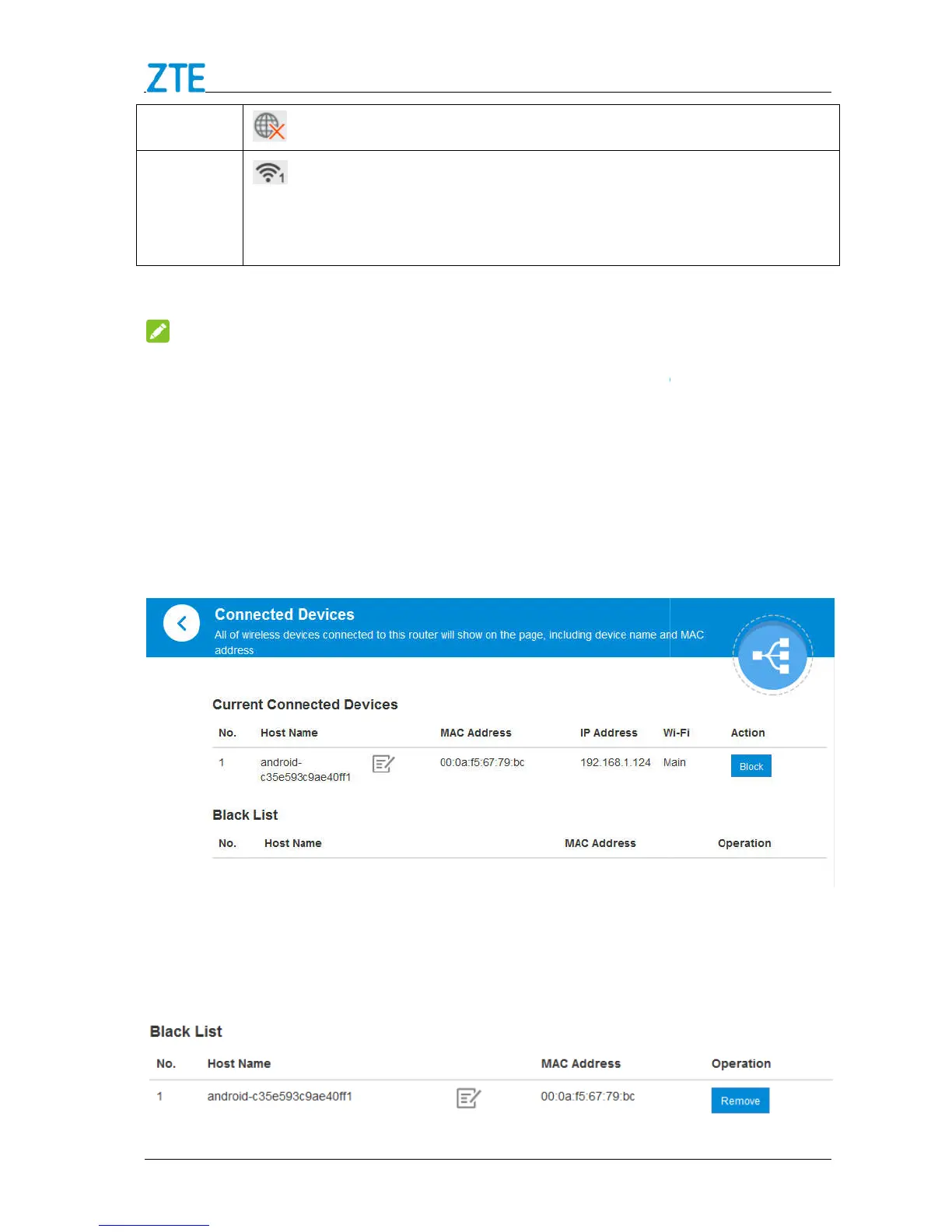
will show in the following figure.
behind the device you want to block and then it will be added to the
Black List. Devices on the black list will not be able to use the device to connect to
Confidential and Proprietary Information of ZTE CORPORATION
Fi status and number of the connected users.
5, these connections are shared between the
and Guest Wi
Do not modify any settings unless instructed by your service provider.
Please disconnect the device from the cellular network before making changes to
Block / unblock devices
section, and all of wireless devices connected to your
will show in the following figure.
behind the device you want to block and then it will be added to the
Black List. Devices on the black list will not be able to use the device to connect to
Fi status and number of the connected users.
hese connections are shared between the
Do not modify any settings unless instructed by your service provider.
Please disconnect the device from the cellular network before making changes to
section, and all of wireless devices connected to your
behind the device you want to block and then it will be added to the
Black List. Devices on the black list will not be able to use the device to connect to



 To Next Page