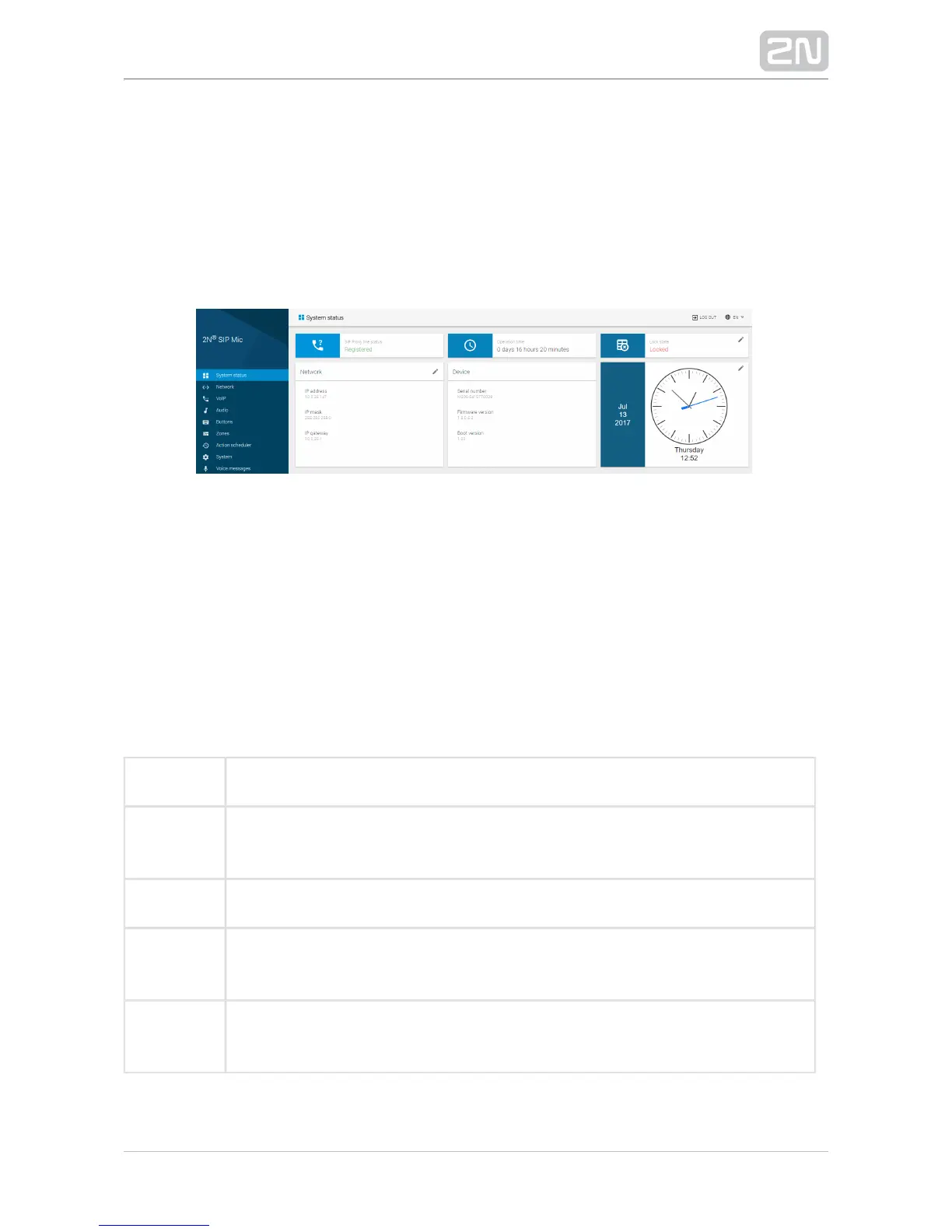
3.1.1 System Status
The menu provides a clear survey of current state and System status 2N SIP Mic
®
information. The page is divided into six sections: , ,SIP proxy line status Operation time
, , and . Some sections provide just Lock state Network Device Date and time
information, some can be configured with the aid of the pencil symbol in the left-hand
upper part.
SIP Proxy Line Status
Provides information on the current state of the SIP Proxy line. SIP Proxy line is
configured in the VoIP menu and helps register with the set SIP Proxy. 2N SIP Mic
®
2N
makes all outgoing SIP calls and receives incoming calls via this line. The SIP Mic
®
available options are as follows: Inactive, Active, Registered, Registration in progress
and registration error. The meanings are as follows.
Inactive The SIP line is off.
Active The SIP line is set in the VoIP menu but registration is not allowed (Outgoing
only).
Registered The SIP line is registered and functional (Outgoing and incoming calls).
Registration
in progress
The registration request was sent but no answer has been received yet because
the SIP Proxy server is busy or the request was sent to a wrong address.
Registration
error
A wrong name or password was used or the station has not been found. Check
the VoIP settings or contact the VoIP provider or your SIP Proxy administrator.


 To Next Page