3D Systems, Inc.
Identify the exact X and Y dimensions of the part using a CAD program.
• Most CAD programs and simple .stl le viewers will provide a way to view a part with its dimensions.
• Make note of the actual X and Y dimensions as XCAD and YCAD.
Build and clean the part and take measurements of the nished part.
• It is recommended to measure along the critical dimensions of the geometry, take measurements in multiple areas and take an
average of the values.
• Measurements can be made using calipers or more advanced metrology methods.
• Make note of the X and Y dimensions of the printed part and mark them as XPART and YPART.
NOTE: If the measurement of the nished part is different from the measurements of the CAD model, ne tune the
accuracy using scaling factors.
Determine Scaling Factor to use for the next build.
• Use the following formula calculate the scaling percentage to be used on the ne tuning build:
X Scaling Factor = (XCAD - XPART) / XCAD* 100 (answer will be as a percentage)
Y Scaling Factor = (YCAD - YPART) / YCAD* 100 (answer will be as a percentage)
EXAMPLE:
X measurement of CAD model = 3.000”
Y measurement of CAD model = 5.000”
X measurement of printed part = 2.998”
Y measurement of printed part = 4.989”
X Scaling Factor = (3.000 - 2.998) / 3.000*100 = 0.067%
Y Scaling Factor = (5.000 - 4.989) / 5.000*100 = 0.22%
Enter Scaling Factor for adjustment build
1. Open ProJet Accelerator Client software and select the
desired 3D printer system.
2. Select the part to print.
3. Open Print Preview to view the part. Select the part (color
should be yellow)
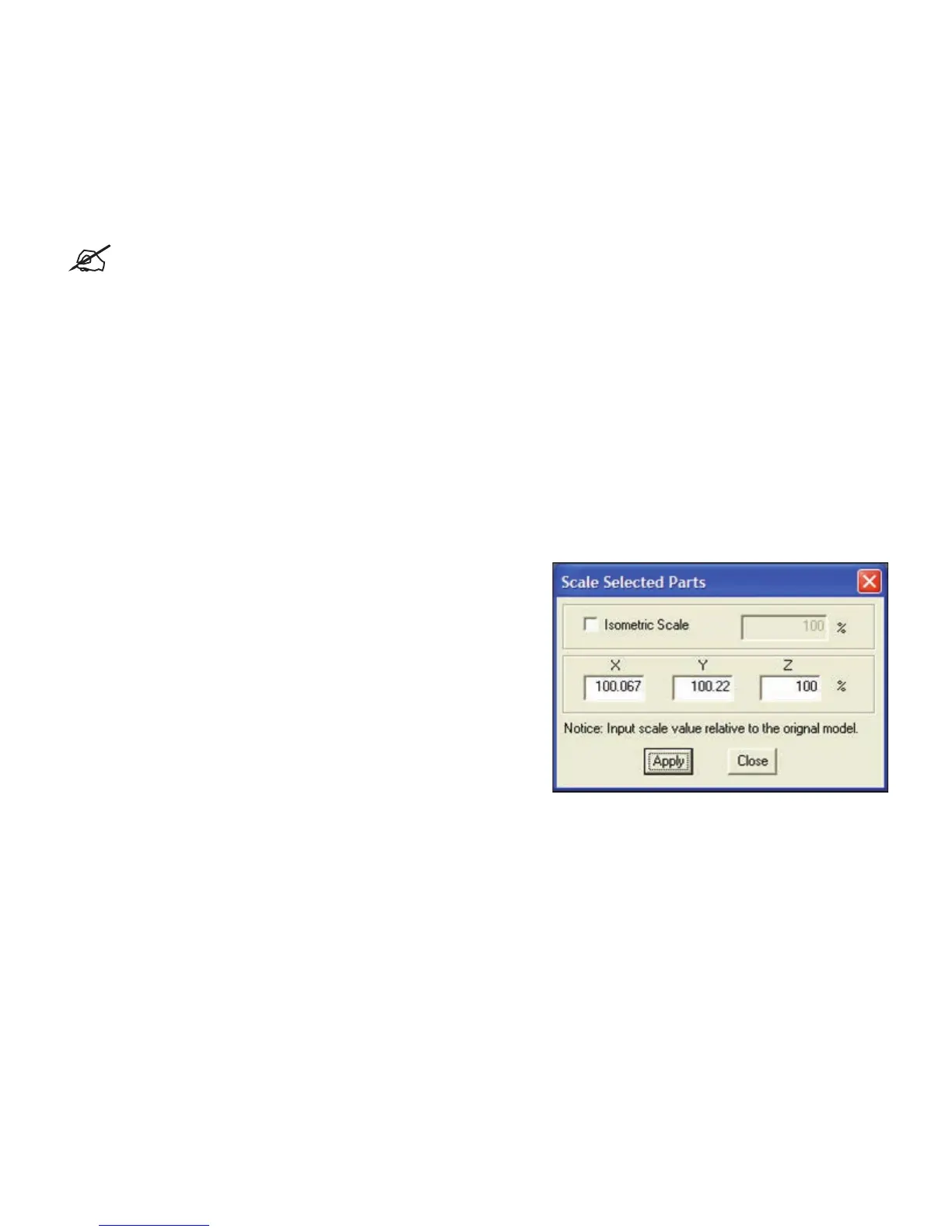
4. Select the Scale Icon and enter the dialog box to enter the
above scaling factors.
5. Uncheck the Isometric Scale button. This allows user to
make individual X and Y adjustments.
6. In the example above the X scaling factor should be 100% +
0.067% = 100.067%
7. The Y scaling factor should be 100% + 0.22% = 100.22%
8. Enter these two numbers in the corresponding scaling boxes
for X and Y.
Build Part with Scaling Factors and measure
Additional iterations of adjusting scaling factors and taking measurements may be necessary with certain geometries.
WAITING ON SHRINK COMPENSATION
INFORMATION FROM WILSONVILLE.
30










 To Next Page