3D Systems, Inc.
SHRINK COMPENSATION FOR PROJET VISIJET® MATERIALS
Material shrinkage occurs in thermosets as they transition from liquid state to solid state during the curing process.
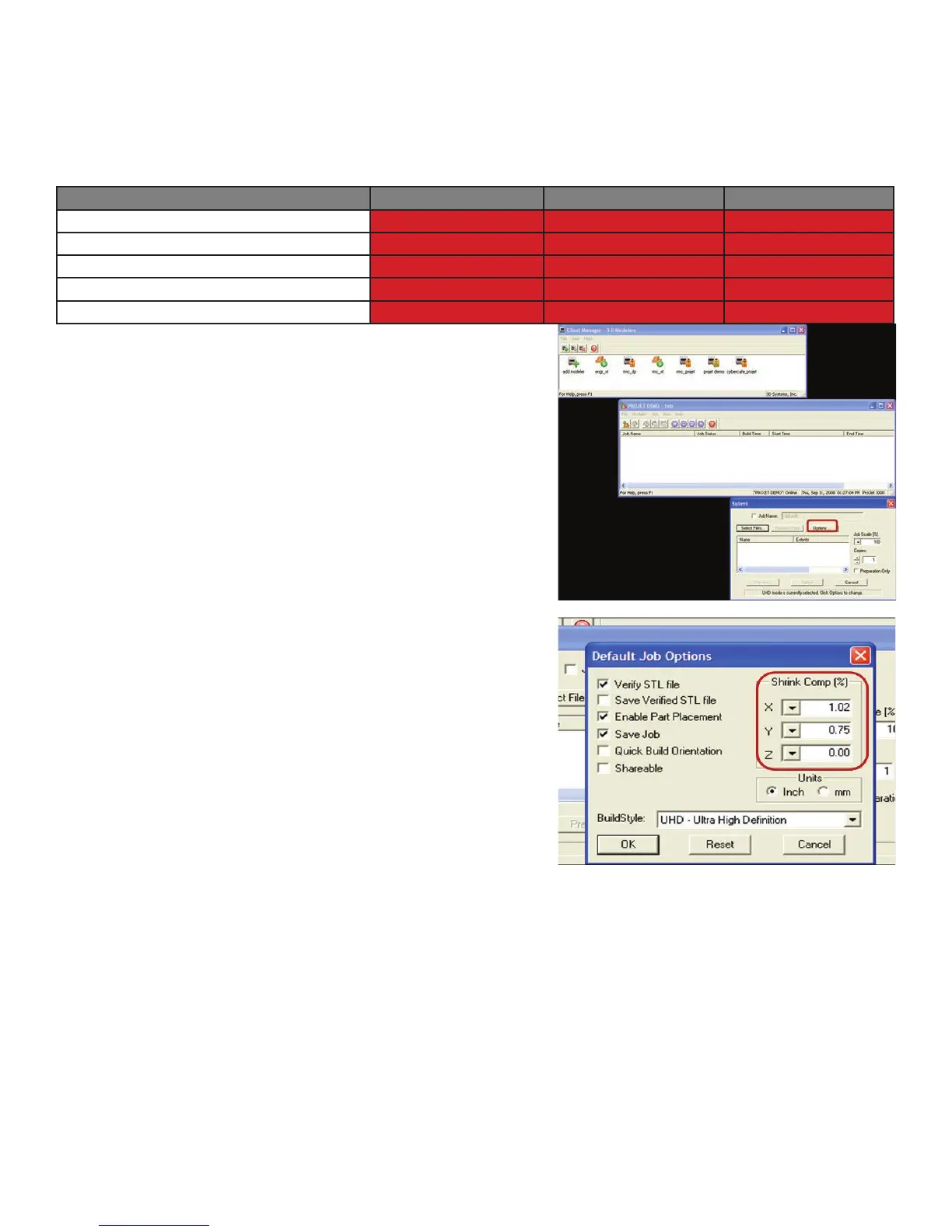
The ProJet Accelerator Client Software has features that allow the user to compensate for the natural shrinkage of the material in order
to ne tune the accuracy of a part.
These shrink compensation values serve as general guidelines to setting shrink compensation. Part building and cleaning in a
controlled process will best determine the optimal shrink compensation values for a particular geometry.
Material X Value Y Value Z Value
VisiJet® M2 RWT (Rigid White) 1.01% 1.01% 0.00%
VisiJet® M2 RCL (Rigid Clear) 1.01% 1.01% 0.00%
VisiJet® M2 RBK (Rigid Black) 0.55% 0.25% 0.00%
VisiJet® M2 EBK (Elastomeric Black)
VisiJet® M2 ENT (Elastomeric Natural)
Enter Standard Shrink Compensation Values for the material.
1. Open ProJet Accelerator Client software and select the desired 3D printer system.
2. Select the part to build.
3. Select the Options Button
4. Within the Options panel, enter shrink compensation values for X, Y, and Z if necessary (compensation is rarely necessary, see
chart on previous page for values).
WAITING ON SHRINK COMPENSATION
INFORMATION FROM WILSONVILLE.
29










 To Next Page