3D Systems, Inc.
MATERIAL CHANGE OVER PROCEDURE (MCO)
When changing from one print material to a new print material you must follow this procedure to ensure successful prints.
NOTE: If you are changing from a pigment to a clear this will be a two-material process. When changing from one
pigment to another you must rst go from pigmant 1 to clear to pigment 2. This is the only way to ensure that all of
the rst pigment is sufciently ushed out of the system before you introduce a new pigment. Doing so will ensure
successful prints and keep the two pigments from mixing and causing clogs in the system.
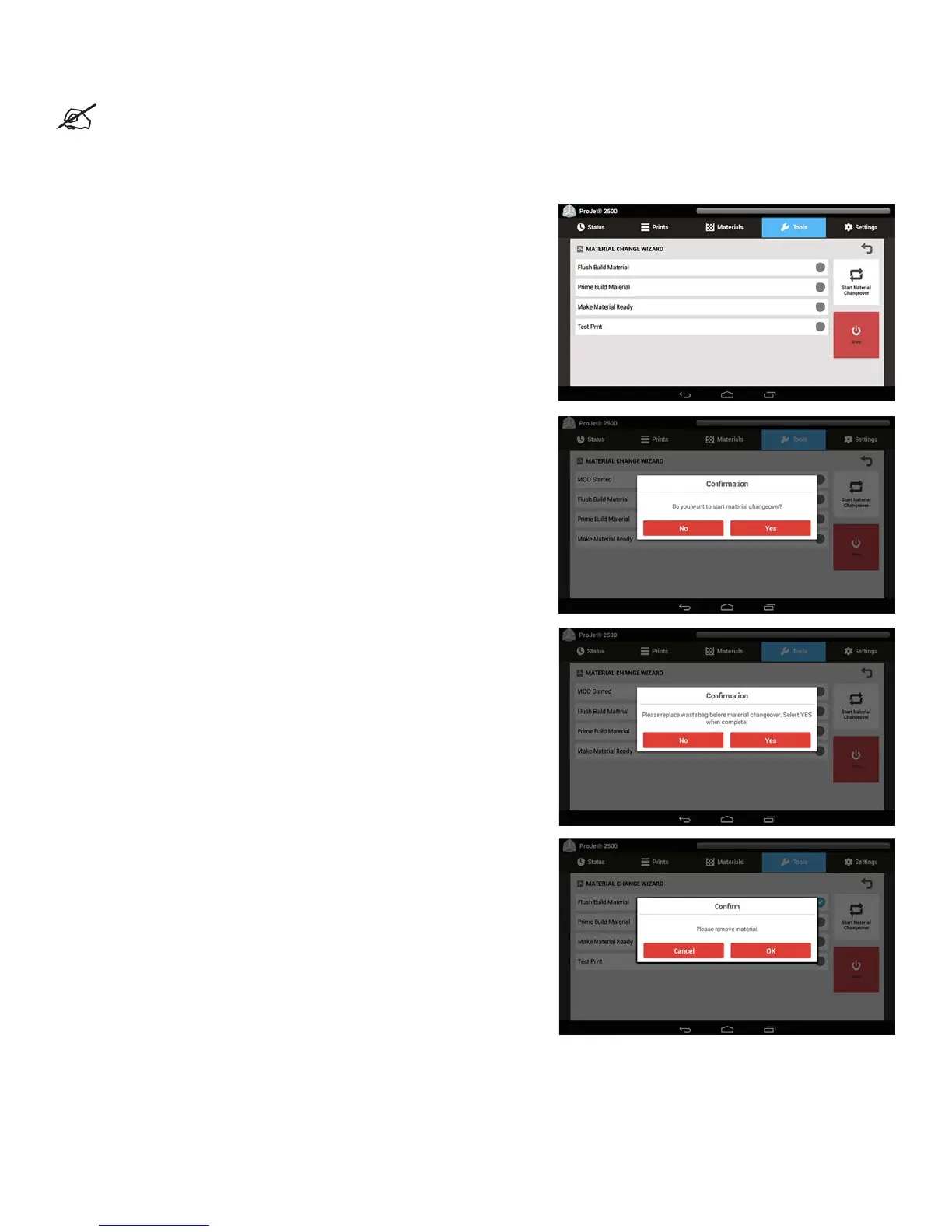
1. From the Machine UI, select Tools > Material Change Wizard.
The rst thing that will appear is a conrmation box asking if you want to start a
material changeover.
2. Select Yes.
The UI will then ask you to replace the waste bag before starting a material
changeover.
3. Open the MDM Drawer and check the waste bag. If it is at least half
empty, leave bag in place and select Yes, otherwise change the waste bag
and select Yes.
4. Close material drawer and continue.
5. The next thing you will be asked is to remove the part material. Remove
both cartridges of part material and select OK.
35










 To Next Page