4.3. Failure to load/unload material
There are two bowden tubes for each extruder in the printer:
• long bowden tube - connects the filament sensor with the extruder,
• short bowden tube - connects the extruder with the hotend.
Case 1: the material does not exist in the printer's memory (MATERIALS), although it is actually loaded to the printer.
Such a case may be caused by choosing the Factory Reset option without first unloading the material. Then only the LOAD
MODEL MATERIAL/LOAD SUPPORT MATERIAL option is available, even though the material is already installed. When you try
to load the material automatically, the printer will display a message informing that the material must be unloaded manually.
In such a case, unload the filament manually and load it again.
Manual unloading of filament:
1. Make certain that the heatbed is empty.
2. Activate the appropriate hotend from which you want to unload the filament: MENU → Activate Tool 0/Acticate Tool1.
3. Heat the hotend up to the nominal temperature (for example, 210°C for PLA): TUNE → Tool 0/Tool 1 and using +/- key set
the temperature.
4. Pressing the EXTRUDE key in the MENU in order to extrude a piece of material.
5. Pressing the RETRACT key in the MENU in order to guide the filament end to the extruder.
6. Pull the material gently at the input opening (fig. 7, point 2, 3) and remove the material from the long bowden tube.
7. After manual unloading, load the material again using the LOAD MODEL MATERIAL/LOAD SUPPORT MATERIAL option.
Case 2: failure to load material.
The printer will automatically withdraw the material. Slide the material out of the filament sensor (fig. 7, point 2, 3) and cut
the material end at the angle of 45° and repeat the material loading procedure using the LOAD MODEL MATERIAL/LOAD
SUPPORT MATERIAL option.
Case 3: failure to load the material due to blockage of the filament in the short bowden tube.
If the printer can not withdraw the filament automatically, for example, due to blockage of the filament in the short bowden
tube, and the filament has exceeded the encoder threshold, unload the material manually.
Manual unloading of filament in this case:
1. If the material is in the hotend, heat the hotend up to the plasticization temperature of the given material and wait for the
hotend to reach the preset temperature: TUNE → Tool 0/Tool 1 and using +/- key set the temperature.
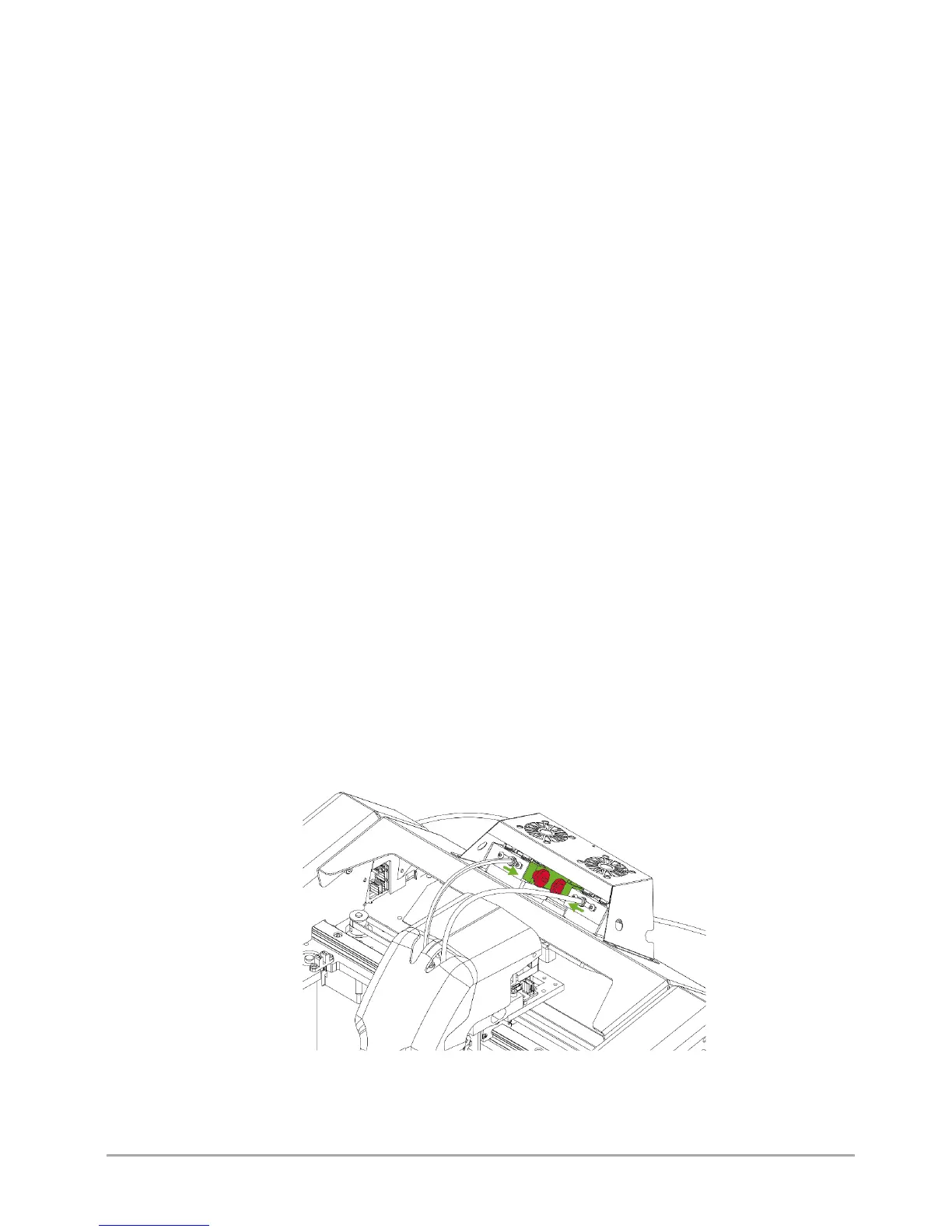
2. To loosen the extruder clamp:
a) loosen the knurled nuts (fig. 39, red colour),
b) pull the extruder clamp (fig. 39, green colour).
3. Pull the material lightly at the filament sensor opening (fig. 7, point 2, 3) and slide the material out of the long bowden
tube.
4. Tighten the knurled nuts (fig. 39, red colour).
5. Cut the filament end at the angle of 45° and repeat the filament loading procedure using the LOAD MODEL MATERIAL/
LOAD SUPPORT MATERIAL option.
Fig. 39 Loosening the extruder clamp



 To Next Page