4.2. Relocating the printer
To ensure the safety of the user and to avoid accidental damage to the printer, the following rules must be followed when
relocating the printer:
• before relocating the printer, switch it off and disconnect it from the power source,
• the printer should be cooled down, the operating material and all loose elements and accessories should be removed from
the printer,
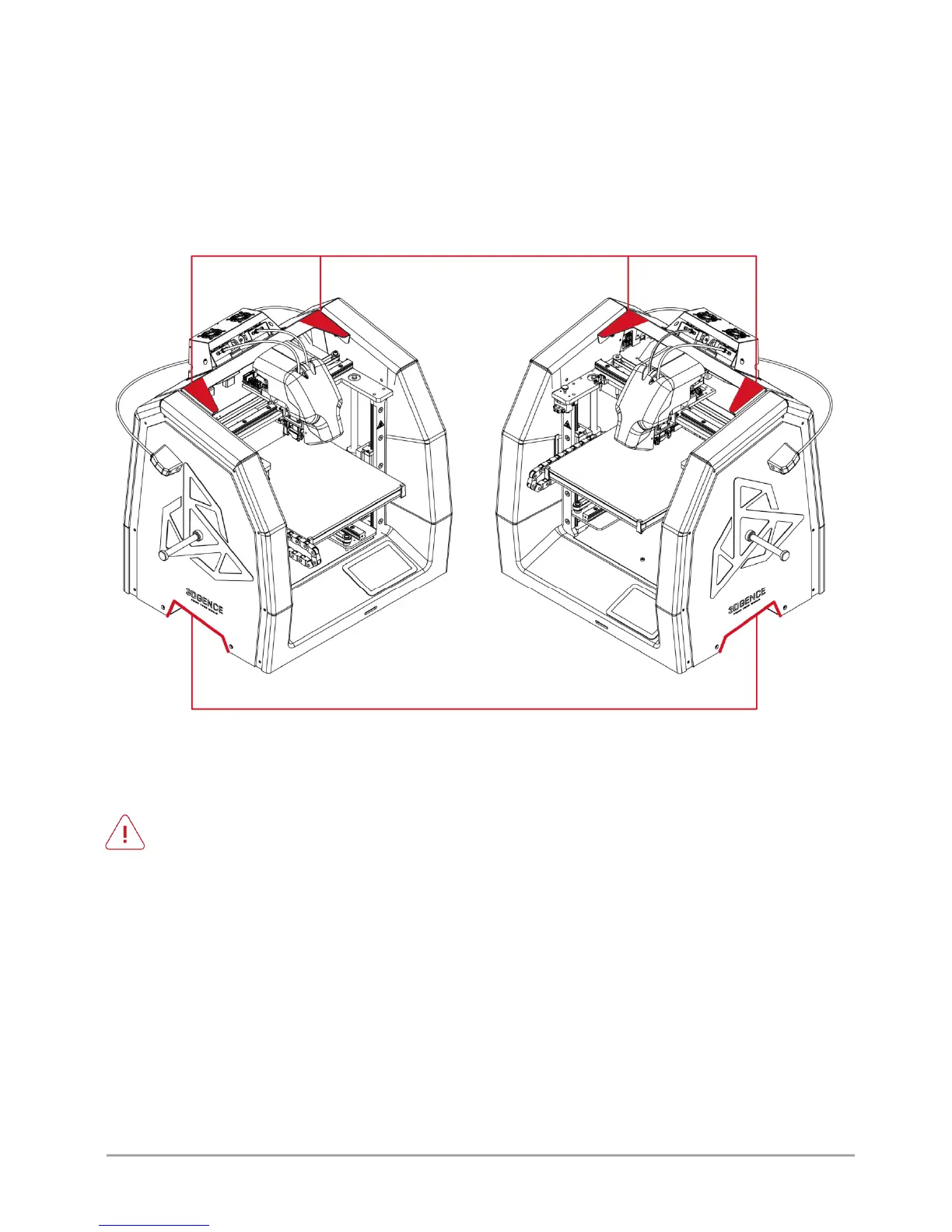
• the printer should be lifted only by the handles designated for this purpose (fig. 3); do not lift the printer by any other
elements,
• the printer should not be carried by children and the elderly due to its significant weight (about 25 kg).
Fig. 3 Locations of handles for printer handling
4.3. Choosing proper installation place for the printer
The printer installation place should meet the following conditions:
• the printer should work at room temperature,
• the printer is not designed for work in a dusty environment,
• ventilation suitable for a room size should be ensured,
• the printer should be installed on a hard and stable ground,
• the printer should not be exposed to direct sunlight,
• ensure sufficient free space around the printer based on the printer's external dimensions and working range
of the axes (fig. 4, 5),
• keep the printer away from other heat sources and draughts,
• the printer's installation place should be equipped with a 230V/50Hz mains socket (110V version for the USA
market),
• uninterruptible power supplies (UPS) should be used in order to ensure that the printing process is not
stopped in case of instantaneous current decay.



 To Next Page