Aprisa SRx User Manual 1.3.0
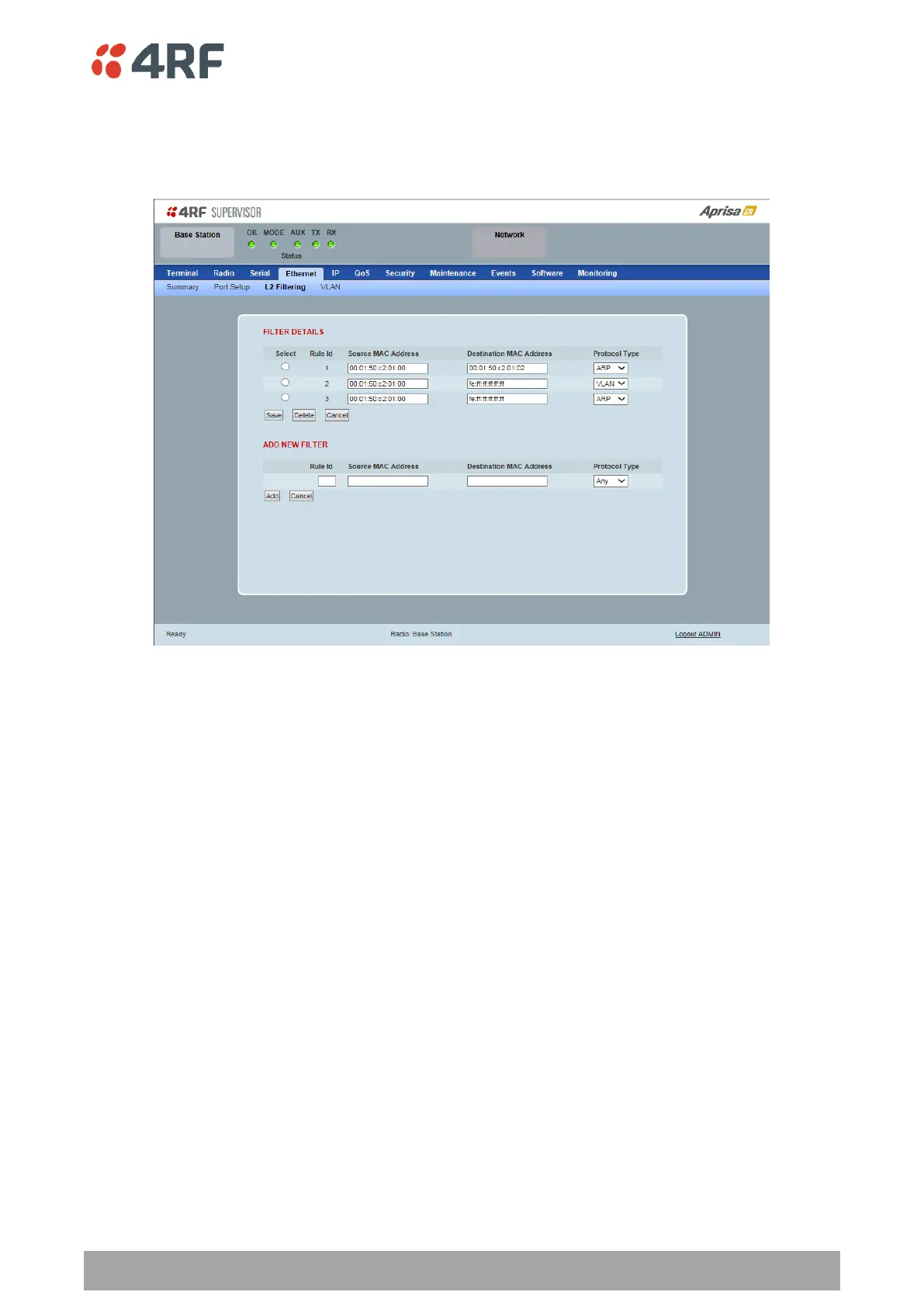
Ethernet > L2 Filtering
This page is only available if the Ethernet traffic option has been licensed (see ‘Maintenance > Licence’ on
page 160).
FILTER DETAILS
L2 Filtering provides the ability to filter radio link traffic based on specified Layer 2 MAC addresses.
Traffic originating from specified Source MAC Addresses destined for specified Destination MAC Addresses
that meets the protocol type criteria will be transmitted over the radio link.
Traffic that does not meet the filtering criteria will not be transmitted over the radio link.
Source MAC Address
This parameter sets the filter to the Source MAC address of the packet in the format ‘hh:hh:hh:hh:hh:hh’.
If the Source MAC Address is set to ‘FF:FF:FF:FF:FF:FF’, traffic will be accepted from any source MAC
address.
Destination MAC Address
This parameter sets the filter to the Destination MAC address of the packet in the format
‘hh:hh:hh:hh:hh:hh’.
If the Destination MAC Address is set to ‘FF:FF:FF:FF:FF:FF’, traffic will be delivered to any destination
MAC address.
Protocol Type
This parameter sets the Ethernet Type accepted ARP, VLAN, IPv4, IPv6 or Any type.



 To Next Page