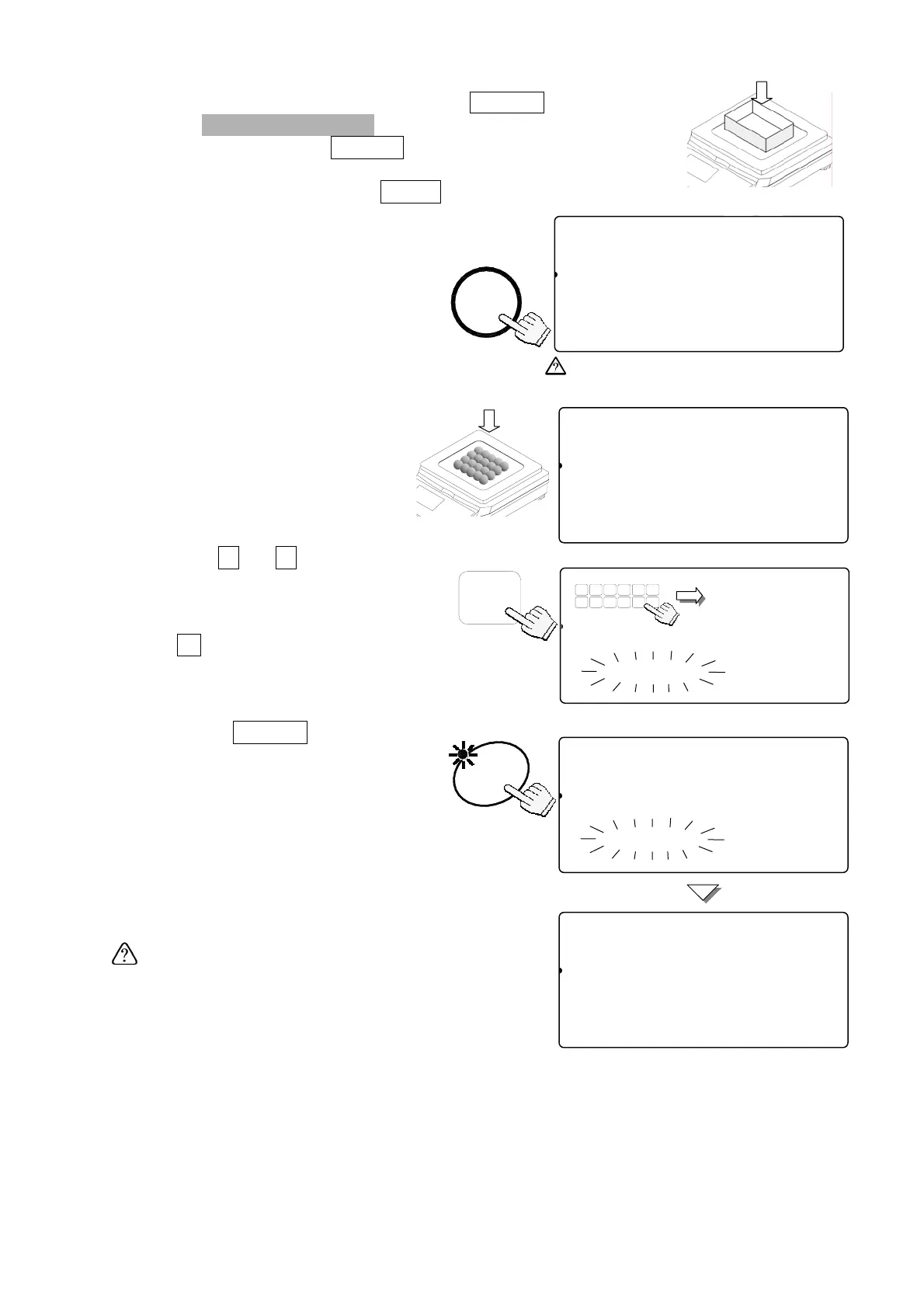
Desired Sample Size Not Using The
SAMPLE
Key
1. Three
UNIT WEIGHT BY
LED’s should be blinking at this
point, if not, press the
RESET
key to clear any unit weight.
lf you are going to use a tare container, place it on the
weighing pan and press the
TARE
key.
Be sure the weight display is “0”.
2. Place sample pieces on the
weighing pan (or in the tared
container).
The weight of the pieces will be
displayed.
3. Use the
0
Æ
9
10-key pad
to enter the sample size of the
pieces you placed.
If you hit the wrong key, press
the
C
key to clear and enter
again. (Example of setting a
sample size of 20)
4. Press the
ENTER
key.
The display will show dashes for
a moment while calculating the
unit weight. After a moment the
display will show the count, total
weight and unit weight.
If the "Add Sample" displays again, then the
sample size is not enough for accurate
counting - add the additional number of sample
pieces.
5. You may now begin counting operations for
pieces of the same weight.
8888820
81
pcs
W2WEIGHT (kg)
11234567892.220
2A3SAMUUW (g)
12345167111.000
8888820
81
pcs
W2WEIGHT (kg)
11234567892.220
A
23Add UW (g)
121345670.00000
STABL
8888810
81
pcs
W2WEIGHT (kg)
12134567890.000
23ASAMPUW (g)
123415670.000004567890123456
TARE
ZERO
M+
SCALE
TOTAL
ENTERED
ÑBlinkingÒ
If weight isn’t zero, press the TARE.
0 Æ 9
8888820
81
pcs
W2WEIGHT (kg)
11234567890.000
A
23Add Sample
123456789012345678901234567
TUV
DEFABC
MNO
6
1
78
PQRS
23
JKLGHI
09
WXYZ
4
#
5
C
.
-------
81
pcs
W2WEIGHT (kg)
1213456-------
A
23Add Sample
123456789012345678901234567
ENTER
TARE
16



 To Next Page