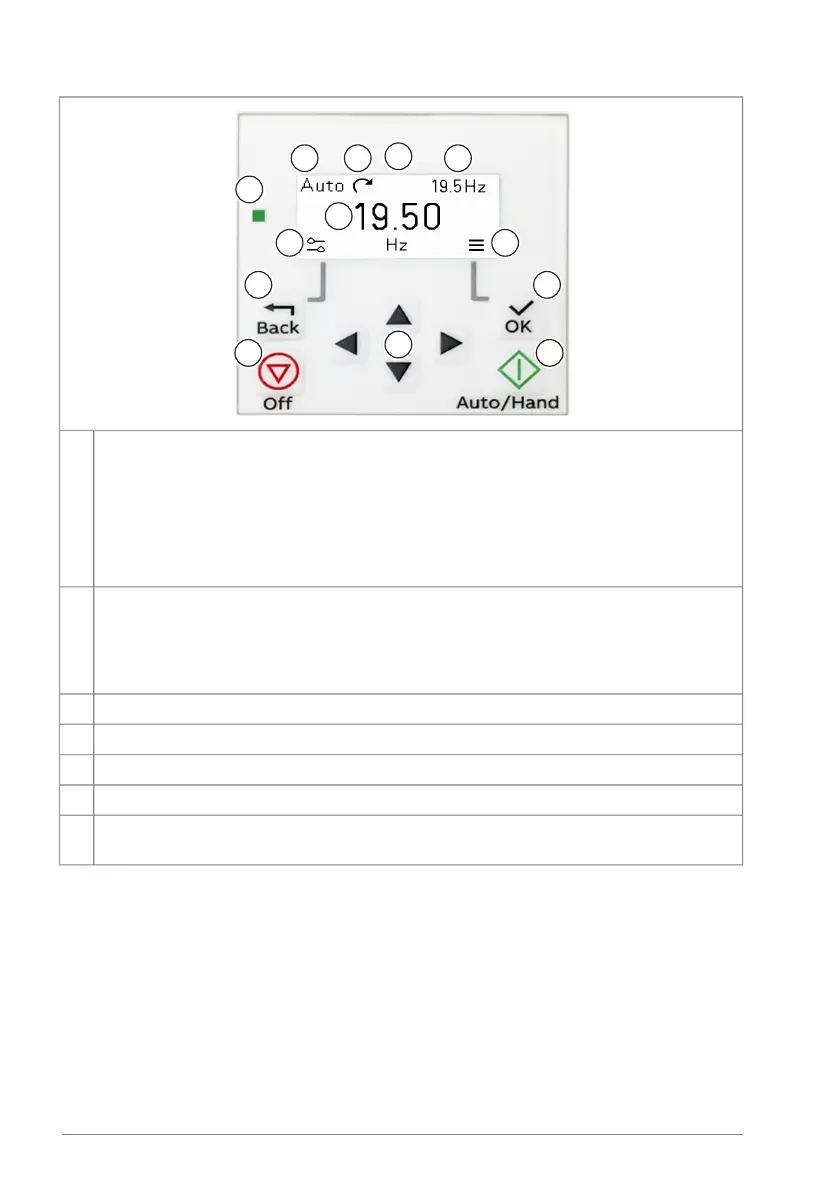
Display (Home view):
a) control location: Hand, Off or Auto
b) status icon
c) reference target value
d) actual measured value
e) left and right softkey actions.
1
Status LED:2
• steady green: normal operation
• blinking green: active warning
• steady red: active fault
• blinking red: active fault, set power to off to reset.
Back key (opens the Options view in the Home view)3
Arrow keys (menu navigation and setting values)4
OK key (opens the Menu in the Home view)5
Off key (stops the drive and switches to the Off mode)6
Auto/Hand key (opens a selection screen view that allows the user to select between
Auto and Hand modes)
7
The user interface in brief:
• In the Home view, push the Back key to open the Options view.
• In the Home view, push the OK key to open the Menu.
• Navigate the views with the arrow keys.
• Push the OK key to open the highlighted setting or item.
• Use the left and right arrow keys to highlight a value.
• Use the up and down arrow keys to set a value.
34 Operation principle and hardware description


 To Next Page