Installing the drive
You can install the drive:
• with screws to a suitable surface (wall or assembly plate)
• to a DIN installation rail.
■
To install the drive with screws
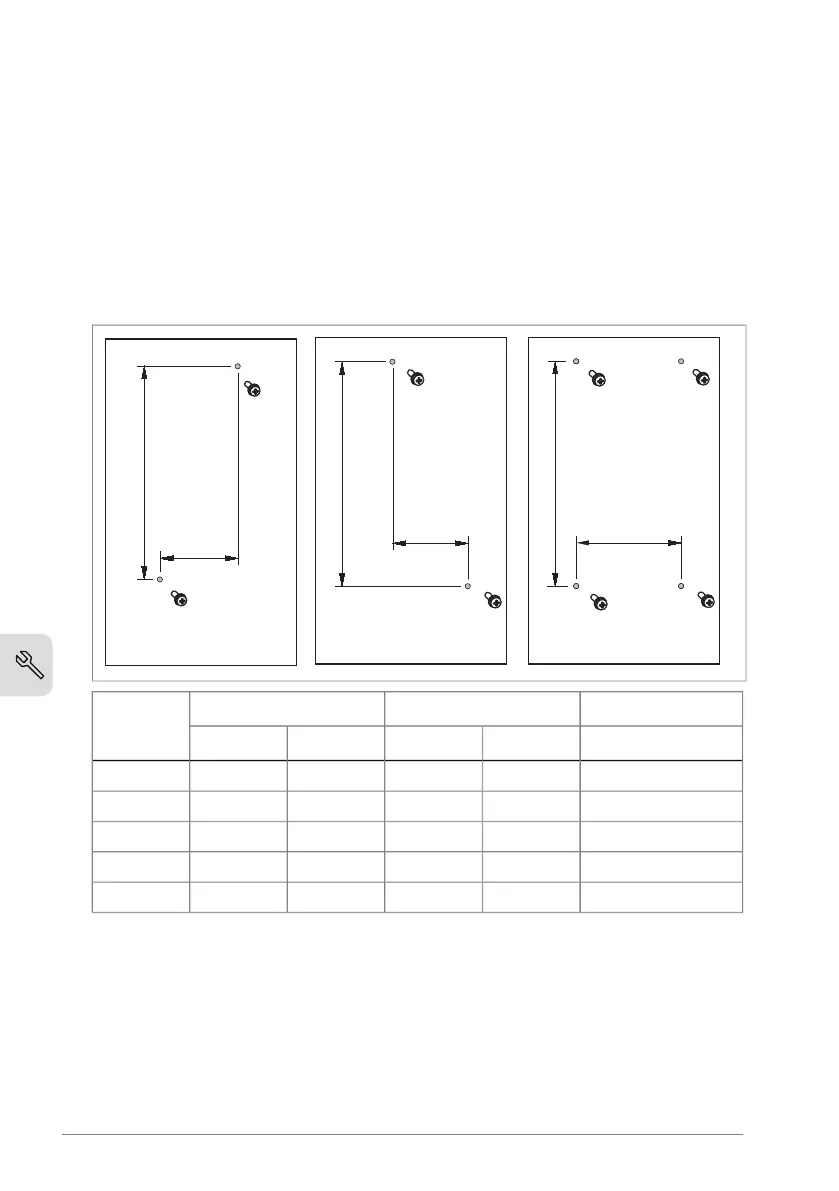
1. Make marks onto the surface for the mounting holes. Use the mounting
template that was delivered with the drive.
Mounting screwsM2M1Frame size
Metricinmminmm
M46.461642.3660R0
M47.091802.3660R1
M47.5190.54.17106R2
M57.521915.83148R3
M57.521919.21234R4
2. Drill the holes for the mounting screws. If necessary, install plugs or anchors
into the holes.
3. Install the mounting screws into the holes. Refer to Dimensions and
weights (page 116) for the max. screw diameter. Leave a gap between the screw
head and installation surface.
4. Put the drive onto the mounting screws.
40 Mechanical installation



 To Next Page