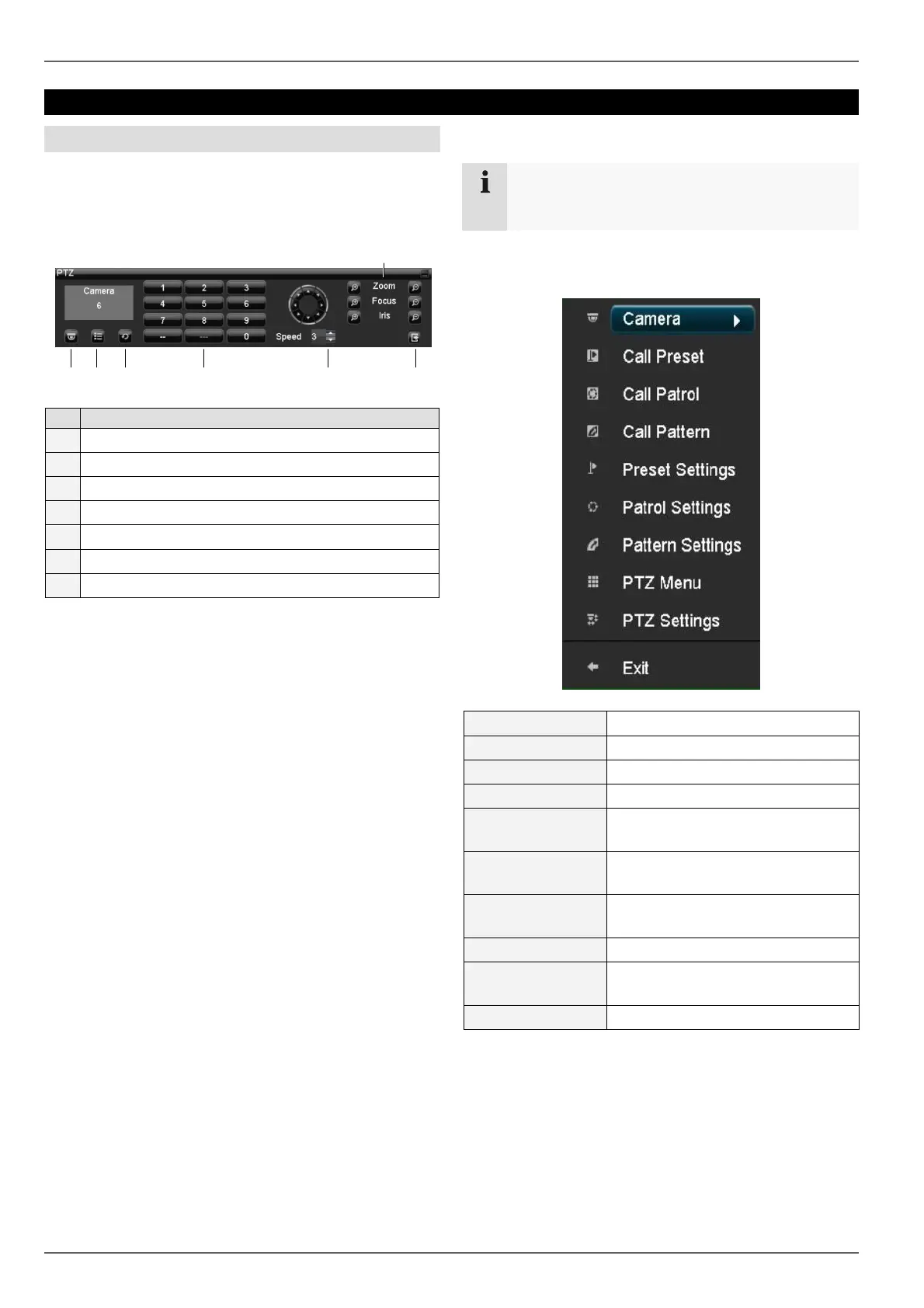
PTZ control
27
PTZ control
General information
PTZ control is used to access individual PTZ IP cameras
or ABUS video servers and control them manually.
Using the PTZ control panel
No. Meaning / function
1 Selects and displays the PTZ camera
2 Call presets
3 Call tours
4 Keypad
5 Speed
6 Zoom, focus and iris adjustment
7 Exits the PTZ control
Pop-up menu for mouse operation
Note
Press the right mouse button when the cursor is
positioned on a live image.
The following settings can be made. The arrow pointing
to the right indicates that a sub-menu is opened for selec-
tion:
Camera PTZ camera selection
Call Preset Selects the set preset
Call Patrol Selects the specific patrol
Call Pattern Selects the defined pattern
Preset
Settings
See page 28
Patrol
Settings
See page 29
Pattern
Settings
See page 29
PTZ Menu Opens the PTZ menu
PTZ
Settings
Displays the hardware parameters
of the connected camera
Exit Exits the PTZ control
1 2 3
4
5
6
7



 To Next Page