I-210+ User Manual 7
Chapter 2 • Product Description
Metering Mode
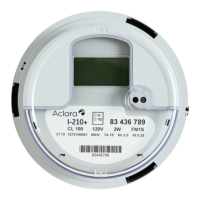
The I-210+ meter accumulates and displays kWh. The I-210+ meter provides
various features, some of which are configurable at the factory.
• kWh energy measurement is accumulated in four ways. One of the
accumulation types must be selected for display. The other accumulators are
available to be read optically or via a suitable AMR/AMI system.
• Display of Energy, configurable for four or five digits
• Disk Analog functionality on LCD - The disk analog is simulated on the
display as explained in Chapter 3, Operating Instructions on page 11.
• Delivered and Received indicators on LCD
• Factory settable option of Instantaneous Power or AMR demand may appear
on the LCD. The S
2
softswitch must be enabled and an appropriate AMR
module must be used for the AMR demand feature.
• Factory settable option of Instantaneous RMS voltage may appear on the
LCD. The V
2
softswitch must be enabled.
• I-210+™ Electronic Meter – User Manual 13
• Optional segment check in display scroll (in addition to the segment check
that is performed on power up and every 24 hours)
• Reset energy to zero in field - The customer can reset the energy
accumulation to zero on site with MeterMate Software and a reset adapter.
Received Only
Only the received energy is accumulated as a positive
quantity
Delivered Only Only the delivered energy is accumulated
Delivered + Received The received and delivered energy are added together
Delivered - Received The net energy is accumulated


 To Next Page