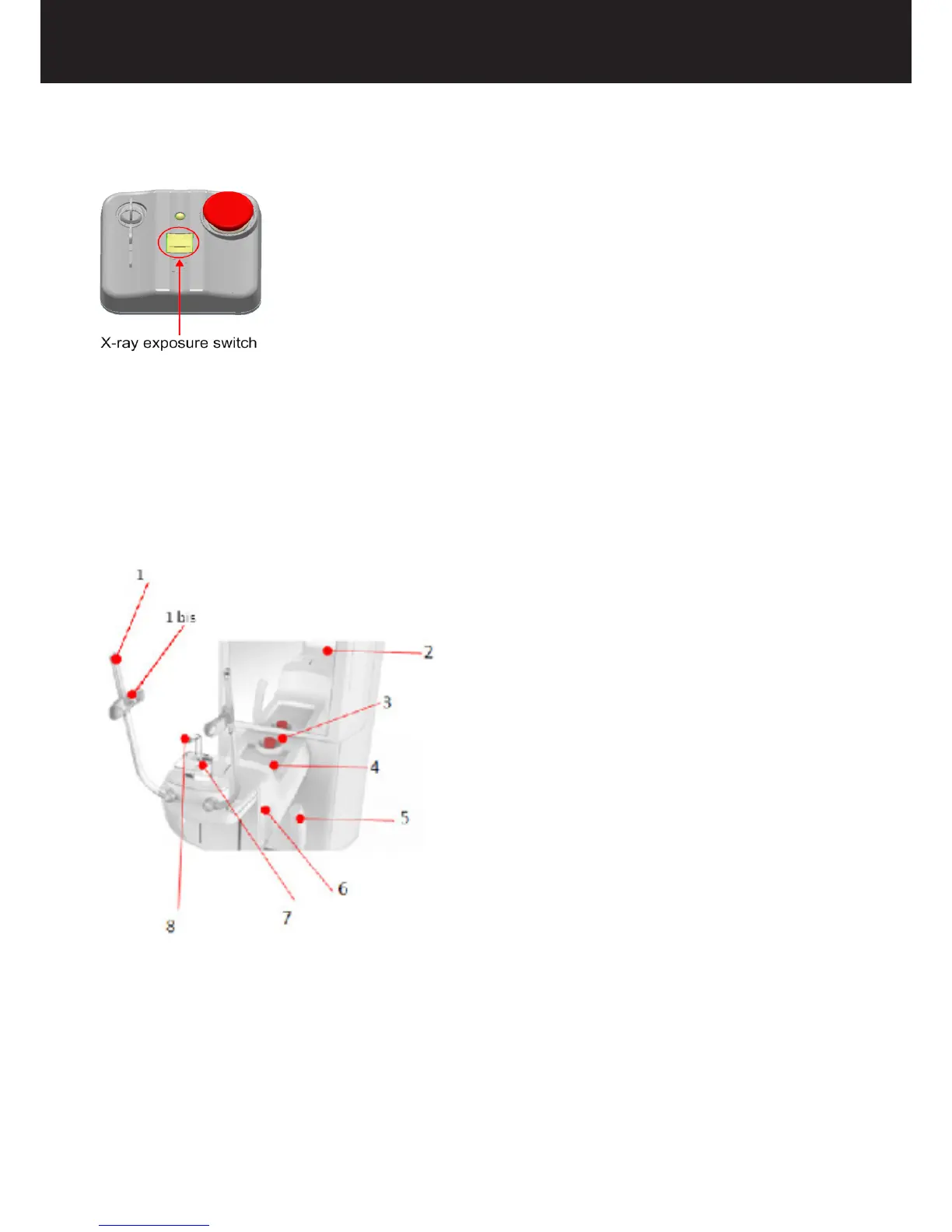
2.11 X-RAY EXPOSURE SWITCH
To activate the exposure, the operator must press and hold the X-ray exposure switch for the entire acquisition. Meanwhile,
the yellow X-ray exposure LED stays ON to indicate X-ray emission.
If the operator removes his/her nger from the exposure button before acquisition is complete, X-ray emission and U-Arm
rotation will be interrupted and the X-ray exposure LED will turn off. At this point, an error message appears in the AIS
software. This message must be deleted before using the medical device again.
2.12 HEAD SUPPORT FOR PAN/CBCT EXAMS
The head support positions and immobilises the patient before the scan. It is equipped with a chin rest and forehead support
to ensure maximum stability.
1. Temple rest
2. Patient mirror
3. Patient emergency switch
4. Courtesy tray
5. Handlebar
6. Temple knob
7. Chin rest
8. Bite block
2.13 HEAD SUPPORT FOR CEPH EXAMS
The head support in CEPH arm positions and immobilises the patient before the scan. It is equipped with a couple of ear rests
and a nose support to ensure maximum stability.















 To Next Page