TROUBLESHOOTING
10.1 ERROR CODES AND REQUIRED ACTIONS
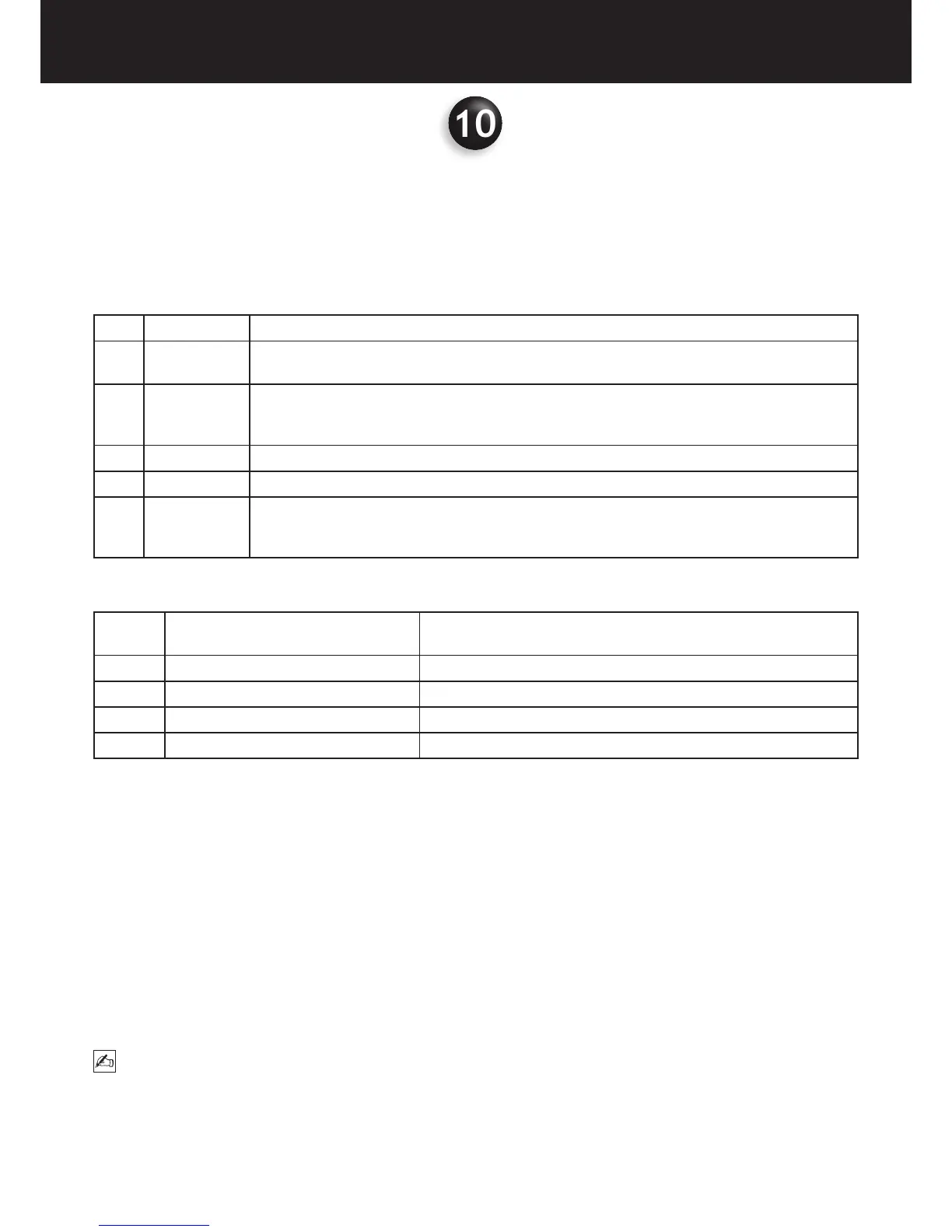
The following table describes the meaning of the various error codes:
CODE DESCRIPTION MEANING
A Serious error Serious error and reduced functionality. The detected fault is too serious for automatic restoration.
The results of the operation are not valid.
B Error Serious fault and reduced functionality but automatic restoration procedures can be applied to
continue processing. The results of the operation may not be valid. The function may only be
partly completed.
C Anomaly Something is not working, reduced functionality.
D Warning Something may have gone wrong. Indicates a potential error; functionality is not reduced.
E Information Simple warning; functionality is not reduced. No error has been detected and no response is
required. This message can indicate that a function is in progress or that an operation has been
completed successfully.
The following table shows the required actions to solve the problem and the corresponding codes:
CODE PERSON IN CHARGE OF THE
SOLUTION
ACTIONS
A X-MIND trium Automatic reset
U Operator The operator can solve the problem (or reset the device)
R Remote assistant The problem can be solved by means of remote control
T Technician A repair by a technician or at the factory is required
Automatic reset
Verify the cause based on the displayed message and reset by clicking on “OK”.
Manual reset
Access the Maintenance and Monitor section from the AIS and press the Reset All Alarms button.
Contact the technical assistance centre if the problem persists after manual reset.
General reset
Manually reset the device; if the error persists, turn the X-MIND trium off from the main switch and turn it on again after
30 seconds. If the error still persists leaving X-MIND trium on, restart the AIS; if the problem is still not solved, restart the
Workstation. If the problem is not solved despite the general reset, contact the technical assistance centre.
Reset FPD
Access the Maintenance and Detector section from AIS and click on “close link” rst and then on “open link”. If the error
persists, restart the AIS. Contact the technical assistance centre if the problem persists after FPD reset.
NOTE
If technical service is required please take note of: Date, hour the patient name and the error code before calling.















 To Next Page