EasyManua.ls Logo

ADE Accenta G3 - Zone Type

ADE Accenta G3
36 pages
Print Icon
To Next Page IconTo Next Page
To Previous Page IconTo Previous Page
Loading...
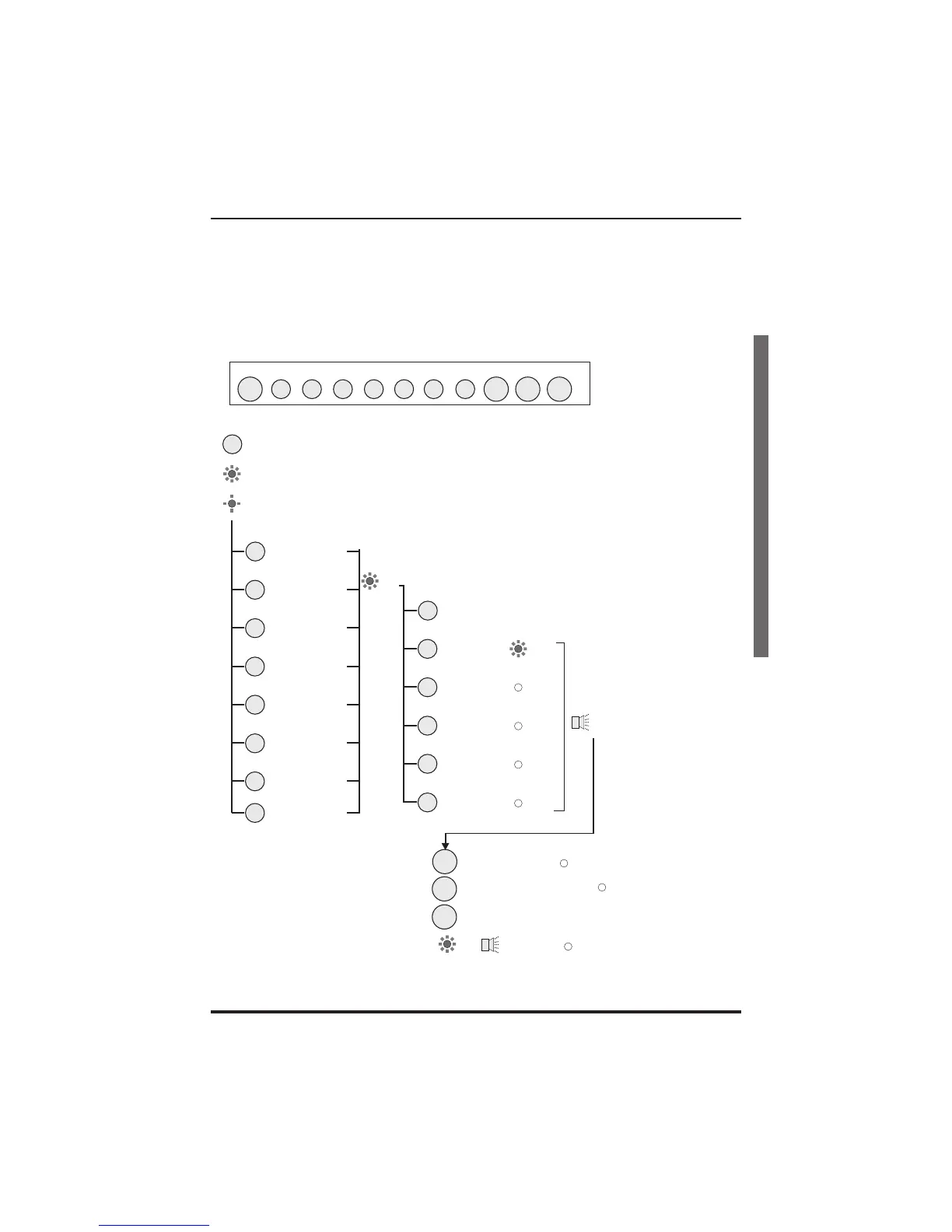
Zone Type
The G3 range of panels are not supplied with
wire links to terminate unused zones. Therefore
all unused zones must be programmed out by
setting them to disabled using the Zone Type
function.
4PI175 issue 1_6/01 19
Accenta/Optima G3 intruder system Engineering information
Zone Type
Zone
Configuration
Zone 1 type
Zone 2 type
Zone 3 type
Zone 4 type
Zone 5 type
Zone 6 type
Zone 8 type
5
6
8
2
3
4
1
5
Attack
All Zones
P
ress a number button to select
Zone to be configured
Press a number button to
select zone type
Day
Exit to zone type
Exit zone configuration
Leave engineer mode
Tamper
Attack
Acknowledge
Day
Disabled
Security
Fire
24h Fire
PTS
Keyswitch
4
5
1
2
3
0
Zone 5
Zone 3
Zone 2
Zone 1
Zone 4
Factory default
Appropriate
Zone indicator
is lit to show
Zone type
Acknowledge
Day
Enter Engineer program mode
Reset
Reset
Reset
Zone 7 type
7
Example: To disable an unused zone 8, Press:
5
Prog
9 9 9 9
0
Reset Reset Reset
8

Table of Contents

Other manuals for ADE Accenta G3

Related product manuals