AIMB-252 User Manual 44
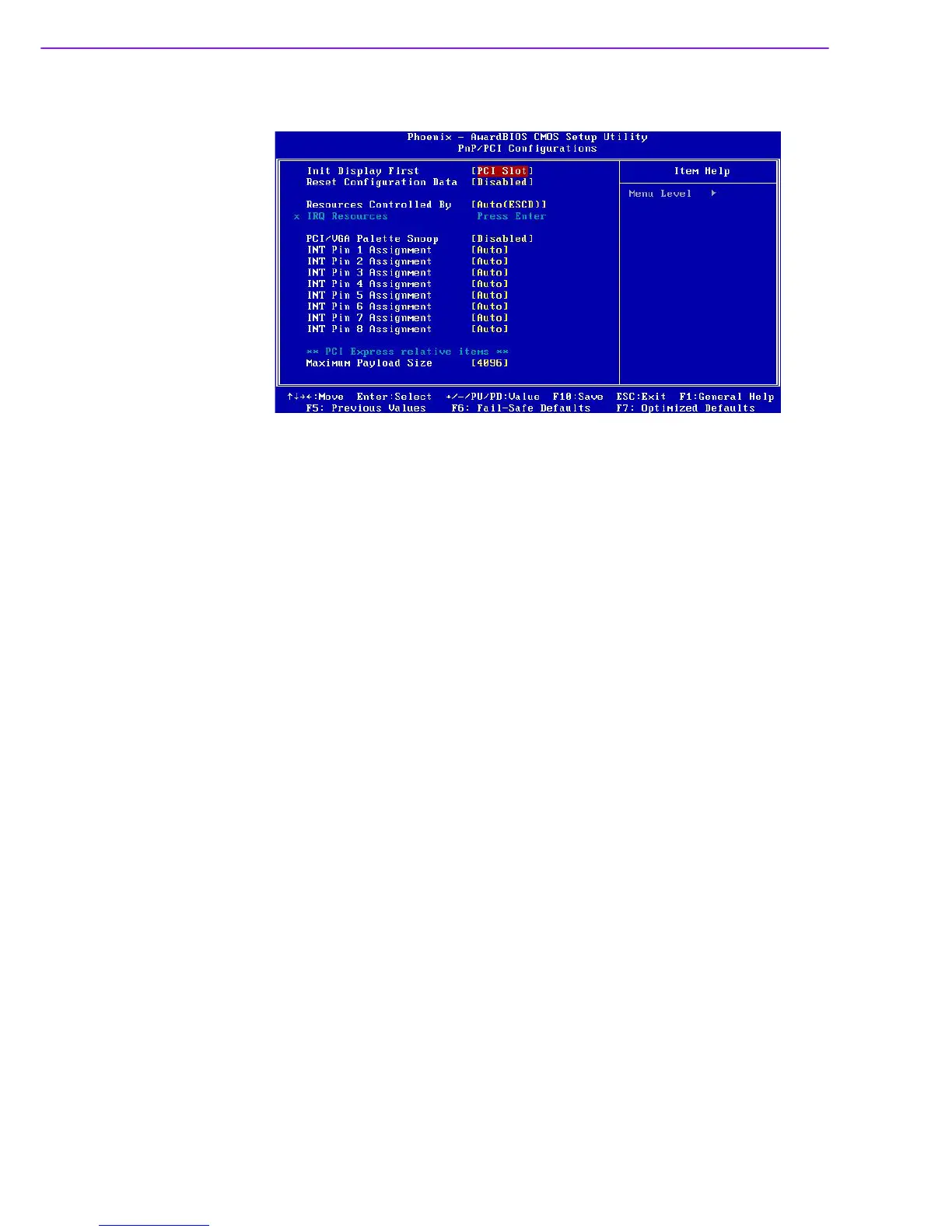
2.2.7 PnP/PCI Configurations
Init Display first [PCI slot]
Choose the first display interface to initiate while booting. The choice is "PCI
Slot" or "Onboard."
Reset Configuration Data [Disabled]
The default is Disabled. Select Enabled to reset Extended System Configuration
Data (ESCD) if you have installed a new add-on card, and system configuration
is in such a state that the OS cannot boot.
Resources Controlled By [Auto(ESCD)]
The commands here are “Auto(ESCD)” or “Manual”. Choosing “Manual”
requires you to choose resources from the following sub-menu. ”Auto(ESCD)”
automatically configures all of the boot and Plug and Play devices, but you must
be using Windows 95 or above.
PCI / VGA Palette Snoop [Disabled]
This is set to “Disabled” by default.
Maximum Payload Size [4096]
This allows you to set the maximum TLP payload size for PCI Express devices.
The options are [128 bytes], [256 bytes], [512 bytes], [1024 bytes], [2048 bytes],
and [4096 bytes].














 To Next Page