32
III. Flight
GetfamiliarwiththeoperatinginstructionsandprecautionsinthisManualbeforetheight.
Preight Checks
(1) CheckiftheUAV,remotecontrolandyourmobiledevicearefullycharged.
(2) Checkifthepropellersareinstalledproperly.
(3) Toshootphotos/videos,makesurethemicroSDcardisinserted.
(4) PowerontheUAVandremotecontrolandcheckiftheyworkproperly.
(5) CheckifthemotorscanbestartedoncetheUAVispoweredon(topreventpersonalinjuriesandother
unpredictablelosses,removethepropellers).
(6) CheckiftheAPPisconnectedtotheonboardcamerasuccessfully.
1. Compass Calibration
Toensurethenormalsystemfunctioningandightsafety,calibratethecompassbeforetherstuse,foreach
newightareaoriftheheadingisautochangedintheight.Thecompassisvulnerabletotheinterference
ofotherelectronicdevices,causingdataerrororevenightaccidents.Frequentcalibrationcankeepthe
compassinitsbestworkingcondition.
※ Donotcalibratethecompassinhigh-intensitymagneticelds(likemagneticmines,parkinglots,building
areaswithundergroundreinforceconcreteorlarge-sizedsteeltowers).
※ Donotcarryanyferromagneticobject,likekey,mobilephone,etc.
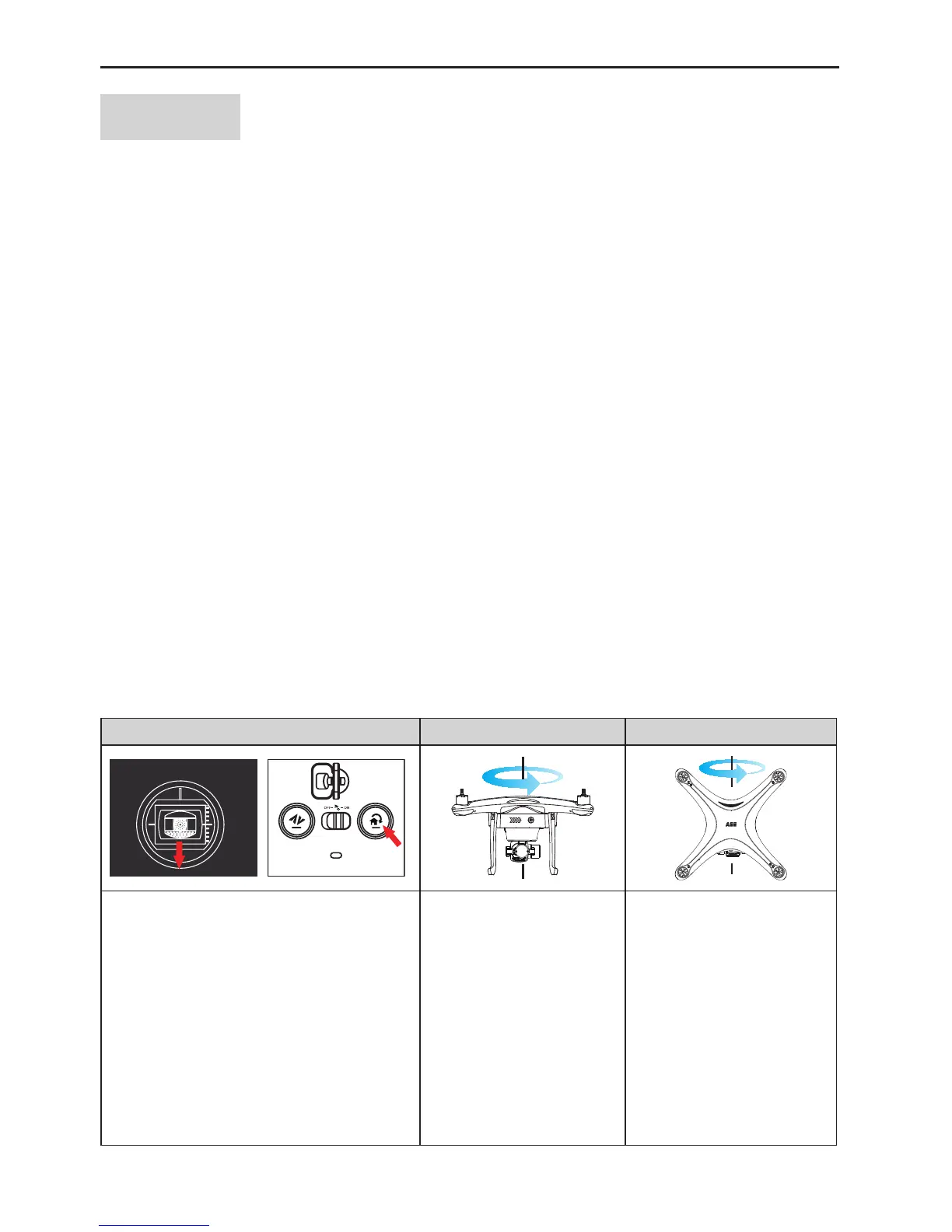
1.1 Calibration Steps
Inanopenarea,powerontheUAVandremotecontrol(makesuretheyworkproperly)andfollowthesteps
belowtocalibratethecompass:
1 2 3
The left joystick
Pullthethrottlejoystickdowntothebottom
andpressthehomekeyatleastfor6
consecutivetimestoenterthecompass
calibrationinterfaceontheremotecontrol.
TheUAVgetsintothecompasscalibration
statewiththereararmLEDashingslowly
inyellow.
Slowlyrotatethe
horizontallypositionedUAV
intheverticaldirectionuntil
thereararmLEDashes
slowlyingreen.
PositiontheUAVvertically
withitsheadfacingdown
androtateitverticallyuntil
thereararmLEDremains
on(indicatetherelevant
mode).Thecalibrationis
completedsuccessfullywhen
thecalibrationinterface
disappears.Recalibrate
thecompassincaseof
unsuccessfulcalibration.



 To Next Page