20
4. Prepare the Remote Control
IntendedtoworkwiththeUAV,theremotecontrolisalreadypairedwiththeUAV.ItsdefaultmodeisU.S.
hand:usetheleftjoysticktocontrolthethrottle.
※Thephoneholderdoesnotsupportanymobiledevicewiderthan6inches.
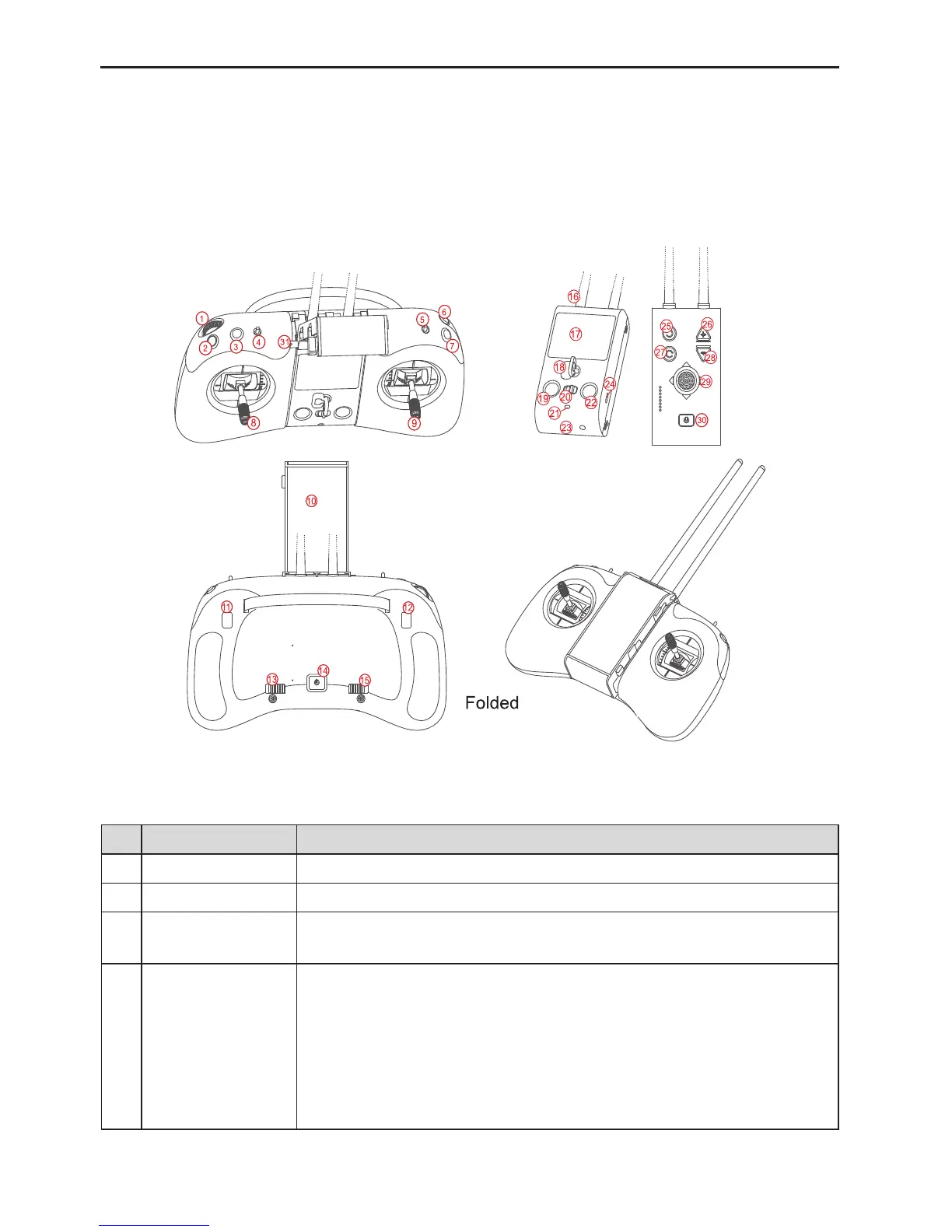
4.1 Remote Control Introduction
Note:
To fold the phone holder without
damage, remember to press the
phone holder fastener.
Fig.15
No. Name Description
1 Thumbwheelswitch Controlthegimbal’spitchingangle
2 Shootkey Pressittoshootonephoto
3 Retractbutton
Automaticretractablelandinggear:pressittoerect/retractthelandinggear.
Manualretractablelandinggear:thisbuttonisinoperative.
4
ToggleswitchA
(ightspeed)
Threepositions:
PositionS(professionalplayer):highhorizontalspeed,highturningspeedand
highdescendingspeed.
PositionD(ordinaryplayer):mediumhorizontalspeed,mediumturningspeed
andmediumdescendingspeed.
PositionE(beginnerplayer):lowhorizontalspeed,lowturningspeedandlow
descendingspeed.



 To Next Page