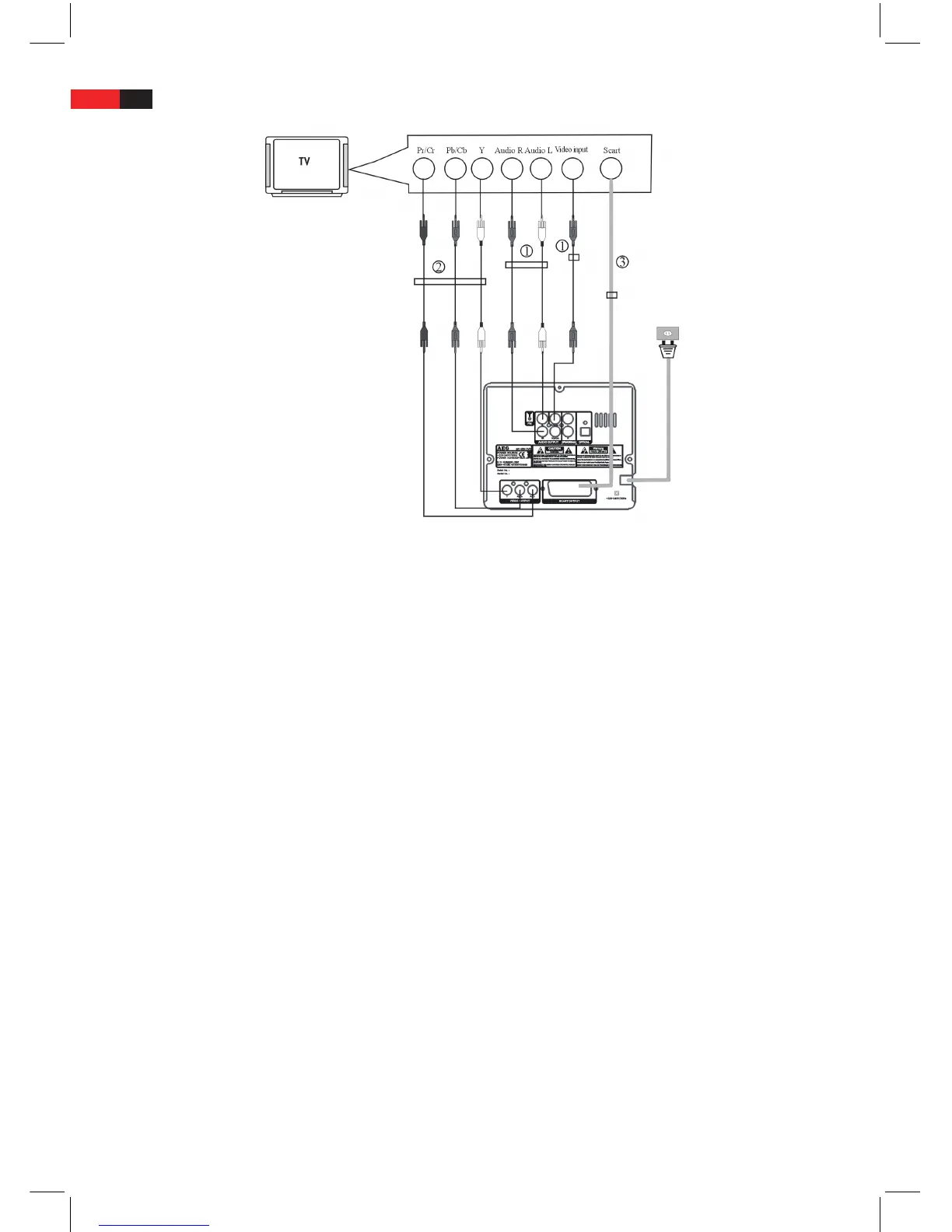
1. VIDEO (Composite Video, CVBS, yellow output) only carries Video-Signal (pictures). An additional Audio con-
nection between the machine and the connected television via the left and right audio output AUDIO FL and
AUDIO FR is required.
2. VIDEO OUTPUT (Component Video, Pr/Cr, Pb/Cb, Y, green-blue-red output) only carries Video-Signal (pictures).
An additional Audio connection between the device and the connected television via the left and right audio
output AUDIO FL and AUDIO FR is required.
3. SCART OUTPUT (Scart Output) carries video- (pictures) as well as audio (sound) signals. No additional audio
connection between device and the connected television is required.
Notes:
• Youcanonlyselectoneoftheseconnectiontypes.Donotsetuptwoormorevideoconnectionsbetweenthe
DVD system and a connected television.
• Thedierencesbetweentheindividualvideoportslieinthepicturequality.TheSCARTconnectoroersthe
best picture quality, then the VIDEO OUTPUT (component port) (COMPONENT VIDEO, YUV), and nally the VIDEO
port (CVBS, COMPOSITE VIDEO).
• Foreachconnectiontypeyoumustsetthecorrectoptionforthevideooutput(CVBS,YUVorRGB)inthe
System setup menu VIDEO SETUP and Menu item VIDEO OUTPUT.
• IfrequiredyoumustselectthecorrectoptionfortheTVmodeintheSystemsettingsmenuVIDEOSETUPand
Menu item TV MODE. The TV mode Option depends on whether you have connected a television which supports
progressive (PROGRESSIVE) or Interlaced (INTERLACE) scan, to the DVD system. See following chapter for details.
• Itmayhappenthatthepicturepresentationofthetelevisiondoesnotfunctionproperlyafterconnectingto
the device. If this is the case, you must select the correct picture format option (16:9, 4:3) and/or the correct
colour transmission system (AUTO, NTSC or PAL) in the system setup menu. You have the option of pressing
the PAL/NTSC button on the remote control, in order to select the correct option for the colour transmission
system. See following chapter for details.


 To Next Page