English
85
PROGRAM: Program Playback
Using the PROGRAM function you can create your personal play list consisting of selected titles, chapters or tracks,
which are then played back in the sequence you have dened.
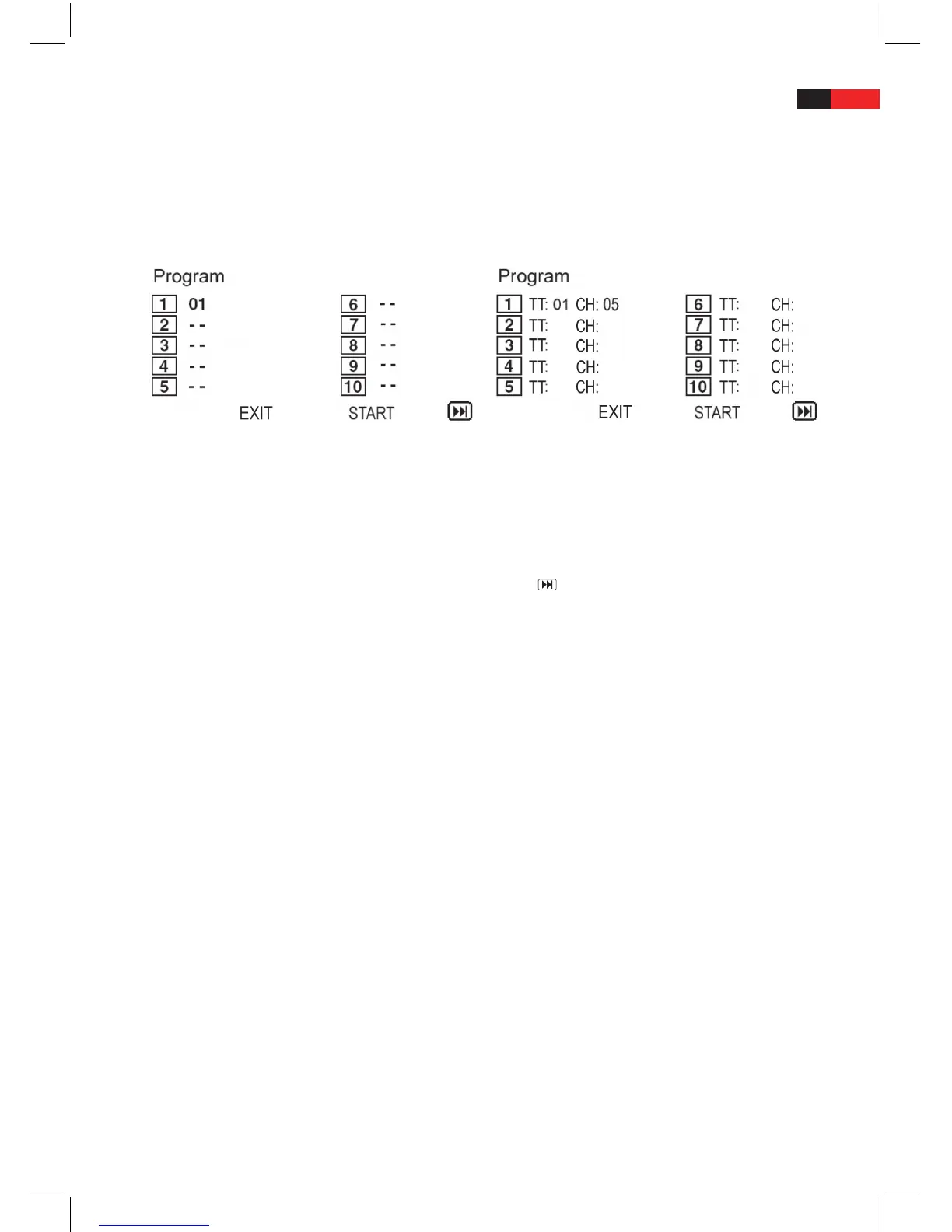
1. Whilst a DVD-, VCD- or CD-Disc is being played, press the PROGRAM button to show the program menu on the
screen.
• InthecaseofaVCD-Disc,theprogrammedplaybackoverridesthePBCPlaybackcontrolfunction.
Program menu for VCD- and CD-Discs Program menu for DVD-Discs
2. The program menu will appear on the screen so that you can enter the number of the selected title, chapter or
track.
3. Using the navigation buttons ▲▼►◄, you can highlight individual entry elds.
4. In the highlighted entry elds, enter the number of the selected title TT, chapter CH or track using the digit
buttons 0-9/10+, in the exact sequence in which they should be played.
• Ifyouhavecompletedtenentryelds,selectthemenuitem
using the Navigation buttons ▲▼►◄
and press PLAY/ENTER to open a new menu page with the next ten entry elds.
• Ifyouwanttodelete(change)theenterednumbers,selecttheentrieswhichyouwantremoveorchange
using the navigation buttons ▲▼►◄ and press the CLEAR button. In the empty eld, you can enter new
title, chapter or track numbers using digit buttons 0-9/10+.
5. When you have created your play list, select the menu item START in the program menu using the navigation
buttons ▲▼►◄ and press the PLAY/ENTER button to start playing the programmed list.
6. The machine plays the selected titles, chapters or soundtracks in the sequence you have dened.
To cancel the programmed playback
1. During programmed playback, press the PROGRAM button.
2. The cursor moves automatically to the STOP menu item.
3. Press the PLAY/ENTER button.
4. The cursor moves automatically to the menu item EXIT.
5. Press PLAY/ENTER again to cancel the programmed playback.
REPEAT: Select repeat option
Using the Repeat button REPEAT, you can continuously repeat a chapter, title, track, le (photo, music title) or the
entire disc.
DVD-Discs
1. Whilst a DVD Disc is playing, press the REPEAT button repeatedly to select one of the following repeat options:
• Chapter: Select this option to continuously repeat the currently played chapter.
• Title: Select this option to continuously repeat the currently played title.


 To Next Page