English
99
Note:
Some of the menu settings can only be selected in Stop mode (depending on DVD).
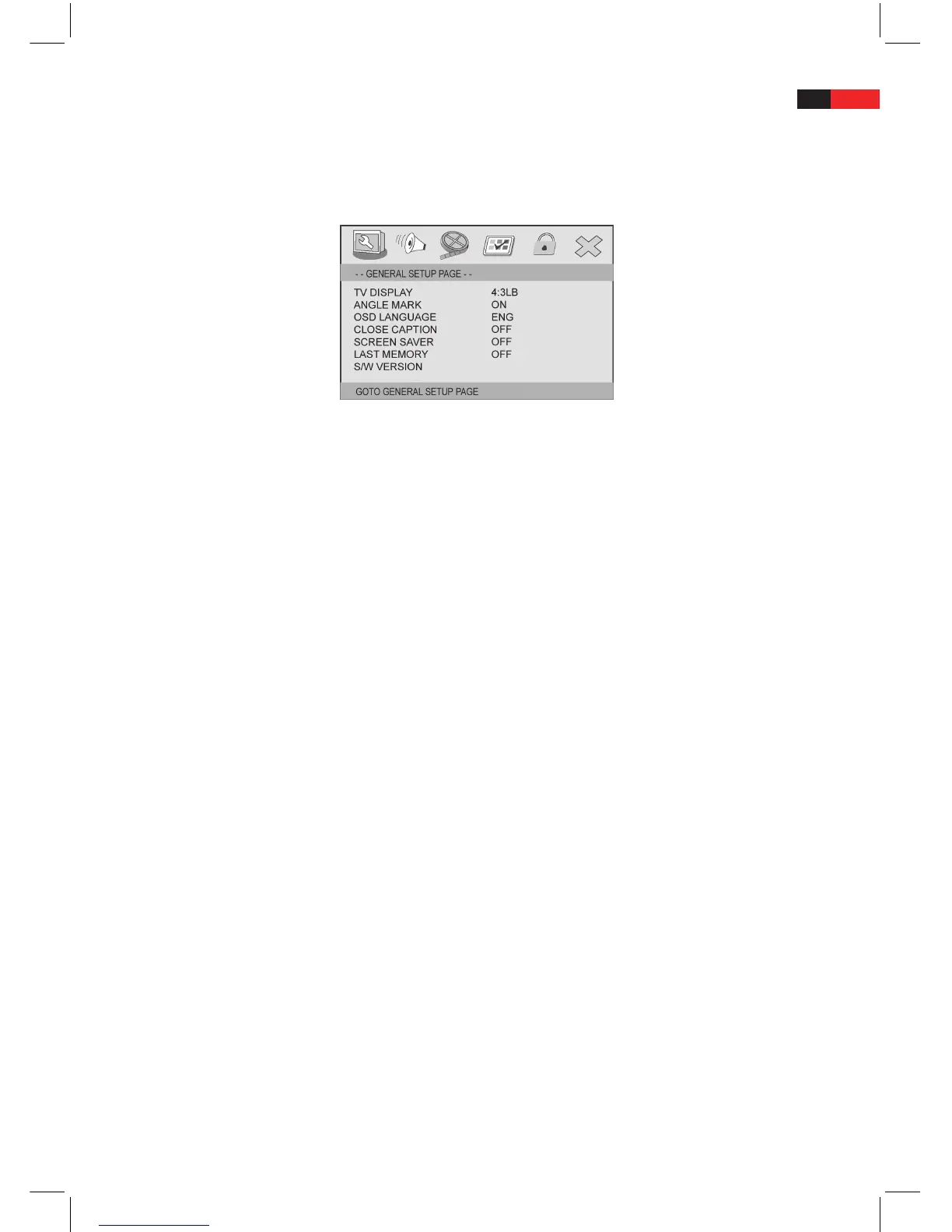
GENERAL SETUP PAGE: General system settings
TV DISPLAY: Picture format (4:3, 16:9)
In this menu item you can adjust the picture format (aspect ratio) of the video signal output to match the con-
nected television.
The following picture formats (aspect ratios) are available:
• 4:3PANSCAN:Selectthispictureformatifthemachineisconnectedtoatelevisionwiththenormal4:3screen.
The picture is set in such a way that it lls the whole screen. PAN&SCAN is a process which attempts to show
part of a wide screen picture on a 4:3-standard television screen. Since however the picture can never be shown
in full, only the key part of the screen, for example the actor who is speaking, is shown on the screen.
• 4:3LETTERBOX:Selectthispictureformatifthemachineisconnectedtoatelevisionwiththenormal4:3
screen. The picture is set in such a way that it lls the whole screen. The picture proportions are retained and
the picture is shrunk until the width of the picture ts a 4:3-standard television screen.
• 16:9WIDE:Selectthissettingifyouconnectthemachinetoawidescreentelevision(16:9WideScreen).Ifyou
select this option for a normal television, the picture is distorted due to the vertical compression.
Notes:
• Thepictureformatdependsontherespectivedisc.Somediscscannotbeplayedinthedefaultpictureformat.
• Ifyouplayadiscwhichhasbeenrecordedin4:3format,onawidescreentelevision,ablackstripappearson
the left and right hand edge of the screen.
• Thepictureformatmustbeadjustedtomatchtheconnectedtelevision.
• Thesetting“4:3PANSCAN“isnotsupportedbyallDVDs.
ANGLE MARK: Camera angle selection
In the menu item ANGLE MARK, you can activate (ON) or deactivate (OFF) the camera angle symbol).
The following settings are available:
• ON:Selectthisoptiontoactivate(display)thecameraanglesymbol.WhilstaDVDdiscisplayingcontaining
scenes which have been recorded from dierent camera angles, the camera angle symbol appears in the top
right hand corner of the screen. The symbol indicates that the current scene has been shot from at least two
dierent perspectives (camera angles). Press the ANGLE button on the remote to select dierent camera angles.
• OFF:Selectthisoptiontodeactivate(hide)thecameraanglesymbol.Thecameraanglesymboldoesnotappear
even if a disc is playing which contains scenes which have been shot from dierent camera angles.


 To Next Page